
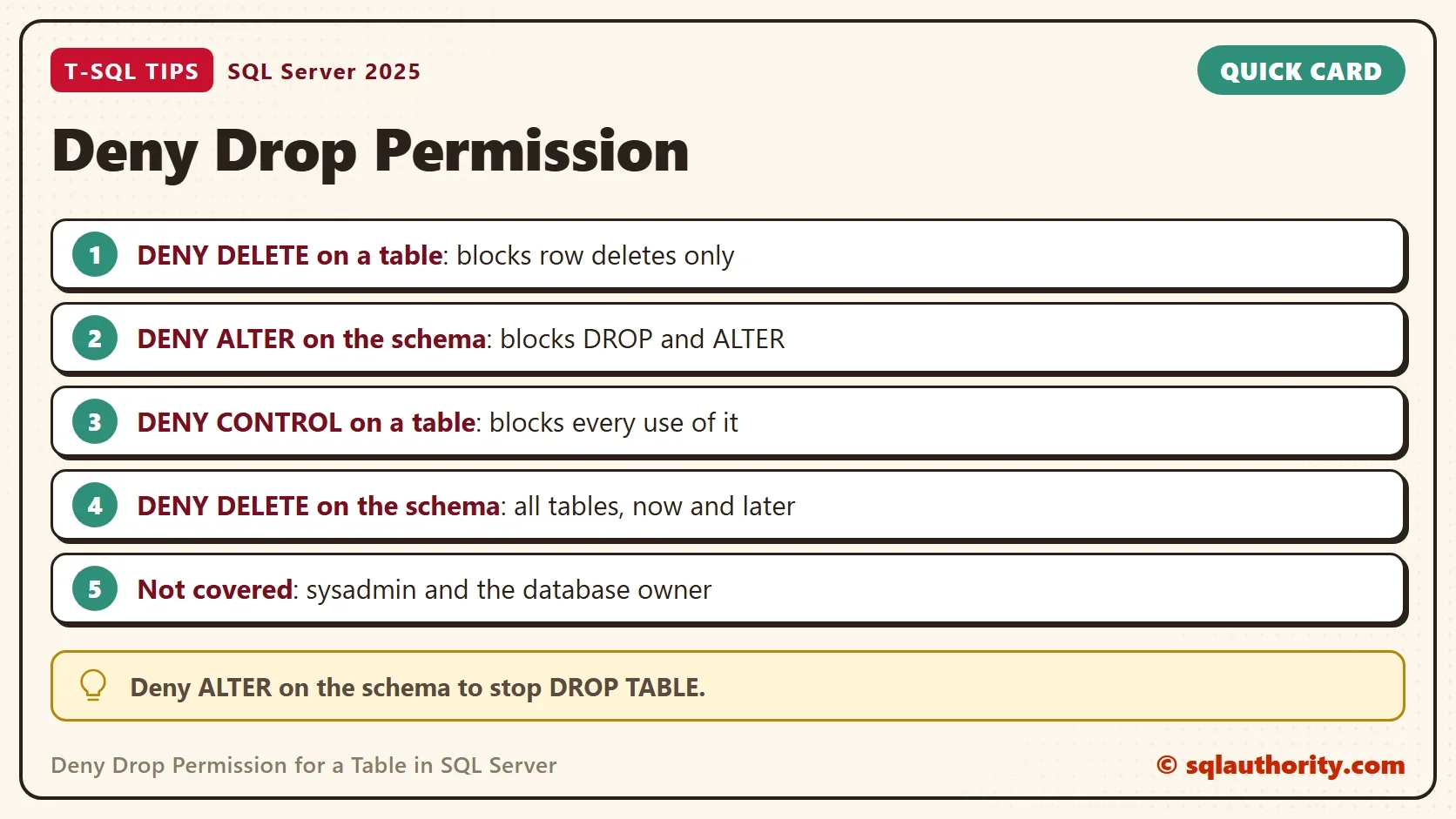
To deny drop permission for a table, deny ALTER on its schema. The DENY DELETE statement does not do the job, because it stops row deletes and leaves DROP TABLE alone.

What DENY DELETE Really Blocks
The statement DENY DELETE ON OBJECT::SchemaName.TableName sounds like it protects a table from removal. It protects the rows. A user with the permission to drop objects can still drop the whole table. The demo proves it with a database user that has no login, so no password is involved.
The user is a member of db_ddladmin, the role that developers get so they can change tables. The script also grants data access on the dbo schema and creates two small tables. The database is named DenyDropDemo.
IF DB_ID(N'DenyDropDemo') IS NULL CREATE DATABASE DenyDropDemo;
GO
USE DenyDropDemo;
GO
DROP TABLE IF EXISTS dbo.Customers, dbo.Orders;
CREATE TABLE dbo.Customers (CustomerID int PRIMARY KEY, CustomerName nvarchar(50) NOT NULL);
CREATE TABLE dbo.Orders (OrderID int PRIMARY KEY, CustomerID int NOT NULL);
INSERT INTO dbo.Customers VALUES (1, N'Maya'), (2, N'Leo');
INSERT INTO dbo.Orders VALUES (10, 1), (11, 2);
IF USER_ID(N'DemoDeveloper') IS NULL CREATE USER DemoDeveloper WITHOUT LOGIN;
ALTER ROLE db_ddladmin ADD MEMBER DemoDeveloper;
GRANT SELECT, INSERT, UPDATE, DELETE ON SCHEMA::dbo TO DemoDeveloper;
Now deny DELETE on the Customers table and try to delete a row as that user. The REVERT statement sits in its own batch, so it runs even when the statement before it fails.
DENY DELETE ON OBJECT::dbo.Customers TO DemoDeveloper;
GO
EXECUTE AS USER = N'DemoDeveloper';
DELETE FROM dbo.Customers WHERE CustomerID = 1;
GO
REVERT;
Msg 229, Level 14, State 5, Line 2
The DELETE permission was denied on the object 'Customers', database 'DenyDropDemo', schema 'dbo'.
The row delete fails, as expected. Now try to drop the table as the same user.
EXECUTE AS USER = N'DemoDeveloper';
DROP TABLE dbo.Customers;
GO
REVERT;
GO
SELECT OBJECT_ID(N'dbo.Customers') AS CustomersObjectId;
| CustomersObjectId |
|---|
| NULL |
The drop succeeds without an error. The table is gone, which the NULL object id confirms. A user cannot delete one row from Customers. The same user can remove the table with every row in it.
What a Drop Needs
A drop needs one of three things. The user needs ALTER permission on the schema that holds the table. CONTROL permission on the table also works, and so does membership in db_ddladmin. DELETE permission is not on the list. A user who holds only data permissions cannot drop a table, with or without DENY DELETE. The deny matters only for a user who can already drop. To deny drop permission, deny one of the permissions that allows it.
Deny Drop Permission With a Schema Deny
The better way to deny drop permission is a deny on the schema. The next script recreates the table, denies ALTER on the dbo schema, and repeats the drop as the same user.
CREATE TABLE dbo.Customers (CustomerID int PRIMARY KEY, CustomerName nvarchar(50) NOT NULL);
INSERT INTO dbo.Customers VALUES (1, N'Maya'), (2, N'Leo');
DENY ALTER ON SCHEMA::dbo TO DemoDeveloper;
GO
EXECUTE AS USER = N'DemoDeveloper';
DROP TABLE dbo.Customers;
GO
REVERT;
Msg 3701, Level 14, State 20, Line 2
Cannot drop the table 'Customers', because it does not exist or you do not have permission.
The drop now fails. A deny wins over a grant that arrives through a role, so the db_ddladmin membership no longer helps. The same deny also stops two other changes. The next two statements fail with a message that says the table does not exist. SQL Server words a missing permission that way here.
EXECUTE AS USER = N'DemoDeveloper';
ALTER TABLE dbo.Orders ADD Note nvarchar(20) NULL;
GO
REVERT;
Msg 1088, Level 16, State 13, Line 2
Cannot find the object "Orders" because it does not exist or you do not have permissions.
EXECUTE AS USER = N'DemoDeveloper';
TRUNCATE TABLE dbo.Orders;
GO
REVERT;
Msg 1088, Level 16, State 7, Line 2
Cannot find the object "Orders" because it does not exist or you do not have permissions.
ALTER TABLE and TRUNCATE TABLE need ALTER permission too, so they fail with the drop. Everyday work is untouched. The user can still read and change rows in the schema.
EXECUTE AS USER = N'DemoDeveloper';
INSERT INTO dbo.Orders VALUES (12, 1);
DELETE FROM dbo.Orders WHERE OrderID = 12;
SELECT COUNT(*) AS OrdersRows FROM dbo.Orders;
GO
REVERT;
| OrdersRows |
|---|
| 2 |
One more question is whether the deny stops new tables. The next batch creates one as the same user.
EXECUTE AS USER = N'DemoDeveloper';
CREATE TABLE dbo.Extra (i int);
GO
REVERT;
The create succeeds for a member of db_ddladmin. A schema deny protects the tables that exist. It does not freeze the schema.
Why Not DENY CONTROL
A deny of CONTROL on one table also blocks the drop. It also blocks everything else, because CONTROL includes every permission on the table. The next script shows the cost.
CREATE TABLE dbo.Archive (ArchiveID int PRIMARY KEY);
DENY CONTROL ON OBJECT::dbo.Archive TO DemoDeveloper;
GO
EXECUTE AS USER = N'DemoDeveloper';
SELECT COUNT(*) FROM dbo.Archive;
GO
REVERT;
Msg 229, Level 14, State 5, Line 2
The SELECT permission was denied on the object 'Archive', database 'DenyDropDemo', schema 'dbo'.
The user cannot even read the table. Use this deny for a table that the user must not touch at all. Use the schema deny when the goal is to keep the table and its data usable.
Deny Delete on Every Table
To stop row deletes on every table in the schema, deny DELETE on the schema instead of on each table. One statement covers all current and future tables in dbo.
DENY DELETE ON SCHEMA::dbo TO DemoDeveloper;
GO
EXECUTE AS USER = N'DemoDeveloper';
DELETE FROM dbo.Orders WHERE OrderID = 10;
GO
REVERT;
Msg 229, Level 14, State 5, Line 2
The DELETE permission was denied on the object 'Orders', database 'DenyDropDemo', schema 'dbo'.
This is how you deny delete on all tables. Combine it with the ALTER deny when the user must neither delete rows nor drop tables.
The catalog lists every deny the user holds, so nobody has to guess what is blocked.
SELECT dp.permission_name AS PermissionName, dp.class_desc AS ClassName,
       COALESCE(OBJECT_NAME(CASE WHEN dp.class = 1 THEN dp.major_id END), SCHEMA_NAME(CASE WHEN dp.class = 3 THEN dp.major_id END)) AS Target
FROM sys.database_permissions AS dp
WHERE dp.grantee_principal_id = USER_ID(N'DemoDeveloper') AND dp.state_desc = N'DENY'
ORDER BY dp.class, dp.permission_name;| PermissionName | ClassName | Target |
|---|---|---|
| CONTROL | OBJECT_OR_COLUMN | Archive |
| ALTER | SCHEMA | dbo |
| DELETE | SCHEMA | dbo |
Who the Deny Does Not Reach
A deny does not apply to members of sysadmin or to the database owner. Those accounts can always drop the table. If a developer is db_owner, none of these statements helps, and the fix is to remove the role membership.
You could argue that a deny is a patch. The cleaner design grants only what the role needs. That is correct. A role with SELECT, INSERT, UPDATE and DELETE and no ALTER cannot drop anything, and it needs no deny. Use the deny when the user already holds a broad role that you cannot change today.
A database trigger is a second way to stop a change to an object. Prevent Index Changes in SQL Server With a DDL Trigger shows the pattern for indexes.
What to Remember
DENY DELETE protects rows and does not protect the table. To deny drop permission, deny ALTER on the schema, and check the result as the user with EXECUTE AS. Query sys.database_permissions to list every deny so nobody has to guess.
When you finish, drop the demo database.
USE master;
GO
ALTER DATABASE DenyDropDemo SET SINGLE_USER WITH ROLLBACK IMMEDIATE;
DROP DATABASE DenyDropDemo;
A deny on rows is not a lock on the table, it is a rule about one permission.
Published by Pinal Dave on SQLAuthority. More of my work at pinaldave.com.
Discover more from SQL Authority with Pinal Dave
Subscribe to get the latest posts sent to your email.



2 Comments. Leave new
Thank you for your clear steps.
Could you also please get us a query to deny delete permissions on all the tables that we have
The above will deny delete on tables and also restrict dropping tables.