COUNT(column) counts only the rows where that column is not NULL. That one rule explains most of the surprising numbers people get from COUNT. Pick the population first, then pick the expression.

Three counts, three different questions
Picture a dashboard that shows one number of customers while the mailing tool shows a smaller number. Someone opens a ticket: “The counts do not match.” Neither count is broken. They answer different questions.
COUNT(*) counts rows. COUNT(Email) counts rows where Email is not NULL. COUNT(DISTINCT Email) counts the different non-NULL values. Here is a tiny table that shows all three. Run every block in one query window, because it uses temp tables.
DROP TABLE IF EXISTS #CountDemo;
GO
CREATE TABLE #CountDemo (PersonId int NOT NULL PRIMARY KEY, Email varchar(100) NULL);

INSERT #CountDemo VALUES
(1, 'first@example.test'), (2, 'first@example.test'), (3, NULL), (4, 'other@example.test');

SELECT COUNT(*) AS TotalRows, COUNT(Email) AS RowsWithEmail, COUNT(DISTINCT Email) AS DistinctEmails
FROM #CountDemo;
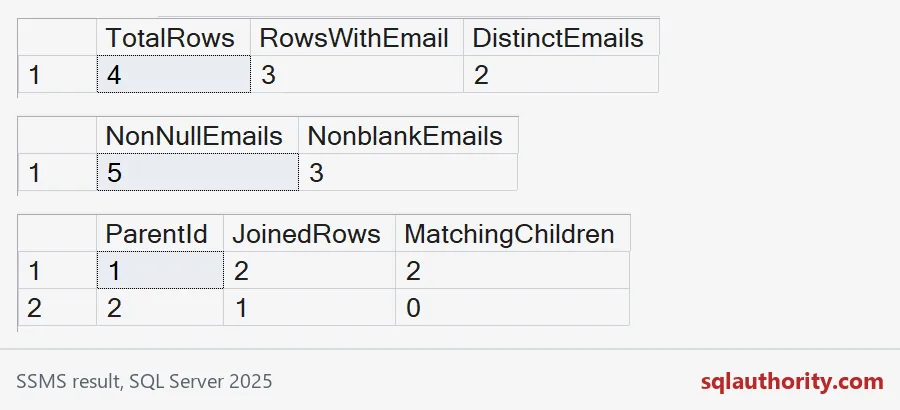
Four rows, three with an email, two different emails. Person 3 is a real row with no email. Persons 1 and 2 share one address. Each number is right for its own question.
Blank text is not NULL
An empty string is a value. So is a string of spaces. COUNT(Email) counts both. If your business treats blank as missing, say so in the query with NULLIF. I add two such rows to the demo and compare the two counts.
INSERT #CountDemo VALUES (5, ''), (6, '   ');

SELECT COUNT(Email) AS NonNullEmails,
       COUNT(NULLIF(LTRIM(RTRIM(Email)), '')) AS NonblankEmails
FROM #CountDemo;
The first count jumps to five, because the empty and the spaces-only rows are not NULL. The second stays at three. Do not quietly clean the stored data just to make a count match. Show both numbers and agree on the rule.
The LEFT JOIN trap
This is the one that bites in real reports. A LEFT JOIN keeps a parent that has no children, and it fills the child columns with NULL. COUNT(*) counts that placeholder row, so zero children becomes one.
Count a column from the child side instead, ideally its key. A real child row always has a key. A placeholder row never does. Also keep child filters in the ON clause. Moving one into WHERE removes the placeholder rows and quietly turns your outer join into an inner join.
DROP TABLE IF EXISTS #CountChild, #CountParent;
GO
CREATE TABLE #CountParent (ParentId int PRIMARY KEY);
CREATE TABLE #CountChild (ChildId int PRIMARY KEY, ParentId int NOT NULL);

INSERT #CountParent VALUES (1), (2);
INSERT #CountChild VALUES (10, 1), (20, 1);

SELECT p.ParentId, COUNT(*) AS JoinedRows, COUNT(c.ChildId) AS MatchingChildren
FROM #CountParent AS p
LEFT JOIN #CountChild AS c ON c.ParentId = p.ParentId
GROUP BY p.ParentId
ORDER BY p.ParentId;
Parent 1 has two children, and both counts say two. Parent 2 has none, yet JoinedRows says one. MatchingChildren says zero, which is the truth. The picture below shows the results of the three queries so far, in order.

COUNT returns int, COUNT_BIG returns bigint
COUNT gives you an int, which tops out at about 2.1 billion. COUNT_BIG gives you a bigint. On a big fact table that difference matters. The query below shows the type of each result, and DISTINCT works the same way with COUNT_BIG.
SELECT COUNT(*) AS TotalRows,
       SQL_VARIANT_PROPERTY(COUNT(*), 'BaseType') AS CountType,
       COUNT_BIG(*) AS TotalRowsBig,
       SQL_VARIANT_PROPERTY(COUNT_BIG(*), 'BaseType') AS CountBigType,
       COUNT_BIG(DISTINCT Email) AS DistinctEmailsBig
FROM #CountDemo;
Check join multiplication before counting
One more trap. Join a customer’s orders to the same customer’s payments and the rows multiply. Two orders and three payments give six joined rows. COUNT(DISTINCT) can hide the damage for one column, but every other total stays inflated. Count each side first, then join the results.
DROP TABLE IF EXISTS #Orders, #Payments;
GO
CREATE TABLE #Orders (OrderId int PRIMARY KEY, CustomerId int NOT NULL);
CREATE TABLE #Payments (PaymentId int PRIMARY KEY, CustomerId int NOT NULL);
INSERT #Orders VALUES (1, 7), (2, 7);
INSERT #Payments VALUES (1, 7), (2, 7), (3, 7);

SELECT o.CustomerId, COUNT(o.OrderId) AS OrdersCounted, COUNT(DISTINCT o.OrderId) AS RealOrders
FROM #Orders AS o
JOIN #Payments AS p ON p.CustomerId = o.CustomerId
GROUP BY o.CustomerId;

SELECT o.CustomerId, o.OrderCount, p.PaymentCount
FROM (SELECT CustomerId, COUNT(*) AS OrderCount FROM #Orders GROUP BY CustomerId) AS o
JOIN (SELECT CustomerId, COUNT(*) AS PaymentCount FROM #Payments GROUP BY CustomerId) AS p
  ON p.CustomerId = o.CustomerId;
The first query claims six orders. The second gives two orders and three payments, side by side. Name your counts like that: OrderCount, PaymentCount, MatchingChildren. A good alias is half the documentation.
DROP TABLE IF EXISTS #Payments, #Orders, #CountChild, #CountParent, #CountDemo;Before you trust a count, say out loud which rows it is counting.
A count is not a complete question, it is an answer about a chosen population.
Published by Pinal Dave on SQLAuthority. More of my work at pinaldave.com.
Discover more from SQL Authority with Pinal Dave
Subscribe to get the latest posts sent to your email.