ALTER SCHEMA TRANSFER moves a table to another schema in one statement. The repair afterwards is the part that needs care. The move takes a moment and copies no data. Permissions disappear, and code that names the old schema stops working.

Why Move a Table Between Schemas
Teams move tables to keep archived data apart. They also group objects by application and give a whole group the same permissions. A permission granted on a schema covers every table inside it. A table that lands in that schema is covered too.
Build the Demo
The demo creates a database named SchemaMoveDemo. It holds a schema named archive and a table dbo.Visitors with a primary key and a default. A view reads that table, and a database user has SELECT permission on it. Run it on a test server.
IF DB_ID(N'SchemaMoveDemo') IS NULL CREATE DATABASE SchemaMoveDemo;
GO
USE SchemaMoveDemo;
GO
DROP VIEW IF EXISTS dbo.ActiveVisitors;
DROP SYNONYM IF EXISTS dbo.Visitors;
DROP TABLE IF EXISTS dbo.Visitors, archive.Visitors;
DROP SCHEMA IF EXISTS archive;
GO
CREATE SCHEMA archive;
GO
CREATE TABLE dbo.Visitors (
    VisitorID int NOT NULL CONSTRAINT PK_Visitors PRIMARY KEY,
    FullName  nvarchar(60) NOT NULL,
    Country   nvarchar(40) NOT NULL CONSTRAINT DF_Visitors_Country DEFAULT N'USA'
);
INSERT INTO dbo.Visitors (VisitorID, FullName) VALUES (1, N'Maya Collins'), (2, N'Leo Brennan');
GO
CREATE VIEW dbo.ActiveVisitors AS SELECT VisitorID, FullName FROM dbo.Visitors;
GO
IF USER_ID(N'ReportReader') IS NULL CREATE USER ReportReader WITHOUT LOGIN;
GRANT SELECT ON dbo.Visitors TO ReportReader;
Look Before You Move
Three facts are worth saving before a transfer. The object ID shows that the table stays the same table. The dependency list shows which views and procedures name it. The permissions show what the move will erase. The last query writes the GRANT statements for the new schema, so you can run them after the move.
SELECT OBJECT_ID(N'dbo.Visitors') AS ObjectIdBefore;
SELECT OBJECT_NAME(d.referencing_id) AS DependsOnIt FROM sys.sql_expression_dependencies AS d WHERE d.referenced_id = OBJECT_ID(N'dbo.Visitors');
SELECT N'GRANT ' + p.permission_name + N' ON archive.Visitors TO ' + QUOTENAME(USER_NAME(p.grantee_principal_id)) + N';' AS ReGrant
FROM sys.database_permissions AS p
WHERE p.major_id = OBJECT_ID(N'dbo.Visitors') AND p.state_desc = N'GRANT';
| ObjectIdBefore |
|---|
| 1221579390 |
| DependsOnIt |
|---|
| ActiveVisitors |
| ReGrant |
|---|
| GRANT SELECT ON archive.Visitors TO [ReportReader]; |
The ID is only a sample, because every server numbers its objects differently. Save the output of the last query. The table has one dependent, the view, and one permission.
Run ALTER SCHEMA TRANSFER
The statement names the target schema first and the object second. The target schema must exist. The login needs CONTROL permission on the table and ALTER permission on the target schema.
ALTER SCHEMA archive TRANSFER dbo.Visitors;
SELECT OBJECT_ID(N'archive.Visitors') AS ObjectIdAfter;
SELECT s.name AS SchemaName, o.name AS ObjectName, o.type_desc AS ObjectType
FROM sys.objects AS o
JOIN sys.schemas AS s ON s.schema_id = o.schema_id
WHERE o.object_id = OBJECT_ID(N'archive.Visitors') OR o.parent_object_id = OBJECT_ID(N'archive.Visitors')
ORDER BY o.type_desc;
SELECT COUNT(*) AS PermissionsLeft FROM sys.database_permissions WHERE major_id = OBJECT_ID(N'archive.Visitors');
| ObjectIdAfter |
|---|
| 1221579390 |
| SchemaName | ObjectName | ObjectType |
|---|---|---|
| archive | DF_Visitors_Country | DEFAULT_CONSTRAINT |
| archive | PK_Visitors | PRIMARY_KEY_CONSTRAINT |
| archive | Visitors | USER_TABLE |
| PermissionsLeft |
|---|
| 0 |
The object ID did not change, so the move did not copy the table. The primary key and the default moved with it, and all rows are still there. The permission is gone. SQL Server drops the permissions of an object when it changes schema. Nothing warns you, so the loss is easy to miss. A user who could read the table now gets an error.
What Breaks After the Move
Any code that names dbo.Visitors now points at nothing. SQL Server does not rewrite it. A direct query shows the failure.
SELECT * FROM dbo.Visitors;
Msg 208, Level 16, State 1, Line 1
Invalid object name 'dbo.Visitors'.
The view fails in the same way. It returns Msg 208 and then Msg 4413, which reports binding errors. Repair the view, then run the saved GRANT statement. The last query counts the permissions again.
ALTER VIEW dbo.ActiveVisitors AS SELECT VisitorID, FullName FROM archive.Visitors;
GO
GRANT SELECT ON archive.Visitors TO ReportReader;
SELECT * FROM dbo.ActiveVisitors;
SELECT COUNT(*) AS PermissionsNow FROM sys.database_permissions WHERE major_id = OBJECT_ID(N'archive.Visitors');
| VisitorID | FullName |
|---|---|
| 1 | Maya Collins |
| 2 | Leo Brennan |
| PermissionsNow |
|---|
| 1 |
Keep the Old Name Working With a Synonym
When many applications still use the old name, a synonym buys time. It is a second name for the table in the new schema. Old queries work again, while you update them one by one.
CREATE SYNONYM dbo.Visitors FOR archive.Visitors;
SELECT COUNT(*) AS RowsViaSynonym FROM dbo.Visitors;
| RowsViaSynonym |
|---|
| 2 |
A synonym is a bridge, not a home. It hides the dependency, and it needs its own permissions. Drop it when the last caller is fixed.
Move Many Tables at Once
ALTER SCHEMA moves one object per statement. For a whole group of tables, let a query write the statements and read them before you run them. The query below lists every table of the archive schema whose name starts with a prefix. It writes the statements that move those tables back to dbo.
SELECT N'ALTER SCHEMA dbo TRANSFER ' + QUOTENAME(s.name) + N'.' + QUOTENAME(t.name) + N';' AS MoveStatement
FROM sys.tables AS t
JOIN sys.schemas AS s ON s.schema_id = t.schema_id
WHERE s.name = N'archive' AND t.name LIKE N'Visitors%';
| MoveStatement |
|---|
| ALTER SCHEMA dbo TRANSFER [archive].[Visitors]; |
Drop the synonym first, because the old name is taken: DROP SYNONYM dbo.Visitors;. Then read the list and run it. The same ALTER SCHEMA TRANSFER statement moves views, procedures and functions. Types need the prefix TYPE:: in front of the name. Every moved object loses its permissions, exactly like the table did.
The Same Move in Management Studio
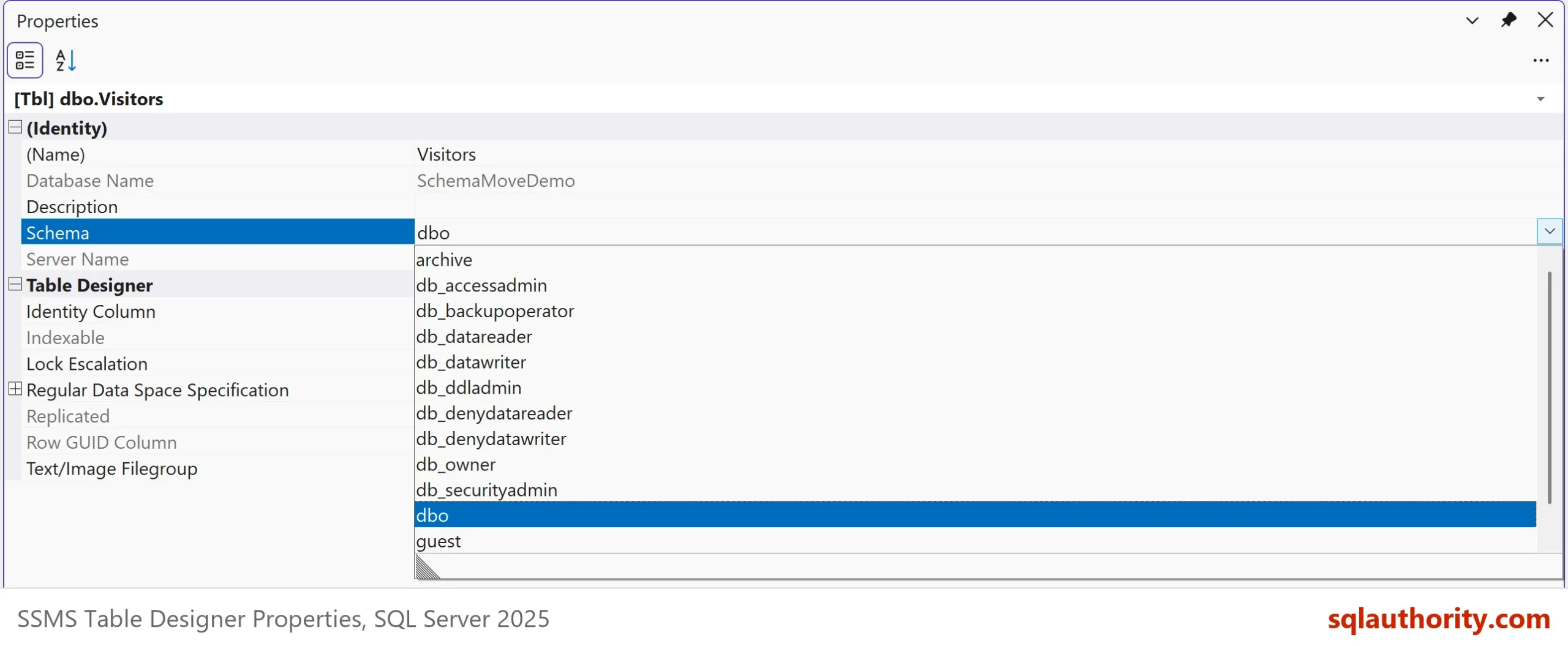
In Management Studio, right-click the table and choose Design. Press F4 to open the Properties window. The Schema box in that window lists the schemas of the database. Change it and save the table. SSMS applies the change when you save the table. The T-SQL way is better for a team, because you can review it and keep it.
Should You Move the Table at All?
You could argue that a new table in the right schema is cleaner than a move. It is, when you can afford the copy. A copy of a big table takes time and space. It also breaks identity values and foreign keys unless you handle them. The transfer is instant and keeps everything except the permissions. I move the table, then fix the permissions.
What to Remember
Before you run ALTER SCHEMA TRANSFER, list the dependents and permissions of the table. After the move, grant the permissions again. Repair every view, procedure and query that names the old schema. A synonym gives you time. The table, its keys and its data do not change.
For a lasting fix, grant on the schema once, for example GRANT SELECT ON SCHEMA::archive TO ReportReader;. Every table that you move into archive is then covered, and the user reads it without a new grant. Move a Table From One Schema to Another Schema shows the bare statement. This post shows what it breaks.
When you finish, run the cleanup script. It removes the demo database.
USE master;
GO
ALTER DATABASE SchemaMoveDemo SET SINGLE_USER WITH ROLLBACK IMMEDIATE;
DROP DATABASE SchemaMoveDemo;
A schema move is not a copy, it is a change of address that every caller must learn.
Published by Pinal Dave on SQLAuthority. More of my work at pinaldave.com.
Discover more from SQL Authority with Pinal Dave
Subscribe to get the latest posts sent to your email.