
nchar and nvarchar are usual types for Unicode character strings in SQL Server. Reader questions prompted my datatype summary.

| Type | Meaning |
|---|---|
| nchar(n) | Fixed length, with n specifying 1 to 4,000 byte-pairs. |
| nvarchar(n) | Variable length, with the same declared byte-pair range. |
| nvarchar(max) | Variable length for larger values, subject to the documented storage limit. |
| ntext | Legacy Unicode large-object type. Use nvarchar(max) for new work. |
SELECT N'नमस्ते' AS UnicodeLiteral, DATALENGTH(N'नमस्ते') AS StorageBytes;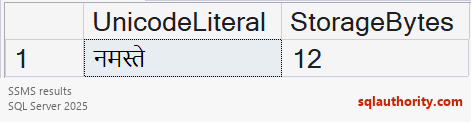
Declared n does not always count visible characters. Supplementary characters can require two byte-pairs under a supporting collation. Prefix a literal with N when conversion must preserve text independently of the database code page.
SQL Server 2019 supports UTF-8 collations with char and varchar. My earlier three-type list did not cover that modern option. Check collation, byte length and application parameter types.
National char and national character correspond to nchar. National char varying and national character varying correspond to nvarchar. National text is the synonym for ntext.
The older ntext type is deprecated. Use nvarchar(max) for new variable-length Unicode storage when appropriate. My original ntext limit used the wrong unit: 1,073,741,823 describes string length, with two bytes per stored character.
Fixed-length nchar and variable-length nvarchar serve different requirements. Review existing ntext columns and application dependencies before migration. The deprecated-type documentation explains the replacement types.
Related reading
Original video
A Unicode type declaration is not the whole text contract, it is one part of encoding, length and parameter handling.
Published by Pinal Dave on SQLAuthority. More of my work at pinaldave.com.
Discover more from SQL Authority with Pinal Dave
Subscribe to get the latest posts sent to your email.




1 Comment. Leave new
Hi Sir,
I am working on migration of files from source to destination bucket. Some of the file names are spanish so I kept the field data type as nvarchar. Now the characters looks good in DB but when I read in c# they are not the same as it shows file not found error.
The example file name : Orden señalando vista por videoconferencia González v. AFV.pdf
It is correctly saved in DB
When I read it from DB it prints in console like this(Using C#):
File does not exist. Orden sen~alando vista por videoconferencia Gonza’lez v. AFV.pdf
Could you please assist me on this. Why this is happening?
Thanks