Question: Where can you inspect the Database Performance facet in SQL Server? In SSMS, right-click the database, choose Facets, then select Database Performance.

A client asked this during a Comprehensive Database Performance Health Check. They wanted to see which performance-related database properties SQL Server exposed and their current values. A facet groups related management properties; it isn’t a performance score.
- Connect to the intended SQL Server instance in SSMS.
- In Object Explorer, expand Databases and right-click the intended database.
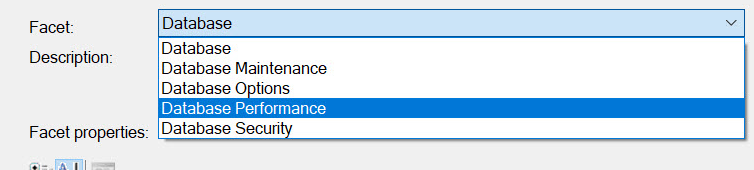
- Select Facets, then Database Performance in the Facet list.
- Read the values without changing them. Close with Cancel when finished inspecting.
A useful starting point for a conversation
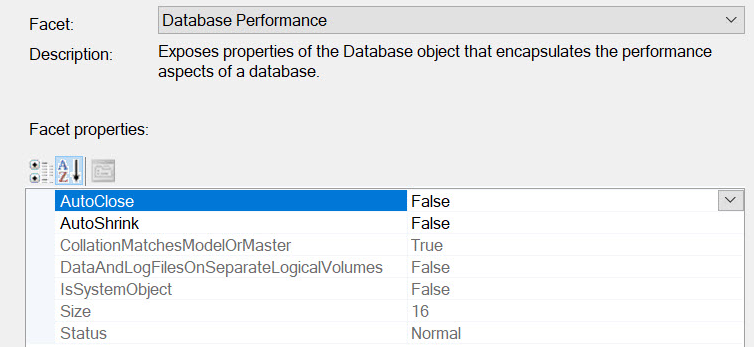
The property I discussed most with this client was DataAndLogFilesOnSeparateLogicalVolumes. It helps us inspect the file layout. It doesn’t prove that two drive letters have separate physical storage, or that separating them will cure a bottleneck.
Data and log I/O have different patterns. Separation can help isolate them, but the storage architecture matters. Two logical volumes can share the same underlying devices. Look at latency, throughput, growth and the workload before recommending a move.
The other properties include AutoClose, AutoShrink, size and status. They give us specific questions to investigate. A database isn’t automatically fast because every visible Boolean has a preferred value. As I often tell clients, there is no single setting that explains every performance problem.
Published by Pinal Dave on SQLAuthority. More of my work at pinaldave.com.
Discover more from SQL Authority with Pinal Dave
Subscribe to get the latest posts sent to your email.