AVG of an integer column returns an integer, so the fraction is gone before you ever see it. The fix is to change the type of the input, not to dress up the output afterward.

The average that lost its fraction
A support ticket arrives. The dashboard says the average rating is 1, but two customers rated it 1 and 2. Somebody did the math in their head and got 1.5. The query is not broken. It is doing exactly what the data type tells it to do.
Here is a tiny table of ratings. One person skipped the question, so one value is NULL.
DROP TABLE IF EXISTS #Ratings;

CREATE TABLE #Ratings (SampleId int PRIMARY KEY, Amount int NULL);

INSERT #Ratings VALUES (1, 1), (2, 2), (3, NULL);
One column, three different answers
AVG picks its result type from its input. An int goes in, so an int comes out. Cast the input to decimal, or multiply by 1.0, and you keep the fraction. The NULL is ignored in every case.
SELECT AVG(Amount) AS IntegerAverage,
       AVG(CAST(Amount AS decimal(19, 4))) AS DecimalAverage,
       AVG(Amount * 1.0) AS LiteralPromotedAverage
FROM #Ratings;
The integer version says 1. The other two say 1.500000. Same rows, same function, and the only difference is the type going in.
Casting after the average is too late
The tempting repair is to wrap the whole thing in a CAST. Try it, next to the correct version.
SELECT CAST(AVG(Amount) AS decimal(9, 2)) AS TooLate,
       AVG(CAST(Amount AS decimal(9, 2))) AS InTime
FROM #Ratings;
TooLate shows 1.00. It has two decimals, but the fraction was already thrown away. InTime shows 1.500000. The cast has to happen on the input, inside the AVG.

SUM divided by COUNT is a different trap
Some people avoid AVG and divide SUM by COUNT instead. That does not escape the problem, because dividing two integers also drops the fraction. Use COUNT of the column, not COUNT(*), so NULL rows stay out of the denominator the way AVG leaves them out. NULLIF protects you from dividing by zero on an empty group.
SELECT SUM(Amount) / NULLIF(COUNT(Amount), 0) AS IntegerDivision,
       SUM(CAST(Amount AS decimal(19, 4))) / NULLIF(COUNT(Amount), 0) AS DecimalDivision
FROM #Ratings;
You get 1 and 1.500000 again. The same lesson, one level down.
Windows follow the same rule
AVG with OVER changes which rows count, not what type comes back. Here is a running average, with a tie-breaking order and an explicit frame.
SELECT SampleId, Amount,
       AVG(Amount) OVER (ORDER BY SampleId ROWS UNBOUNDED PRECEDING) AS RunningIntegerAverage,
       AVG(CAST(Amount AS decimal(19, 4)))
           OVER (ORDER BY SampleId ROWS UNBOUNDED PRECEDING) AS RunningDecimalAverage
FROM #Ratings
ORDER BY SampleId;
The integer column stays at 1 for all three rows. The decimal column goes 1.000000, 1.500000, and 1.500000 again on the NULL row, because a NULL adds nothing to the average.
Ask SQL Server what type it returned
Do not trust how a grid looks. Ask for the type. SQL_VARIANT_PROPERTY reports the base type, precision, and scale of a value.
SELECT SQL_VARIANT_PROPERTY(AVG(Amount), 'BaseType') AS IntegerResultType,
       SQL_VARIANT_PROPERTY(AVG(CAST(Amount AS decimal(19, 4))), 'BaseType') AS DecimalResultType,
       SQL_VARIANT_PROPERTY(AVG(CAST(Amount AS decimal(19, 4))), 'Precision') AS ResultPrecision,
       SQL_VARIANT_PROPERTY(AVG(CAST(Amount AS decimal(19, 4))), 'Scale') AS ResultScale
FROM #Ratings;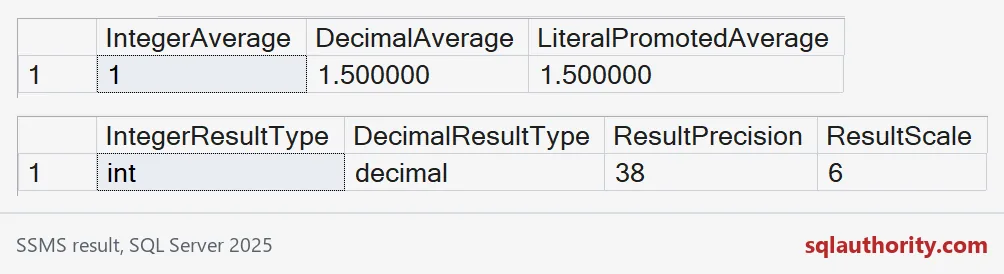
The screenshot shows the first average query on top and this type check below. The integer average has type int. The decimal one is a decimal with precision 38 and scale 6, from a decimal(19,4) input.
Decimal or float?
Casting to float also keeps the fraction, but float is approximate arithmetic. That is fine for measurements. For money, or anything shown as an exact quantity, choose decimal, and give it the precision and scale the business needs.
SELECT AVG(CAST(Amount AS float)) AS FloatAverage,
       SQL_VARIANT_PROPERTY(AVG(CAST(Amount AS float)), 'BaseType') AS FloatResultType
FROM #Ratings;

DROP TABLE IF EXISTS #Ratings;
The float average is 1.5, and the type says float. Keep one small test with a fractional answer, like this one. Whole-number test data can make a broken AVG look correct for years.
The next time an average looks too round, check the type going in.
A decimal display is not recovered precision, it is precision preserved before aggregation.
Published by Pinal Dave on SQLAuthority. More of my work at pinaldave.com.
Discover more from SQL Authority with Pinal Dave
Subscribe to get the latest posts sent to your email.