Sessionizing turns a pile of timestamped events into visits, using an idle gap as the dividing line. Compare each event with the one before it for the same user. If the gap is too long, a new session starts.

Clicks do not come with a visit ID
Your product manager asks how many visits the app had yesterday. You look at the table. It has a user, a timestamp, and nothing else. Nobody logged a “visit started” event, so the visits have to be inferred.
The usual rule is an idle gap. If a user goes quiet for more than 30 minutes, the next click belongs to a new visit. Thirty is a choice, not a law. Some apps need less, and some need an explicit logout event. Decide first which events count as activity, because a background heartbeat will keep every visit alive forever.
DROP TABLE IF EXISTS #Activity;

CREATE TABLE #Activity (EventId int NOT NULL PRIMARY KEY, UserId int NOT NULL, EventAt datetime2 NOT NULL);

INSERT #Activity VALUES
    (1, 10, '2025-01-01T09:00:00'),
    (2, 10, '2025-01-01T09:10:00'),
    (3, 10, '2025-01-01T10:00:00'),
    (4, 20, '2025-01-01T09:05:00'),
    (5, 20, '2025-01-01T09:35:00');
User 10 has two quiet stretches. User 20 has one gap of exactly 30 minutes, which is the interesting one.
Flag each new session with LAG
LAG reads the previous event time inside each user. The first event has no predecessor, so it starts a session. Any later event starts a new one if the previous event is more than 30 minutes older. The ORDER BY uses the timestamp and then EventId, so two events at the same instant always sort the same way.
WITH PreviousEvents AS
(
    SELECT EventId, UserId, EventAt,
           LAG(EventAt) OVER (PARTITION BY UserId ORDER BY EventAt, EventId) AS PreviousAt
    FROM #Activity
)
SELECT EventId, UserId, EventAt, PreviousAt,
       DATEDIFF_BIG(second, PreviousAt, EventAt) AS IdleSeconds,
       CASE WHEN PreviousAt IS NULL OR PreviousAt < DATEADD(minute, -30, EventAt)
            THEN 1 ELSE 0 END AS NewSession
FROM PreviousEvents
ORDER BY UserId, EventAt, EventId;
Events 1 and 4 are the first for their users, so both are flagged. Event 3 follows a 3000-second gap and starts a second session. Event 5 follows exactly 1800 seconds, which is not more than 30 minutes, so it stays in the same session.
Notice that I compare timestamps with DATEADD instead of using DATEDIFF in minutes. DATEDIFF counts boundaries crossed, not time elapsed.
SELECT DATEDIFF(minute, '2025-01-01T09:00:59', '2025-01-01T09:01:01') AS MinutesCounted;Two seconds apart, and it says 1 minute, because the clock ticked over a minute mark. Near a threshold, that kind of answer decides who gets a new session.
Number the sessions with a running sum
The flags are 1 or 0. A running sum of the flags, per user, turns them into session numbers: 1, 1, 2 for user 10. The running sum cannot sit inside the same SELECT as the flag calculation, so each step gets its own CTE. The numbers restart for every user.
CREATE TABLE #Sessions
(UserId int, SessionNumber int, SessionStart datetime2, LastActivity datetime2, EventCount int);

WITH PreviousEvents AS
(
    SELECT EventId, UserId, EventAt,
           LAG(EventAt) OVER (PARTITION BY UserId ORDER BY EventAt, EventId) AS PreviousAt
    FROM #Activity
),
Flagged AS
(
    SELECT UserId, EventAt,
           CASE WHEN PreviousAt IS NULL OR PreviousAt < DATEADD(minute, -30, EventAt)
                THEN 1 ELSE 0 END AS NewSession,
           EventId
    FROM PreviousEvents
),
Numbered AS
(
    SELECT UserId, EventAt,
           SUM(NewSession) OVER (PARTITION BY UserId ORDER BY EventAt, EventId
                                 ROWS UNBOUNDED PRECEDING) AS SessionNumber
    FROM Flagged
)
INSERT #Sessions (UserId, SessionNumber, SessionStart, LastActivity, EventCount)
SELECT UserId, SessionNumber, MIN(EventAt), MAX(EventAt), COUNT(*)
FROM Numbered
GROUP BY UserId, SessionNumber;

SELECT UserId, SessionNumber, SessionStart, LastActivity, EventCount
FROM #Sessions
ORDER BY UserId, SessionNumber;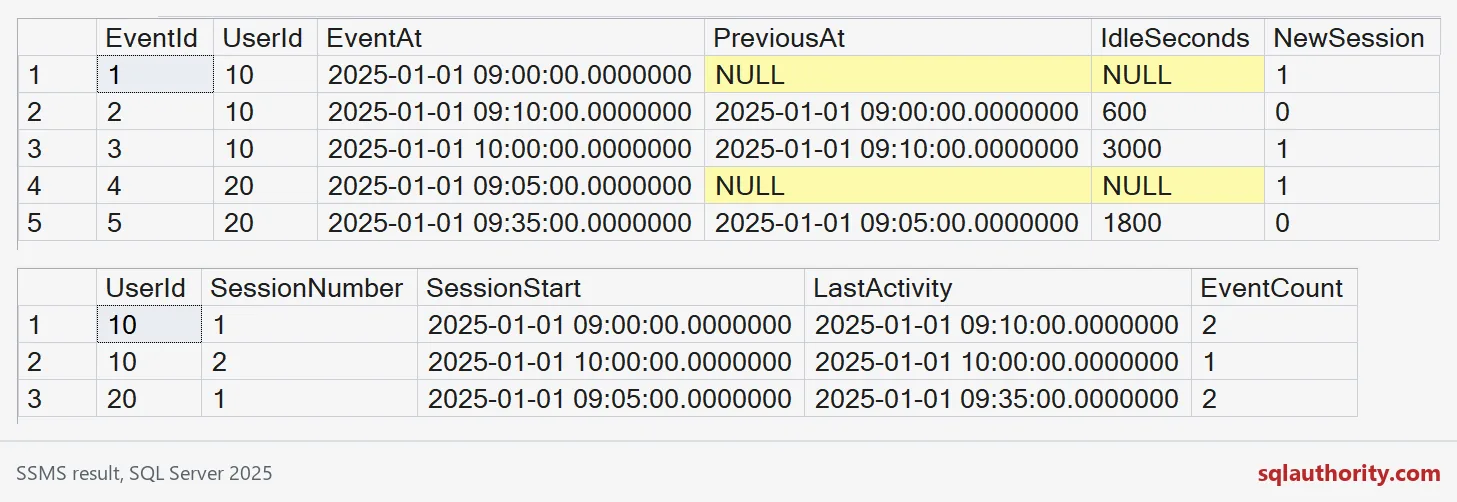
Three sessions come back. User 10 has two, one with two events and one with a single event. User 20 has one session with two events. Session 1 for user 10 and session 1 for user 20 are different visits.

Name the duration you actually measured
How long was each visit? Be careful with the answer. First event to last event is the observed span. It does not include time spent reading after the final click.
SELECT UserId, SessionNumber,
       DATEDIFF_BIG(second, SessionStart, LastActivity) AS ObservedSeconds,
       DATEADD(minute, 30, LastActivity) AS InferredExpiry
FROM #Sessions
ORDER BY UserId, SessionNumber;
The single-event session has an observed span of 0 seconds, which surprises people. Keep last activity and inferred expiry as separate columns if you need both, and decide which one the report publishes.
Late events and report boundaries
Real data arrives late. A late event can bridge two sessions into one, or push a session start earlier. Reprocess a window larger than the idle gap, and do not assume arrival order matches event order.
Report boundaries bite too. If you filter to today before running LAG, the first event after midnight looks like a new visit every day. Pull in enough earlier history to know whether it continues one.
DROP TABLE IF EXISTS #Sessions;
DROP TABLE IF EXISTS #Activity;
Keep a few awkward cases in your tests: equal timestamps, an exact-threshold gap, and a lonely single event.
A session number is not a logged fact, it is a grouping rule.
Published by Pinal Dave on SQLAuthority. More of my work at pinaldave.com.
Discover more from SQL Authority with Pinal Dave
Subscribe to get the latest posts sent to your email.