
To find the data type of an expression in SQL Server, hand the expression to the function SQL_VARIANT_PROPERTY. It tells you the type, the precision and more, without creating a table.

The Question: What Type Is This Result?
A common question shows why you need to find the data type of an expression. A report line computes a percentage, 17 * @amount / 100. What data type does the result have? Columns have a type you can look up. An expression has no column, so the type has to be worked out.
Start by running the expression. The variable holds an integer amount of 2300. The first expression multiplies by 17 and divides by 100. The second uses 17.0 in place of 17. The last two columns divide by 7 in both forms.
DECLARE @amount int = 2300;
SELECT 17 * @amount / 100 AS WholeNumber, 17.0 * @amount / 100 AS WithDecimal,
@amount / 7 AS IntegerDivision, @amount / 7.0 AS DecimalDivision;| WholeNumber | WithDecimal | IntegerDivision | DecimalDivision |
|---|---|---|---|
| 391 | 391.000000 | 328 | 328.571428 |
The values hint at the types. Integer division drops the fraction, so 2300 divided by 7 gives 328. The decimal form keeps six places. A hint isn’t proof, though. You can’t read a precision off a result, and the result can look right for a type you didn’t expect.
Find the Data Type With SQL_VARIANT_PROPERTY
The function takes an expression and the name of a property. It returns that property of the expression. BaseType gives the type name. Precision and Scale give the numeric details. The next query asks four questions about the two percentage expressions.
DECLARE @amount int = 2300;
SELECT SQL_VARIANT_PROPERTY(17 * @amount / 100, 'BaseType') AS WholeType,
       SQL_VARIANT_PROPERTY(17.0 * @amount / 100, 'BaseType') AS DecimalType,
       SQL_VARIANT_PROPERTY(17.0 * @amount / 100, 'Precision') AS DecimalPrecision,
       SQL_VARIANT_PROPERTY(17.0 * @amount / 100, 'Scale') AS DecimalScale;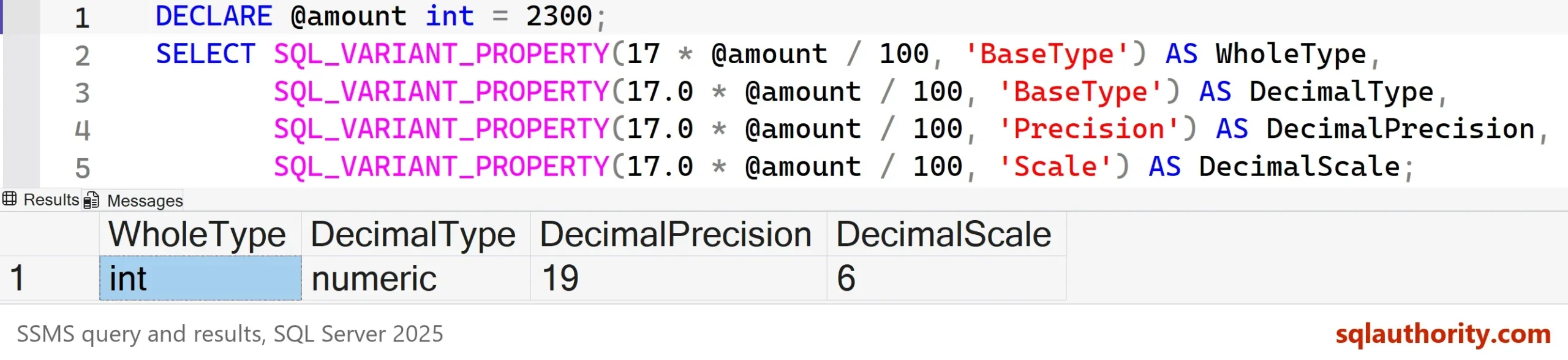
The first expression is an int. All three parts are integers, so the result is an integer. The second is numeric with precision 19 and scale 6. The literal 17.0 is a numeric value, and one numeric operand pulls the whole expression to numeric. That is the answer to the client’s question, and it comes from SQL Server and not from a guess.
Other Properties You Can Ask For
Strings and dates have properties too. MaxLength returns the size in bytes, not in characters. Collation returns the collation of a string. The query below checks a Unicode string and the current time.
SELECT SQL_VARIANT_PROPERTY(N'Maya', 'BaseType') AS TextType,
       SQL_VARIANT_PROPERTY(N'Maya', 'MaxLength') AS TextBytes,
       SQL_VARIANT_PROPERTY(N'Maya', 'Collation') AS TextCollation,
       SQL_VARIANT_PROPERTY(SYSDATETIME(), 'BaseType') AS TimeType,
SQL_VARIANT_PROPERTY(SYSDATETIME(), 'Scale') AS TimeScale;| TextType | TextBytes | TextCollation | TimeType | TimeScale |
|---|---|---|---|---|
| nvarchar | 8 | SQL_Latin1_General_CP1_CI_AS | datetime2 | 7 |
The word Maya has four characters, and the property reports 8 bytes, because each Unicode character takes two. SYSDATETIME returns datetime2 with a scale of 7, which means seven decimal places of seconds.
How Mixed Types Come Out
SQL Server follows data type precedence. When an expression mixes types, the type with the higher precedence wins, and the other operands convert to it. The next query tests five mixes. Each column holds the base type of one expression.
DECLARE @amount int = 2300;
SELECT SQL_VARIANT_PROPERTY(@amount / 7, 'BaseType') AS IntOverInt,
       SQL_VARIANT_PROPERTY(@amount / 7.0, 'BaseType') AS IntOverDecimal,
       SQL_VARIANT_PROPERTY(@amount * 1.5e0, 'BaseType') AS IntTimesFloat,
       SQL_VARIANT_PROPERTY(CAST(5 AS tinyint) + CAST(5 AS tinyint), 'BaseType') AS TinyPlusTiny,
SQL_VARIANT_PROPERTY(1 + '1', 'BaseType') AS IntPlusText;| IntOverInt | IntOverDecimal | IntTimesFloat | TinyPlusTiny | IntPlusText |
|---|---|---|---|---|
| int | numeric | float | tinyint | int |
Two results deserve a second look. A tinyint plus a tinyint is a tinyint, so a sum above 255 would overflow. And an int plus the text ‘1’ is an int, because the text converts to an integer. The base type follows the operands. An int never turns into a bigint to fit the answer.
When the Type Shows Itself as an Error
The overflow in an integer sum is a quick test of the same rule. The largest int is 2,147,483,647. Add 1 to it, and no int can hold the result. SQL Server doesn’t switch to a bigger type. It reports an error that names the type.
SELECT 2147483647 + 1 AS TooBig;
Msg 8115, Level 16, State 2, Line 1
Arithmetic overflow error converting expression to data type int.
The message says data type int. Both operands are int, so the result is an int, and an int has no room for the answer. To get a result, write one operand as bigint or as a decimal. The sum then gets a type that fits it. The data type of the expression decides everything here.
Describe a Whole Query
The function works on one expression at a time. To find the data type of every column in a query, use sys.dm_exec_describe_first_result_set. It needs SQL Server 2012 or later. It takes the query text as a string, plus the declaration of its parameters. It returns one row per column, with the type, size and precision. Nothing runs and nothing is created.
SELECT name, system_type_name, max_length, precision, scale
FROM sys.dm_exec_describe_first_result_set(
     N'SELECT 17 * @amount / 100 AS WholeNumber, 17.0 * @amount / 100 AS WithDecimal, N''Maya'' AS FirstName, SYSDATETIME() AS Moment',
N'@amount int', 0);| name | system_type_name | max_length | precision | scale |
|---|---|---|---|---|
| WholeNumber | int | 4 | 10 | 0 |
| WithDecimal | numeric(19,6) | 9 | 19 | 6 |
| FirstName | nvarchar(4) | 8 | 0 | 0 |
| Moment | datetime2(7) | 8 | 27 | 7 |
The result matches the earlier answers. WithDecimal is numeric(19,6), and the types of the other columns agree with the single-expression checks. The function also can’t take every type. A varchar(max) or an xml value fails with Msg 206, operand type clash, because those types are incompatible with sql_variant. For them, use the describe function. Use it too when you need the shape of a full result, for example to design a table for it.
Is a Temporary Table Easier?
You could argue that SELECT INTO a temporary table is easier. Create the table from the query, then read the column types from the table. It works, but it runs the query and creates an object you must drop. SQL_VARIANT_PROPERTY and the describe function do neither. I prefer them for a quick check.
What to Remember
Don’t guess. Find the data type of an expression by asking SQL Server. Use SQL_VARIANT_PROPERTY for one expression and sys.dm_exec_describe_first_result_set for a whole query. Remember that a mix of types follows precedence, and that integer math stays integer.
Next time a result looks slightly wrong, check its type before you check its value. A hidden int or an unexpected numeric scale explains many surprises.
A result is not only a value, it is a value with a type that someone chose for you.
Published by Pinal Dave on SQLAuthority. More of my work at pinaldave.com.
Discover more from SQL Authority with Pinal Dave
Subscribe to get the latest posts sent to your email.



1 Comment. Leave new
I have used the “select into” creating a new table and then checking the field type.
Thanks for showing another way, where there is no need to create and drop an unneeded table.