JSON_MODIFY changes one property inside a JSON document without touching the rest. It follows a path instead of hunting through text. It is safer than string surgery, but it has a few quirks around types, NULL and missing paths.

Why string replacement bites
Say your app keeps user settings as JSON in an nvarchar column. A developer wants to switch one user to the dark theme, so they write REPLACE(Document, ‘light’, ‘dark’). It works on the demo row. Then it also rewrites a tag that happens to contain the word light, and nobody sees it until a customer complains.
JSON_MODIFY avoids that. You name the property by its path, such as $.display.size, and SQL Server changes only that value. The examples use a temp table with a CHECK constraint, so the column can only hold valid JSON.
Change a value and keep the rest
The document has a theme, a nested display size, a tags array and an obsolete flag. I change two properties in one UPDATE. Then OPENJSON lists the top-level keys with their type codes.
DROP TABLE IF EXISTS #UserSettings;
CREATE TABLE #UserSettings (Id int PRIMARY KEY, Document nvarchar(max) CHECK (ISJSON(Document) = 1));
INSERT #UserSettings VALUES (1, N'{"theme":"light","display":{"size":12},"tags":["demo"],"obsolete":true}');

UPDATE #UserSettings
SET Document = JSON_MODIFY(JSON_MODIFY(Document, '$.theme', N'dark'), '$.display.size', 14)
WHERE Id = 1;

SELECT [key], value, type FROM OPENJSON((SELECT Document FROM #UserSettings WHERE Id = 1)) ORDER BY [key];
Theme is now dark and the size is 14. Type code 1 is a string, 3 a Boolean, 4 an array and 5 an object. The first grid in the screenshot below shows exactly this.
The number or the text trap
The value you pass decides the JSON type. Pass 16 and you get a number. Pass ’16’ in quotes and you get a string. JSON_MODIFY does not complain, and the application that reads the size may break later.
SELECT JSON_MODIFY(Document, '$.display.size', '16') AS SizeAsText,
       JSON_MODIFY(Document, '$.display.size', 16) AS SizeAsNumber
FROM #UserSettings WHERE Id = 1;
Look for the quotes around 16 in the first column and none in the second.
Remove a property or set it to JSON null
With a normal path, a NULL value removes the property. That is how the obsolete flag disappears below. With the word strict in front of the path, NULL sets the property to a JSON null instead, and the property stays. The application may treat “no setting” and “setting is null” differently, so pick on purpose.
UPDATE #UserSettings SET Document = JSON_MODIFY(Document, '$.obsolete', NULL) WHERE Id = 1;

SELECT JSON_MODIFY(Document, 'strict $.theme', NULL) AS WithExplicitNull
FROM #UserSettings WHERE Id = 1;

SELECT [key], value, type FROM OPENJSON((SELECT Document FROM #UserSettings WHERE Id = 1)) ORDER BY [key];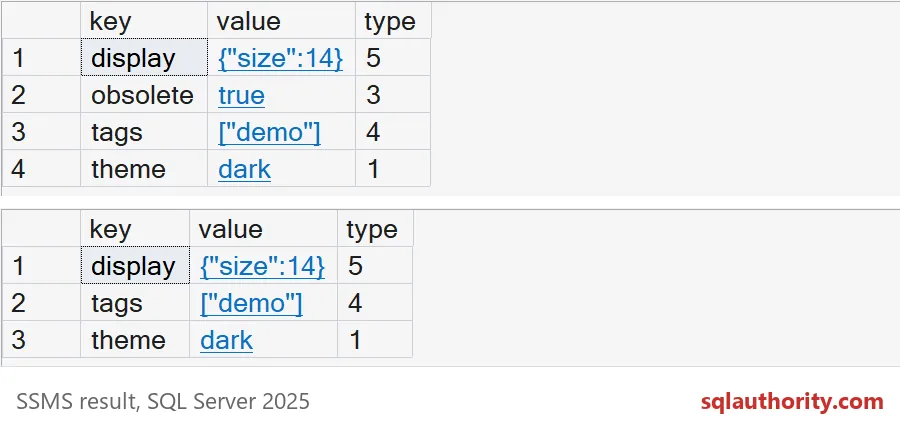
The screenshot shows the key list before and after the removal. The WithExplicitNull result comes back as the document with “theme”:null. The stored row is unchanged, because that query only selects.
Lax paths add, strict paths complain
What if the property is missing? A normal path quietly adds it. A strict path raises error 13608. That makes strict the better choice when a missing property means the code has a bug.
SELECT JSON_MODIFY(Document, '$.volume', 7) AS LaxAddsIt FROM #UserSettings WHERE Id = 1;

BEGIN TRY
    SELECT JSON_MODIFY(Document, 'strict $.volume', 7) AS StrictFails FROM #UserSettings WHERE Id = 1;
END TRY
BEGIN CATCH
    SELECT ERROR_NUMBER() AS ErrorNumber, ERROR_MESSAGE() AS ErrorMessage;
END CATCH;
Objects, arrays and retries
A plain SQL string that looks like JSON is stored as an escaped string, with backslashes. Wrap it in JSON_QUERY to store a real object. The same applies to arrays.
Appending to an array is also not idempotent. Run the UPDATE twice, maybe because a job retried, and the tag appears twice.
SELECT JSON_MODIFY(Document, '$.preferences', N'{"alerts":true}') AS AsPlainString,
       JSON_MODIFY(Document, '$.preferences', JSON_QUERY(N'{"alerts":true}')) AS AsObject
FROM #UserSettings WHERE Id = 1;

UPDATE #UserSettings SET Document = JSON_MODIFY(Document, 'append $.tags', N'reviewed') WHERE Id = 1;
UPDATE #UserSettings SET Document = JSON_MODIFY(Document, 'append $.tags', N'reviewed') WHERE Id = 1;

SELECT JSON_QUERY(Document, '$.tags') AS TagsAfterRetry FROM #UserSettings WHERE Id = 1;
The first column shows the escaped string, and the second the real object. The tag list ends up as demo, reviewed, reviewed.
Guard against two writers
JSON_MODIFY works on the stored row, so it will not overwrite a property you did not touch. Two people changing the same property is still a conflict. Add an expected-value predicate and check how many rows changed. Here the theme is already dark, so the checked update finds nothing to change.
UPDATE #UserSettings
SET Document = JSON_MODIFY(Document, '$.theme', N'blue')
WHERE Id = 1 AND JSON_VALUE(Document, '$.theme') = N'light';

SELECT @@ROWCOUNT AS RowsChanged;
GO
DROP TABLE IF EXISTS #UserSettings;
RowsChanged is 0. Your code should treat that as a conflict, not as success.
After any JSON update, read the whole document back and look at what changed.
A JSON update is not a text replace, it is an edit with rules for paths.
Published by Pinal Dave on SQLAuthority. More of my work at pinaldave.com.
Discover more from SQL Authority with Pinal Dave
Subscribe to get the latest posts sent to your email.