
I was trying to install SQL BI features for one of the assignments I had got. In the setup wizard when I reached the Features Page I got a surprise of my life. There were many features missing! I could not see features available while installing SQL Server listed here:
- SQL Analysis Service
- SQL Reporting Services
- SQL Integration Services
- Data Quality Services
- Polybase Query Service for External Data
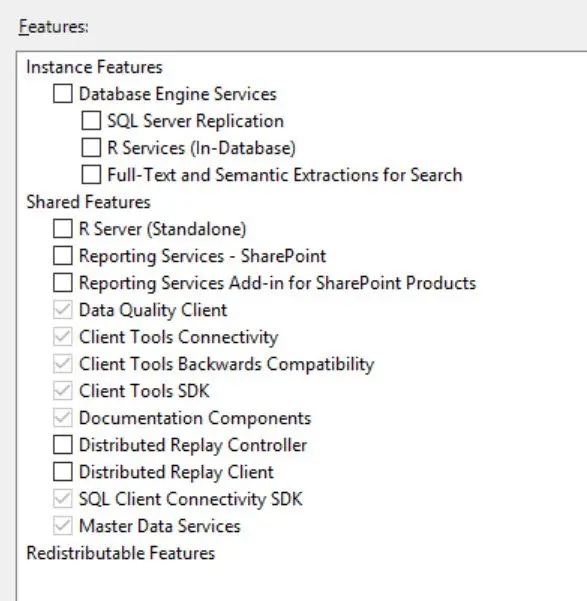
SOLUTION/WORKAROUND
After a brief period fiddling with this issue, I was able to figure that the corresponding MSI files for these missing features were not even present in the setup media. These are usually present in the below path,
<Media>\x64\Setup
This could have happened when I was extracting the ISO image. I quickly extracted the ISO once again and found that this time I was able to see the missing MSI files and I was also able to see the features listed in the setup wizard,
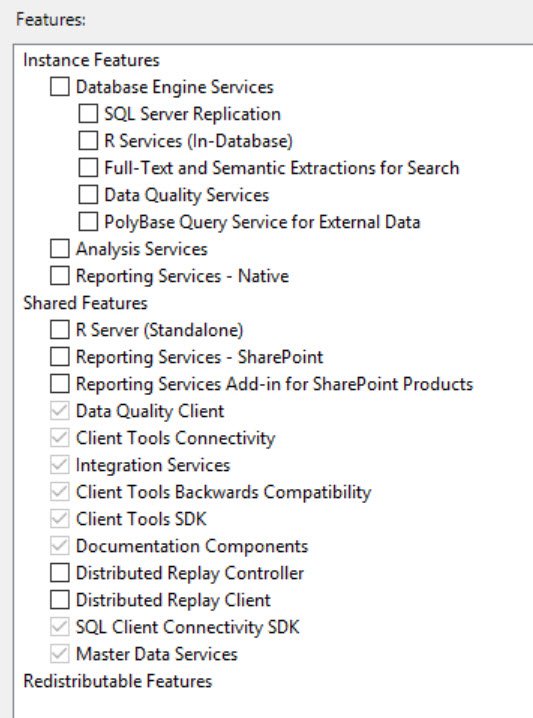
This was a really interesting behavior where setup doesn’t give any error. It just removes the component from the list! I hope you find this blog post interesting as I personally did not ever encountered such an error and for me, it was a strange error.
Please leave your opinion in the comments section.
Published by Pinal Dave on SQLAuthority. More of my work at pinaldave.com.
Discover more from SQL Authority with Pinal Dave
Subscribe to get the latest posts sent to your email.



1 Comment. Leave new
Thank you for this post, I was going crazy trying to figure out why the features weren’t there.