
Adding two dates in SQL Server doesn’t raise an error. It returns a date in the year 2126. A typo is enough to trigger it, and the result looks like a real date.

The Puzzle
The comma and the plus sign sit far apart on a keyboard, yet one slip can swap them. You meant to list two dates side by side with SELECT @date1, @date2. You typed SELECT @date1 + @date2 instead. Run the script below.
DECLARE @date1 datetime, @date2 datetime;
SELECT @date1 = '2010-01-20', @date2 = '2016-10-22';
SELECT @date1 + @date2 AS result;
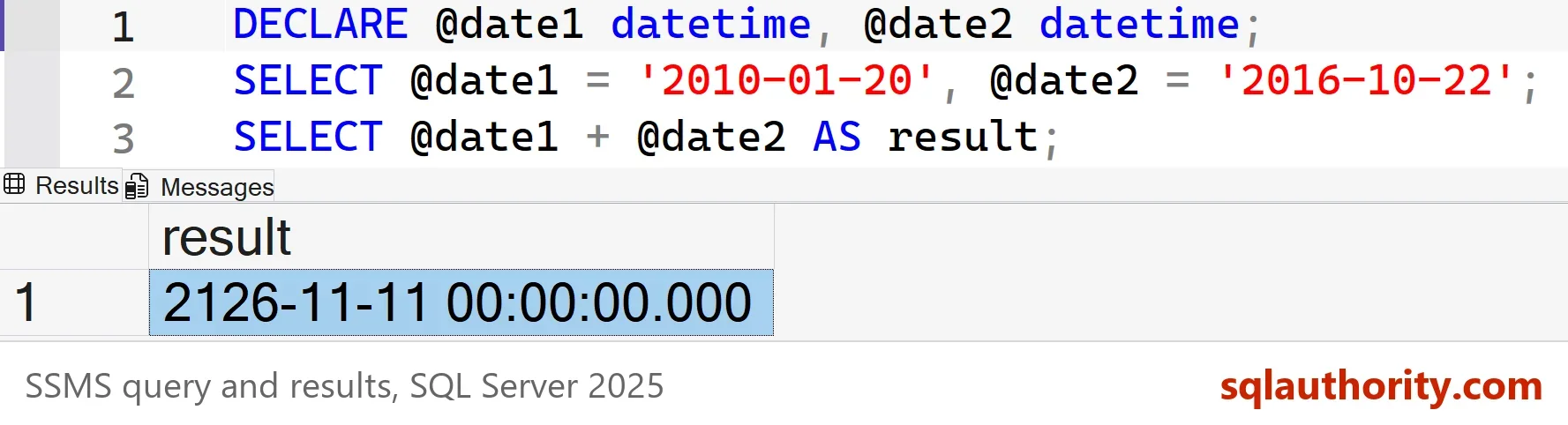
The question: how can the sum be a date in the year 2126, and not an error? Adding two dates has no meaning in a calendar. Try your own answer, then read on.
The Answer: A Datetime Is a Number
SQL Server stores a datetime as a count of days since 1900-01-01. The time of day is a fraction of a day. The date 1900-01-01 is day zero. The plus operator on a datetime expects a number of days on the right side. When the right side is a datetime too, SQL Server reads it as its day count. It adds that many days to the left date.
The next script shows the steps. It casts each date to an integer, adds the two numbers, and rebuilds the date with DATEADD. The last column proves that day zero is the start of 1900.
DECLARE @date1 datetime = '2010-01-20', @date2 datetime = '2016-10-22';
SELECT CAST(@date1 AS int) AS Days1, CAST(@date2 AS int) AS Days2,
       CAST(@date1 AS int) + CAST(@date2 AS int) AS TotalDays,
       DATEADD(DAY, CAST(@date2 AS int), @date1) AS DateAddForm,
CAST(0 AS datetime) AS DayZero;| Days1 | Days2 | TotalDays | DateAddForm | DayZero |
|---|---|---|---|---|
| 40196 | 42663 | 82859 | 2126-11-11 00:00:00.000 | 1900-01-01 00:00:00.000 |
The first date is 40,196 days after 1900-01-01. The second is 42,663 days after it. The sum of the two is 82,859 days, and 82,859 days after 1900-01-01 is 2126-11-11. The plus sign did what it always does with a number of days. It took the second date for a number.
You can check the answer with a rough estimate. The number 42,663 is about 116.8 years of days. Add that to January 2010 and you land late in 2126, which matches the result. Run this kind of check whenever a date looks wrong. A date far from where you expect it is a sign that a number slipped in somewhere. A spreadsheet counts days from a different start date. Its answer for the same sum can differ by a day or two.
The Time Part Adds Up Too
The time of day is the fraction after the decimal point. Noon is half a day. The second date at noon is the number 42,663.5, and the time parts add as well. Two noons make one more day.
DECLARE @t1 datetime = '2010-01-20 12:00', @t2 datetime = '2016-10-22 12:00';
SELECT CAST(@t2 AS float) AS SecondAsNumber, @t1 + @t2 AS NoonPlusNoon;
| SecondAsNumber | NoonPlusNoon |
|---|---|
| 42663.5 | 2126-11-12 00:00:00.000 |
The result moved from the 11th to the 12th at midnight. The two half days added up to a whole day.
Which Types Accept the Plus Sign
The datetime and smalldatetime types accept the plus sign. The smalldatetime range ends in 2079, so this pair of dates overflows there with Msg 8115. The newer types refuse the plus sign. A datetime2 value raises Msg 8117 on the same statement. The date type raises the same message with date in its place. For the newer types, SQL Server refuses to add two dates, which is the safer behavior.
DECLARE @a datetime2 = '2010-01-20', @b datetime2 = '2016-10-22';
SELECT @a + @b AS result;
Msg 8117, Level 16, State 1, Line 2
Operand data type datetime2 is invalid for add operator.
A datetime sum can fail as well. Two values near the top of the range add up to a day count that no datetime can hold. SQL Server reports an overflow.
DECLARE @a datetime = '9000-01-01', @b datetime = '9000-01-01';
SELECT @a + @b AS result;
Msg 8115, Level 16, State 2, Line 2
Arithmetic overflow error converting expression to data type datetime.
What to Write Instead
If you wanted two dates side by side, use a comma. If you wanted the gap between two dates, use DATEDIFF. If you wanted a date some days later, use DATEADD. Subtracting one datetime from another doesn’t give the gap either. It gives a date that is that many days before 1900-01-01.
DECLARE @a datetime = '2010-01-20', @b datetime = '2016-10-22';
SELECT @a AS FirstDate, @b AS SecondDate, DATEDIFF(DAY, @a, @b) AS DaysBetween,
DATEADD(DAY, 30, @a) AS ThirtyDaysLater, @a - @b AS StrangeDifference;| FirstDate | SecondDate | DaysBetween | ThirtyDaysLater | StrangeDifference |
|---|---|---|---|---|
| 2010-01-20 00:00:00.000 | 2016-10-22 00:00:00.000 | 2467 | 2010-02-19 00:00:00.000 | 1893-03-31 00:00:00.000 |
The gap is 2,467 days. The strange difference is the date 2,467 days before 1900-01-01, which is 1893-03-31. It looks like a date, but it isn’t a gap.
You could argue that SQL Server should refuse to add two dates in every case. For the newer types it does. The datetime type keeps its older arithmetic rules for compatibility.
What to Remember
Adding two dates gives a strange date because a datetime is a number in disguise. Many other strange dates are numbers in disguise too. When a result sits far from where you expect, cast the inputs to integers and look at them. The same trick explains many surprises in old datetime code.
Prefer datetime2 and date in new tables. They refuse to add two dates. A typo like this one then stops with an error, not with a date in 2126.
A date is not a quantity, it is a place on the calendar.
Published by Pinal Dave on SQLAuthority. More of my work at pinaldave.com.
Discover more from SQL Authority with Pinal Dave
Subscribe to get the latest posts sent to your email.




29 Comments. Leave new
The starting date of SQL server is 1900-01-01.
While adding 2 dates, it will returns date calculated from 1900-01-01: (Day count from 1900-01-01 to Date1) + (Day count from 1900-01-01 to Date2)
Ex:
DECLARE @date1 DATETIME, @date2 DATETIME
SELECT @date1=’2010-01-20′, @date2=’2016-10-22′
SELECT DATEDIFF(DAY,’1900-01-01′,@date1)
SELECT DATEDIFF(DAY,’1900-01-01′,@date2)
SELECT DATEADD(DAY, 0, DATEDIFF(DAY,’1900-01-01′,@date1)+DATEDIFF(DAY,’1900-01-01′,@date2))
SELECT @date1+@date2 AS result
Dates are stored as difference from “January 1, 1900”.
In case you are adding two dates,
a.) first find no of days one date differ from “January 1, 1900”.
b.) And add those day to second date variable.
E.g
DECLARE @date1 DATETIME, @date2 DATETIME
SELECT @date1=’2010-01-20′, @date2=’2016-10-22′
SELECT DATEADD(DAY,DATEDIFF(DAY,’1900-01-01′,@date1),@date2) as TestResult1, SELECT @date1+@date2 AS Testresult2
Interesting that if you “port” this to excel, you get 2126-11-13
01/20/2010 is 40198
10/22/2016 is 42665
sum is 82863 which formatted for date in excel is 2126-11-13
The + operator after date expression expects a number of days to add, and SQL convert the second expression @date2 to an integer number implicit, which adds 42663 days to the first date.
== @date1+cast( @date2 as int) == @date1 + 42663 => ‘2126-11-11’
https://docs.microsoft.com/en-us/sql/t-sql/language-elements/add-transact-sql?view=sql-server-2017
(fix my comment)
The + operator after date expression expects a number of days to add, and SQL convert the second expression @date2 to number implicit, which adds 42663 days to the first date.
== @date1+cast( @date2 as int) == @date1 + 42663 => ‘2126-11-11’
(not integer)
Izhar Azati
My guess is that SQL stores DATETIMES as offsets from 1900-01-01. Adding them together is equivalent to adding two integers, the result of which is being interpreted as a new DATETIME equal to the summation of the two values.
Its because SQL Server stores dates as numbers. For example:-
select cast(0 as datetime)
This returns 1900-01-01 00:00:00.000
This means that when you add two dates together you are in fact adding the date values together.
select cast(cast(‘20100120’ as datetime) as int)
Returns 40196
select cast(cast(‘20161022’ as datetime) as int)
Returns 42663
40196 + 42663 = 82859
Therefore:-
select cast(82859 as datetime)
Returns 2126-11-11 00:00:00.000
This can be really useful in code as you don’t need to use the dateadd function when adding or subtracting days from a date as you can use the +/- operators instead.
For example:-
select getdate()+1
Returns the same results as select dateadd(day,1,getdate()) but with less typing.
To get your 2016 date: SELECT cast(21130 AS datetime) + cast(21329 AS datetime)
As everyone else stated dates are truly numbers, and performing the plus operator on them just adds the two numbers.