ROWCOUNT and PAGECOUNT let you tell SQL Server that a tiny table is huge. The optimizer believes you and plans for the big table, while your laptop does no extra work. It is a neat trick for plan testing, and an easy one to forget to undo.

Why you would fake a big table
A junior DBA asked me last month, “Production has 500 million rows in that table. How do I see the plan it gets without copying all of it?” Good question. Copying is slow, and the test server never has the space anyway.
One answer is to fake the size. You change what SQL Server believes about the table, not the table itself. The plan you get is the plan the optimizer would choose for a big table.
These two options are not officially documented, and they could behave differently in a future build. So use them on a test copy, never on a table you care about. The demo below creates one small table and removes it at the end.
Start with a tiny table and read its real size
The table has three rows. The first result shows your server build, which will differ from the one in my screenshot. The second shows what SQL Server records for the table: three rows on one page.
SET NOCOUNT ON;
DROP TABLE IF EXISTS dbo.FakeSizeDemo;

CREATE TABLE dbo.FakeSizeDemo
(
    ItemId  int       NOT NULL CONSTRAINT PK_FakeSizeDemo PRIMARY KEY CLUSTERED,
    Payload char(100) NOT NULL
);
INSERT dbo.FakeSizeDemo (ItemId, Payload) VALUES (1, 'a'), (2, 'b'), (3, 'c');

SELECT CONVERT(varchar(30), SERVERPROPERTY('ProductVersion')) AS tested_build;

UPDATE STATISTICS dbo.FakeSizeDemo WITH FULLSCAN;

SELECT N'before' AS phase, row_count, in_row_data_page_count
FROM sys.dm_db_partition_stats
WHERE object_id = OBJECT_ID(N'dbo.FakeSizeDemo') AND index_id = 1;
Tell the optimizer the table is huge
Now we set the lie. UPDATE STATISTICS accepts a ROWCOUNT and a PAGECOUNT. I picked 10 million rows on 200,000 pages. Then I read the size again, and I also count the real rows.
UPDATE STATISTICS dbo.FakeSizeDemo PK_FakeSizeDemo
WITH ROWCOUNT = 10000000, PAGECOUNT = 200000;

SELECT N'simulated' AS phase, row_count, in_row_data_page_count
FROM sys.dm_db_partition_stats
WHERE object_id = OBJECT_ID(N'dbo.FakeSizeDemo') AND index_id = 1;

SELECT COUNT_BIG(*) AS actual_rows FROM dbo.FakeSizeDemo;
The metadata now says 10,000,000 rows and 200,000 pages. The query that really reads the table still finds 3 rows. Nothing was loaded. Only the numbers the optimizer reads have changed.
See what the optimizer does with the lie
Here is the payoff. Ask for the estimated plan of a simple query. In SSMS you can press Ctrl+L, or use SHOWPLAN_ALL as I do here, so you can read the EstimateRows column.
SET SHOWPLAN_ALL ON;
GO
SELECT ItemId, Payload FROM dbo.FakeSizeDemo WHERE ItemId > 1;
GO
SET SHOWPLAN_ALL OFF;
With the real size, the plan is a clustered index seek that estimates 2 rows, at a total cost of 0.0033. With the pretend size, it is still a seek, but it estimates 6,666,666.5 rows and the cost jumps to about 106. Two of the three rows qualify, and two thirds of 10 million is what you see.
The estimate is the useful part. If your real query would change its join or scan at that size, you can spot it here, in seconds.

Put the real numbers back
This is the step people forget. A fake size stays until something replaces it. DBCC UPDATEUSAGE with COUNT_ROWS recounts the real rows and pages. Its message even tells you what it fixed: from 10,000,000 rows back to 3. Then a FULLSCAN statistics update records the real data again.
DBCC UPDATEUSAGE (0, N'dbo.FakeSizeDemo') WITH COUNT_ROWS;

UPDATE STATISTICS dbo.FakeSizeDemo WITH FULLSCAN;

SELECT N'reset' AS phase, row_count, in_row_data_page_count
FROM sys.dm_db_partition_stats
WHERE object_id = OBJECT_ID(N'dbo.FakeSizeDemo') AND index_id = 1;

SELECT COUNT_BIG(*) AS actual_rows FROM dbo.FakeSizeDemo;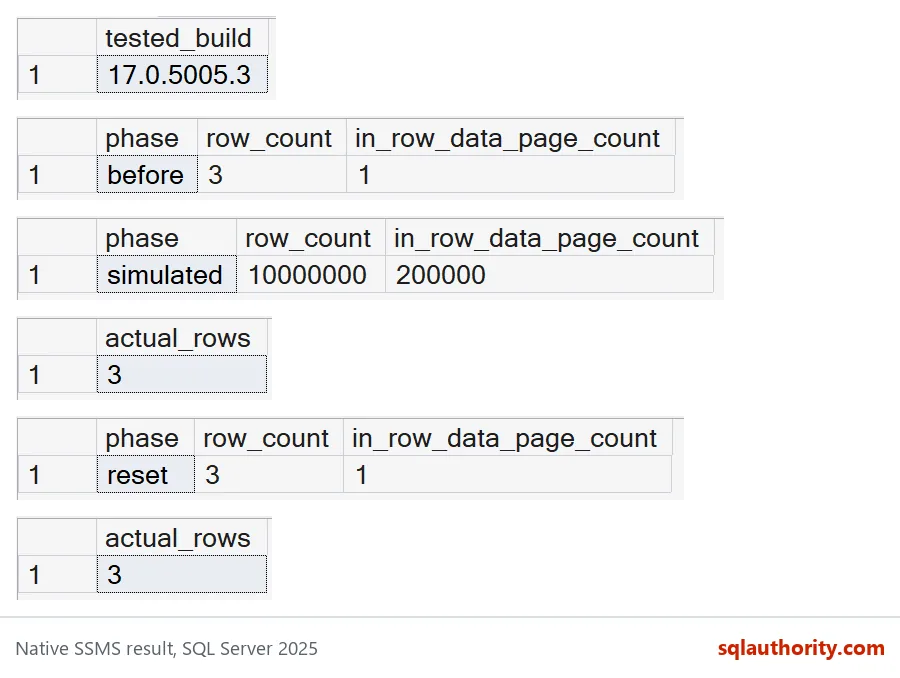
Read the grids from top to bottom. Before: 3 rows, 1 page. Simulated: 10,000,000 rows, 200,000 pages. The real count never moves from 3. After the reset, the metadata is back to 3 rows and 1 page.
Run the plan check once more to confirm the estimate is back to 2 rows. Then drop the table.
SET SHOWPLAN_ALL ON;
GO
SELECT ItemId, Payload FROM dbo.FakeSizeDemo WHERE ItemId > 1;
GO
SET SHOWPLAN_ALL OFF;
GO
DROP TABLE IF EXISTS dbo.FakeSizeDemo;
What this trick can and cannot tell you
A faked size shows you the optimizer’s choice. It does not show you the cost of running that choice. Do not time a three-row table and call it a benchmark. There is no real data distribution, no real disk reads and no other users.
For runtime and index maintenance decisions, use real data that looks like production. For “what plan would it pick at this size”, fake it, check it, and reset it. Write the reset down before you start. Future you will say thanks.
Try it on a scratch table of your own, and watch the estimate jump.
A faked table size is not a large workload, it is an optimizer assumption.
Published by Pinal Dave on SQLAuthority. More of my work at pinaldave.com.
Discover more from SQL Authority with Pinal Dave
Subscribe to get the latest posts sent to your email.