
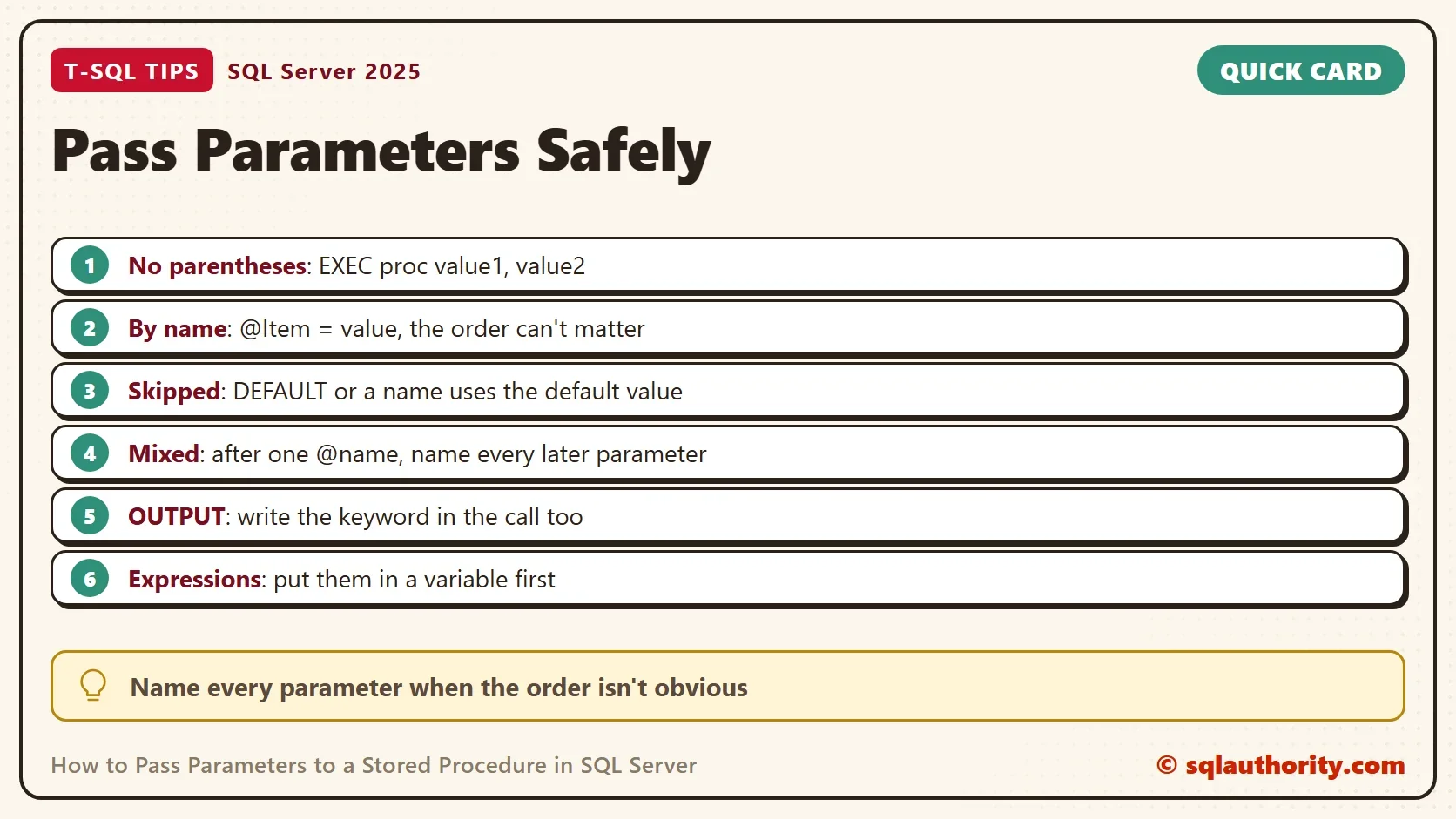
To pass parameters to a stored procedure, write the values after EXEC without parentheses, and name each parameter. Most programming languages call a function with parentheses, so this is the first habit to drop. The second is trusting the order of the values.

A Procedure to Practice On
The demo database holds a table of bakery orders and one procedure that adds an order. The procedure has two required parameters and a quantity that defaults to 1. A fourth, an OUTPUT parameter, hands back the new order number. It’s a typical mix.
IF DB_ID(N'ProcParamsDemo') IS NULL CREATE DATABASE ProcParamsDemo;
GO
USE ProcParamsDemo;
GO
DROP PROCEDURE IF EXISTS dbo.AddOrder;
DROP TABLE IF EXISTS dbo.Orders;
CREATE TABLE dbo.Orders (
    OrderID  int IDENTITY(1,1) NOT NULL PRIMARY KEY,
    Customer nvarchar(50) NOT NULL,
    Item     nvarchar(50) NOT NULL,
    Quantity int NOT NULL
);
GO
CREATE PROCEDURE dbo.AddOrder
    @Customer nvarchar(50),
    @Item     nvarchar(50),
    @Quantity int = 1,
    @OrderID  int = NULL OUTPUT
AS
BEGIN
    SET NOCOUNT ON;
    INSERT INTO dbo.Orders (Customer, Item, Quantity) VALUES (@Customer, @Item, @Quantity);
    SET @OrderID = SCOPE_IDENTITY();
END;
Leave Out the Parentheses
A developer used to C# or JavaScript writes the call like a function. SQL Server doesn’t accept it.
EXEC dbo.AddOrder(N'Maya', N'Scone');
Msg 102, Level 15, State 1, Line 1
Incorrect syntax near 'Maya'.
The parentheses make no sense to EXEC, and the parser stops at the first value. To pass parameters correctly, write the name of the procedure, then the values separated by commas.
Pass Parameters by Position or by Name
Without names, SQL Server matches values to parameters in the order they were declared. With names, the order is free. The next script makes three calls. The second one swaps the values by mistake, and SQL Server can’t tell, because both values are text.
EXEC dbo.AddOrder N'Maya', N'Scone';
EXEC dbo.AddOrder N'Bagel', N'Leo';
EXEC dbo.AddOrder @Item = N'Bagel', @Customer = N'Leo';
SELECT OrderID, Customer, Item, Quantity FROM dbo.Orders ORDER BY OrderID;
| OrderID | Customer | Item | Quantity |
|---|---|---|---|
| 1 | Maya | Scone | 1 |
| 2 | Bagel | Leo | 1 |
| 3 | Leo | Bagel | 1 |
Row 2 is wrong. A bagel is now a customer, and nothing failed. Row 3 used names, so the order of the values didn’t matter. Names also protect you when the procedure gains a new parameter with a default in the middle of the list. Positional calls shift, and named calls keep working. A misspelled name is different. The call stops with an error, so a typo can’t store wrong data.
Defaults and Skipped Parameters
A parameter with a default value can be left out. If you leave it out in a named call, the default is used. A positional call can’t skip a parameter in the middle, so the DEFAULT keyword stands in for it.
EXEC dbo.AddOrder @Customer = N'Priya', @Item = N'Muffin';
EXEC dbo.AddOrder @Customer = N'Priya', @Item = N'Muffin', @Quantity = 3;
EXEC dbo.AddOrder N'Noor', N'Granola', DEFAULT;
SELECT OrderID, Customer, Item, Quantity FROM dbo.Orders WHERE OrderID > 3 ORDER BY OrderID;
| OrderID | Customer | Item | Quantity |
|---|---|---|---|
| 4 | Priya | Muffin | 1 |
| 5 | Priya | Muffin | 3 |
| 6 | Noor | Granola | 1 |
Mixing the two styles has one rule. Once you name a parameter, you must name every parameter after it. This call puts a bare value after a named one.
EXEC dbo.AddOrder N'Maya', @Item = N'Scone', 2;
Msg 119, Level 15, State 1, Line 1
Must pass parameter number 3 and subsequent parameters as '@name = value'. After the form '@name = value' has been used, all subsequent parameters must be passed in the form '@name = value'.
Get a Value Back With OUTPUT
An OUTPUT parameter sends a value back to the caller. The keyword must appear in the call as well as in the procedure. Forget it, and the procedure runs and your variable stays empty. The next script calls the procedure twice, once without and once with the keyword.
DECLARE @id int;
EXEC dbo.AddOrder @Customer = N'Sam', @Item = N'Rye bread', @OrderID = @id;
SELECT @id AS WithoutOutput;
EXEC dbo.AddOrder @Customer = N'Sam', @Item = N'Rye bread', @OrderID = @id OUTPUT;
SELECT @id AS WithOutput;
| WithoutOutput |
|---|
| NULL |
| WithOutput |
|---|
| 8 |
Both calls inserted a row. Only the second one reported the new order number, 8.
Values Must Be Values, Not Expressions
When you pass parameters, a call accepts literals and variables. It doesn’t accept an expression, such as a concatenation or a function call. The fix is to put the value in a variable first.
EXEC dbo.AddOrder @Customer = N'Maya', @Item = N'Scone' + N's';
Msg 102, Level 15, State 1, Line 1
Incorrect syntax near '+'.
DECLARE @item nvarchar(50) = N'Scone' + N's';
EXEC dbo.AddOrder @Customer = N'Maya', @Item = @item;
The same rule answers a common question: how do you pass the result of a SELECT into a procedure? Select it into a variable, then pass the variable. For a whole list of rows, use a table-valued parameter. Declare a table type. Give the procedure a parameter of that type, marked READONLY. Then pass a filled table variable.
DROP PROCEDURE IF EXISTS dbo.AddOrderLines;
DROP TYPE IF EXISTS dbo.OrderLineList;
CREATE TYPE dbo.OrderLineList AS TABLE (Customer nvarchar(50) NOT NULL, Item nvarchar(50) NOT NULL, Quantity int NOT NULL);
GO
CREATE PROCEDURE dbo.AddOrderLines @Lines dbo.OrderLineList READONLY
AS
BEGIN
    SET NOCOUNT ON;
    INSERT INTO dbo.Orders (Customer, Item, Quantity) SELECT Customer, Item, Quantity FROM @Lines;
END;
GO
DECLARE @lines dbo.OrderLineList;
INSERT INTO @lines VALUES (N'Noor', N'Granola', 2), (N'Noor', N'Herb tea', 1);
EXEC dbo.AddOrderLines @Lines = @lines;
SELECT COUNT(*) AS NoorRows FROM dbo.Orders WHERE Customer = N'Noor';| NoorRows |
|---|
| 3 |
Noor now has three rows: the Granola order from before and the two lines this call added.
Return Codes and Result Sets
Every procedure also returns a whole number, zero unless the procedure uses RETURN with another value. Catch it with EXEC @rc = .... That’s a separate channel from the OUTPUT parameters. A procedure that ends with a SELECT sends a result set instead, and INSERT ... EXEC saves it in a table.
DROP PROCEDURE IF EXISTS dbo.GetOrders;
GO
CREATE PROCEDURE dbo.GetOrders @Customer nvarchar(50)
AS
    SELECT OrderID, Item, Quantity FROM dbo.Orders WHERE Customer = @Customer;
GO
DECLARE @rc int;
EXEC @rc = dbo.AddOrder @Customer = N'Sam', @Item = N'Oat bars';
SELECT @rc AS ReturnCode;
CREATE TABLE #Priya (OrderID int, Item nvarchar(50), Quantity int);
INSERT INTO #Priya EXEC dbo.GetOrders @Customer = N'Priya';
SELECT COUNT(*) AS RowsCaptured FROM #Priya;| ReturnCode |
|---|
| 0 |
| RowsCaptured |
|---|
| 2 |
Priya has two orders, so two rows were captured. Those rows are now in a table, where the next statement can use them.
Let Management Studio Write the Call
Management Studio can write the call for you. Right-click the procedure in Object Explorer and choose Execute Stored Procedure. Fill in the values, press OK, and it opens a script with every parameter named. Copy that script as the starting point for your own call. The menu path is from SSMS 22.
Calling From an Application
You could argue that building the text EXEC dbo.AddOrder @Customer = 'Maya' in code is quicker. It’s quicker once. A single quote in a name breaks it, and a crafted value turns it into an injection hole. Use the database library’s command object. Set its type to stored procedure, and pass only the procedure name as the command text. Don’t write EXEC in the text. Add one parameter object per value, and let the library pass them. The same rule holds for any language.
What to Remember
To pass parameters, write EXEC, the procedure name and the values, with no parentheses. Name every parameter when the order isn’t obvious. Use OUTPUT on both sides of a call, and put expressions in variables first.
When you finish with the demo, drop the test database.
USE master;
GO
ALTER DATABASE ProcParamsDemo SET SINGLE_USER WITH ROLLBACK IMMEDIATE;
DROP DATABASE ProcParamsDemo;
A stored procedure call is not a function call, it is a list of values you should name.
Published by Pinal Dave on SQLAuthority. More of my work at pinaldave.com.
Discover more from SQL Authority with Pinal Dave
Subscribe to get the latest posts sent to your email.



4 Comments. Leave new
Hi Dave,
Thank you for this post! Quick question, is it possible to execute a stored procedure using Sql Command Parameters? For an example
string query = “exec myStoredProcedure @tokenGuid = @usertoken”
sqlcommand sqlcmd = new sqlCommand(query)
sqlcmd.AddWithValue(@usertoken, token)
sqlcmd.Execute();
I’m trying to protect against SQL Injection, so I read that I should use a paramterized SQL Query. But I’m having trouble calling the stored procedure this way. I get an error of ‘Must declare the scalar variable “@userToken”
Try putting the variable in double quotes:
sqlcmd.AddWithValue(“@usertoken”, token)
thanks for your help ……….Im using pivot table how can i make a parameter for searing by name and between date and date with vb.net
Is it possible to pass the result of a select to a storeprocedure, please?
exec storeprocedure select cont(*) from table1