
Unable to initialize encryption can stop SQL Server before it accepts connections. In this 2017 client case, the startup log pointed to the Windows security library and SSL initialization. The surrounding errors were more useful than the final service start failure.

The Original Startup Failure
The instance ran SQL Server 2008 SP4, build 10.0.6547.0, on Windows 6.1 SP1. Windows 6.1 is the Windows 7 and Windows Server 2008 R2 generation. These were the important messages from the original ERRORLOG.
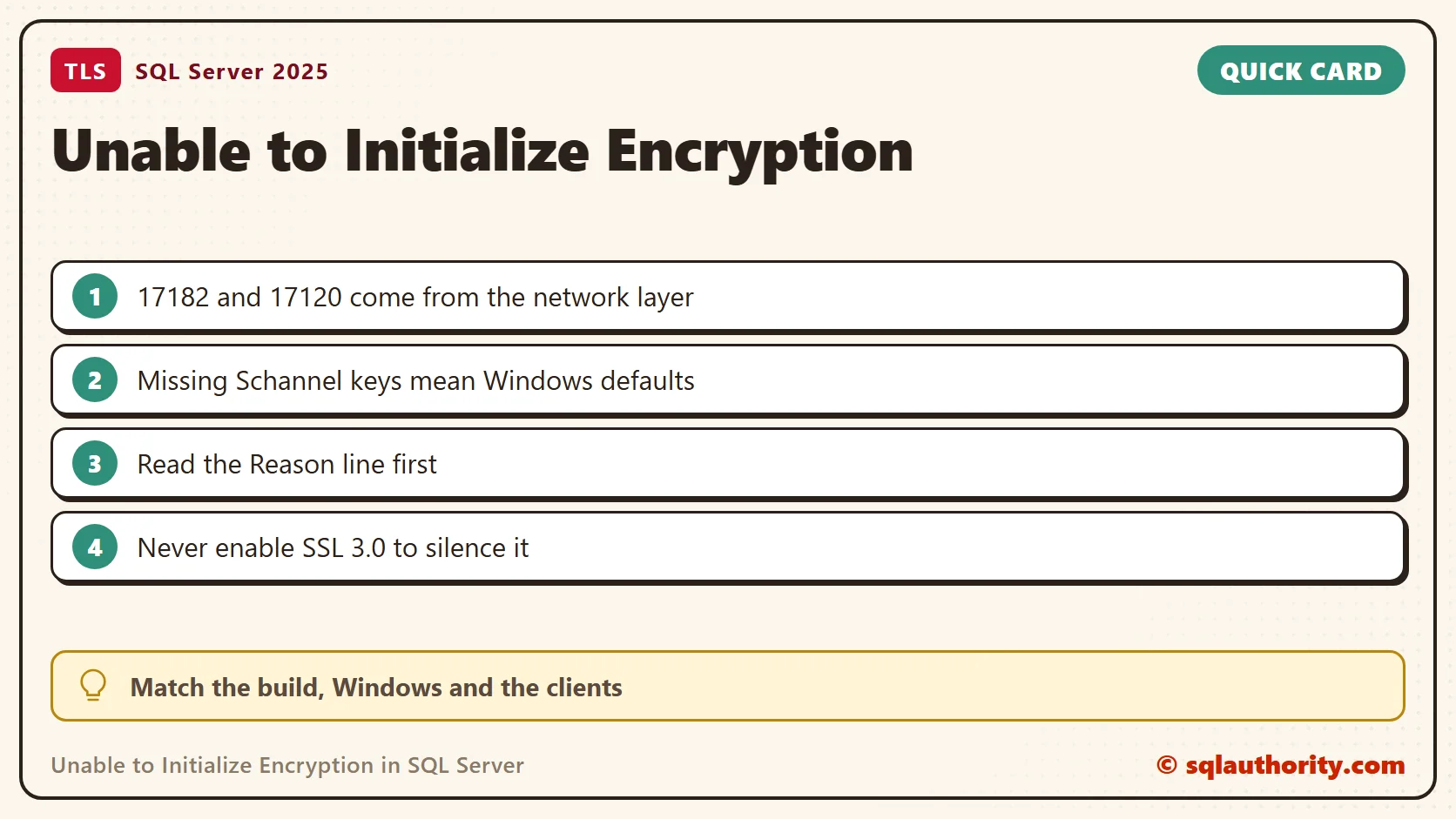
The server was unable to initialize encryption because of a problem with a security library.
Error: 17182, Severity: 16, State: 1.
TDSSNIClient initialization failed with error 0x139f, status code 0x80.
Reason: Unable to initialize SSL support.
Error: 17120, Severity: 16, State: 1.
SQL Server could not spawn FRunCM thread.
The final thread message followed the network library failure. It did not show that the computer needed more worker threads. The security library wording did not prove that a DLL was missing, either. The line to read is the one that starts with Reason.
Correct the Old TLS Explanation
We inspected the Schannel protocol settings. In the original incident, adding TLS 1.0 client and server registry settings let SQL Server start. That outcome stays part of the case, but its explanation needs a correction.
I first treated missing TLS registry keys as proof that TLS was disabled. That was wrong. When explicit settings are absent, the defaults of that Windows release apply. The recorded SQL Server build already appears in Microsoft’s TLS 1.2 support table. So this case does not show that SQL Server needed TLS 1.0 or SSL 3.0. I would not use the old registry change as a general fix today.
This block lists the explicit protocol settings on a machine. On my Windows 11 PC the Protocols key exists and holds no protocol keys, so Windows defaults apply.
$root = 'HKLM:\SYSTEM\CurrentControlSet\Control\SecurityProviders\SCHANNEL\Protocols'
$keys = Get-ChildItem $root -Recurse -ErrorAction SilentlyContinue
if (-not $keys) { 'No explicit protocol settings: Windows defaults apply.' }
else {
    foreach ($k in $keys) {
        $p = Get-ItemProperty -Path $k.PSPath
        [pscustomobject]@{ Key = $k.Name -replace '^.*\\Protocols\\', ''; Enabled = $p.Enabled; DisabledByDefault = $p.DisabledByDefault }
    }
}
Read What the Engine Reports
When the instance starts, three read-only checks show how it handles encryption. The first reads the text of the two startup errors and searches the current ERRORLOG. The second looks for a chosen certificate. The third shows whether your session is encrypted.
SELECT message_id, text FROM sys.messages WHERE message_id IN (17120, 17182) AND language_id = 1033 ORDER BY message_id;
EXEC master.dbo.xp_readerrorlog 0, 1, N'certificate';
EXEC master.dbo.xp_readerrorlog 0, 1, N'security library';
SELECT value_name, value_data FROM sys.dm_server_registry WHERE value_name IN (N'ForceEncryption', N'Certificate');
SELECT session_id, net_transport, encrypt_option FROM sys.dm_exec_connections WHERE session_id = @@SPID;
My SQL Server 2025 instance logged A self-generated certificate was successfully loaded for encryption. The security library search found nothing. No certificate or ForceEncryption value is set, and my session is encrypted. When no certificate is chosen, the engine makes its own at startup. A failure at that step is what error 17182 reports. If the log names a certificate instead, check that the service account can read its private key.
Check the Supported Combination
- Record the exact SQL Server build and Windows version from the startup log and system information.
- Match the full ERRORLOG sequence with the Windows Schannel events from the same time.
- Review recent protocol, cipher suite, certificate and service account changes with the people who made them.
- Check that the server and the affected client components support the approved TLS version. A server update does not update every client driver.
- If the logs name a certificate or a private key, investigate that failure on its own. Do not assume every encryption error has the same cause.
For an older installation, the SQL Server TLS 1.2 build and client update table lists the updates for each build. The build and the client components decide the next step, so look up both.
Verify Recovery Without Weakening Encryption
Use the supported protocol settings for your Windows and SQL Server versions. Do not enable SSL 3.0 or switch encryption off to silence the error. Plan any configuration change and service restart around the applications that depend on the instance.
After the change, confirm a normal startup and an encrypted connection from the affected application. Read the new logs for remaining failures, and keep the old and the new logs side by side. For the SQL Server 2008 generation, a move to a supported platform belongs in the longer plan.
A service that starts is not the whole security check, it is one step in restoring the intended encrypted connection.
Published by Pinal Dave on SQLAuthority. More of my work at pinaldave.com.
Discover more from SQL Authority with Pinal Dave
Subscribe to get the latest posts sent to your email.



15 Comments. Leave new
Yes. I got this TLS issue and I applied a patch which resolved my issue. Windows team were disabled the older TLS without our information and due to that service was not starting.
Reference
https://support.microsoft.com/en-us/help/3135244/tls-1-2-support-for-microsoft-sql-server
Perfect. Thanks for sharing.
I had a same issue and i updated Sql server 2012 to SP2 and it works fine on TLS1.1 and TLS1.2
I have same issue after enable TLS 1.2 & SSL 2.0 and disabled TLS 1.0, TLS 1.1 & SSL 3.0.
I have downloaded an update to enable TLS 1.2 support for SQL Server 2008 R2 SP3.
Please find more information from below link:
https://support.microsoft.com/en-us/help/3135244/tls-1-2-support-for-microsoft-sql-server
Mine was on a SQL 2012 install. Our server teams now provision new servers with only TLS 1.2 turned on. SQL 2012 RTM doesn’t support 1.2. The DB engine service install apparently worked but it couldn’t be started until I made the necessary registry change to support TLS 1.0. Now the service started but I couldn’t login. The SQL erorrlog was complaining about SPNs. So I uninstalled/reinstalled the DB engine and that finally worked.
Of course now I’ll have to apply the SQL patches and disallow TLS 1.0 connections or get flagged by a security audit!
Thanks for the solution, it really help fix the issues that a particular OEM is still struggling to resolve after 3 days
worked…
Thank you. Solution worked. But the solution reverted the changes I had to make to get a A+ ranking for SSL.
Thanks a lot. it worked well
Thanks a lot Pinal. You saved my life.
Thanks a lot, It worked for me.
Perfect. It worked for me. Thank you for sharing!
Thx a lot. Worked fine for me and now we are an the run to update our SQL-Server Version :)
Thank you very much! it worked well!
I encountered the same issue on my Windows Server 2019 shortly after installing SQL Server 2014. I resolved it by enabling only SSL 3.0 (not TLS 1.0), and everything worked flawlessly.
However, I would caution against enabling TLS 1.0 in 2024 due to security concerns.
Thank you Pinal Dave for the solution.