
Question: What is the difference between EXCEPT and NOT IN? EXCEPT returns distinct left-side rows absent from the right-side result. NOT IN is a predicate whose NULL behavior and duplicate preservation can produce a different answer.

In the original 2016 interview, several resumes listed SQL Server 2005 experience, yet the EXCEPT operator introduced in that release was unfamiliar. The AdventureWorks comparison was a good starting point. It was not proof that these two forms are interchangeable for every dataset.
-- Original comparison: use your installed AdventureWorks sample database.
SELECT ProductID FROM Production.Product
EXCEPT SELECT ProductID FROM Production.WorkOrder;
SELECT ProductID FROM Production.Product
WHERE ProductID NOT IN(SELECT ProductID FROM Production.WorkOrder);

-- Self-contained counterexample: duplicates and NULL change the semantics.
DECLARE @Left TABLE(Value int);
DECLARE @Right TABLE(Value int);
INSERT @Left VALUES(1),(1),(2),(NULL);
INSERT @Right VALUES(2),(NULL);
SELECT Value FROM @Left EXCEPT SELECT Value FROM @Right;
SELECT Value FROM @Left WHERE Value NOT IN(SELECT Value FROM @Right);
SELECT L.Value FROM @Left AS L
WHERE NOT EXISTS(SELECT 1 FROM @Right AS R WHERE R.Value=L.Value);
Keep the original sample, but explain why it agrees
ProductID is unique and non-null in Production.Product, and non-null in Production.WorkOrder. Under those conditions, both sample queries identify products without work orders. The original historical plans also used the same general access paths:
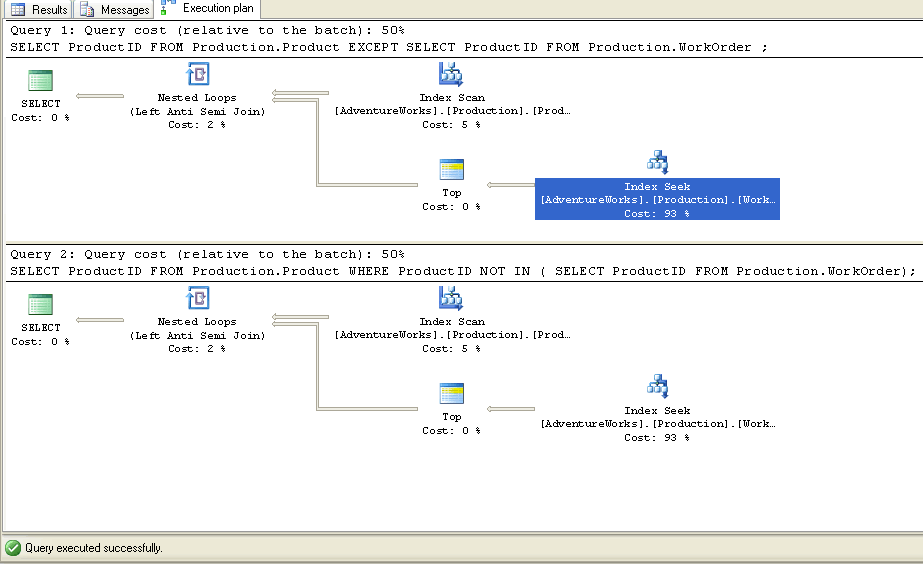
This larger saved original preserves the complete query headers and readable Left Anti Semi Join labels. Truncated object captions are not used to identify an index. These are historical plans, not a promise that a current optimizer will choose an identical plan.
Add a NULL and a duplicate
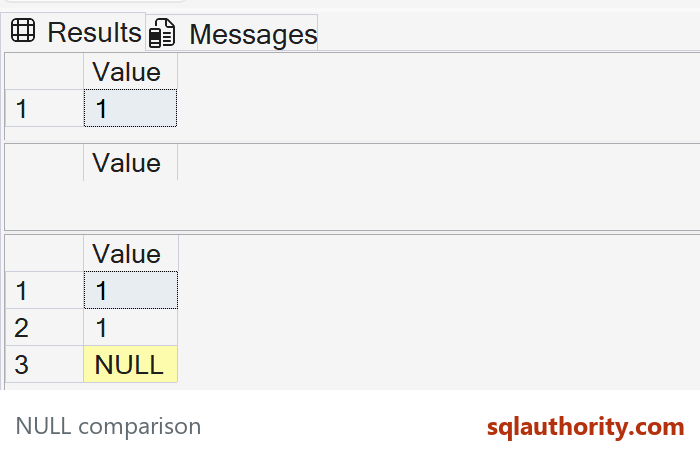
In the second example, EXCEPT returns one row, 1. The NULL on the left matches the NULL on the right for EXCEPT’s distinct-row comparison. The duplicate 1 is collapsed.
NOT IN returns no rows. The right-side NULL makes the test unknown for otherwise unmatched values, so they do not pass the WHERE filter.
NOT EXISTS returns 1, 1 and NULL: duplicates remain, and ordinary equality does not match NULL to NULL. It is often useful for an anti-match requirement, but that does not give it EXCEPT’s distinct and NULL-equality semantics.
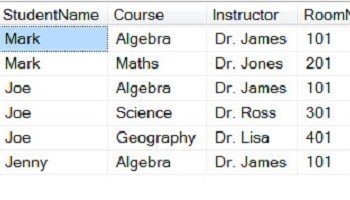
EXCEPT can compare several compatible columns at once. Use explicit columns in the same order rather than SELECT * across schemas that can change. Neither the same row count nor a similar execution plan establishes that two queries always return the same values.
Microsoft’s EXCEPT reference documents distinct rows, NULL comparison and left anti semi join display.
Published by Pinal Dave on SQLAuthority. More of my work at pinaldave.com.



19 Comments. Leave new
Hi Pinal, another important detail: with EXCEPT we can use more than one column to compare the datasets.
Thank you
Hi Pinal, I tend to use “LEFT JOIN” (T-SQL). How is it different from “Left Anti Semi Join”. Thank you.
A little unfortunate example, as you are checking an Identity column, might be confusing for not very carefull readers. If you were checking any not unique column, then unless you put DISTINCT in the “NOT IN” query, you cannot be sure that the results will be the same.
Here is a good example anyone can run to backup your point:
WITH GoodEnvironmentList
AS (SELECT IQ.EnvironmentId
,IQ.EnvoronementName
FROM ( VALUES ( 1, ‘Dev’), ( 2, ‘Test’), ( 3, ‘Staging’), ( 4, ‘Production’) ) IQ (EnvironmentId, EnvoronementName)
),
ShortEnvironmentList
AS (SELECT IQ.EnvironmentId
,IQ.EnvoronementName
FROM ( VALUES ( 1, ‘Dev’), ( 2, ‘Test’), ( 3, ‘Production’) ) IQ (EnvironmentId, EnvoronementName)
)
SELECT GEL.EnvironmentId
,GEL.EnvoronementName
FROM GoodEnvironmentList GEL
EXCEPT
SELECT SEL.EnvironmentId
,SEL.EnvoronementName
FROM ShortEnvironmentList SEL;
You cannot do this with NOT IN!
Interesting!
you can do the same with NOT IN, if you use CHECKSUM / BINARY_CHECKSUM. The only exception is, that NOT IN has no implicit DISTINCT. On the other hand a checksum compare could be faster, if you have only few rows but tons of columns.
WITH GoodEnvironmentList
AS (SELECT IQ.EnvironmentId
,IQ.EnvoronementName
FROM ( VALUES ( 1, ‘Dev’), ( 2, ‘Test’), ( 3, ‘Staging’), ( 4, ‘Production’) ) IQ (EnvironmentId, EnvoronementName)
),
ShortEnvironmentList
AS (SELECT IQ.EnvironmentId
,IQ.EnvoronementName
FROM ( VALUES ( 1, ‘Dev’), ( 2, ‘Test’), ( 3, ‘Production’) ) IQ (EnvironmentId, EnvoronementName)
)
SELECT GEL.EnvironmentId
,GEL.EnvoronementName
FROM GoodEnvironmentList GEL
WHERE BINARY_CHECKSUM(*)
NOT IN (SELECT BINARY_CHECKSUM(*)
FROM ShortEnvironmentList SEL
)
I hope you missed something important, Except returns distinct result set but Not In does not.
Good Day!!!
Thanks for sharing.
Also, of note with EXCEPT (and INTERSECT) is that the left and right queries must have the exact same columns in the exact same order, and all columns are compared. You cannot pad values you want to ignore with blanks or nulls as the comparison will not match.
Thanks for the comment Joe O’Connor
USE AdventureWorks;
GO
SELECT ProductID
FROM Production.Product p
WHERE not exists
(
SELECT 1
FROM Production.WorkOrder w
where w.ProductID=p.ProductID);
Also Showing Same execution plan, is it means Except,Not IN and Not Exist all are same ?
Try to run the queries with not unique columns (e.g. the product name or a datetime column instead of the ID). In the EXECPT you should see a DISTINCT SORT that does not occur in the other plans.
Thanks for your reply Thomas.
Another important difference is that, if there are NULL values in the result from subquery, NOT IN will evaluate to UNDEFINED, and query will return empty set. EXCEPT doesn’t have this limitation:
SELECT *
FROM
(VALUES (1), (2), (3), (4), (5), (6)) AS ii(i)
WHERE i NOT IN
(SELECT i
FROM (VALUES (NULL), (2), (3), (4), (5), (6)) AS ii(i))
— returns empty set
SELECT *
FROM
(VALUES (1), (2), (3), (4), (5), (6)) AS ii(i)
EXCEPT
(SELECT i
FROM (VALUES (NULL), (2), (3), (4), (5), (6)) AS ii(i))
— returns: 1
perfect , good post and impressive Comment
For null, not in always fail.
create table #temp1(id int)
create table #temp2(id int)
insert #temp1 select 1
insert #temp1 select 2
insert #temp1 select null
insert #temp1 select null
insert #temp2 select 1
select * from #temp1
except
select * from #temp2
select * from #temp1 where id not in (select id from #temp2)
Good finding.
I am always amazed by the little snippets of code that creep into comments. In this case the creation of a temporary table using SELECT Column from VALUES as Tablename(Column). Intriguing. I had been experimenting with EXCEPT with an extract of around 100,000 records and 30 columns. It works well and resolves the NULL issue but I have to repeat the select 30 columns in the except clause with a WHERE for the records I don’t want. My original filter was WHERE UNIT NOT IN (‘0001’, ‘0002’). EXCEPT works great but is a bit cumbersome with the select statement repeated.
So, I did a LEFT OUTER JOIN on
SELECT Exceptions FROM (VALUES (‘0001’), (‘0002’)) as EX(Exceptions)
and then a WHERE EX(Exceptions) IS NULL.
Its easy to write, resolved the NULL issue and, for some reason, is incredibly fast.
Thanks for sharing your idea.