The max_length column in sys.columns counts bytes, not characters. That is why a generated copy of an nvarchar(50) column comes out twice as wide. Read the number together with the data type before you write a declaration from it.

The script that doubled every column
Picture a junior DBA who writes a script to build CREATE TABLE statements from the catalog. It works on the first try, which should be a warning. The new table has Name nvarchar(100) where the old one had nvarchar(50).
Nothing fails. The columns are simply too wide, and nobody notices until a wide index complains. The script copied max_length straight into the declaration. Let me show you why that is wrong, and what to do instead.
Build a table with one of every kind
This demo makes a small alias type and a table with the usual suspects: a Unicode column, a MAX column, a decimal, a datetime2, a UTF-8 column and a spatial column. The cleanup block at the end drops both.
DROP TABLE IF EXISTS dbo.Orders;
DROP TYPE IF EXISTS dbo.OrderCode;
GO
CREATE TYPE dbo.OrderCode FROM varchar(12) NOT NULL;
GO
CREATE TABLE dbo.Orders
(
    OrderId    int NOT NULL,
    Name       nvarchar(50),
    LargeText  nvarchar(max),
    Amount     decimal(12,2),
    OccurredAt datetime2(3),
    Code       dbo.OrderCode,
    Utf8Name   varchar(40) COLLATE Latin1_General_100_CI_AS_SC_UTF8,
    Place      geography
);
Read the type next to max_length
Join sys.columns to sys.types on user_type_id, so the number and its type travel together. Name shows 100, although we declared 50. Each nvarchar character takes two bytes, so 50 characters need 100 bytes.
SELECT c.name, t.name AS type_name, c.max_length, c.precision, c.scale,
       t.is_user_defined, t.is_assembly_type
FROM sys.columns AS c
JOIN sys.types AS t ON t.user_type_id = c.user_type_id
WHERE c.object_id = OBJECT_ID(N'dbo.Orders')
ORDER BY c.column_id;
Two more things in that grid. LargeText and Place both show -1, which means MAX or a large value. Never divide that by two. And Amount shows max_length 9, which is storage size, not a length you would ever type.
Turn the catalog row into a declaration
Each type family needs its own rule. Character and binary types use max_length (halved for nvarchar and nchar). Decimal needs precision and scale. The date types need scale. Alias types keep their own schema-qualified name.
SELECT c.name,
 CASE
   WHEN t.is_user_defined = 1
     THEN QUOTENAME(SCHEMA_NAME(t.schema_id)) + N'.' + QUOTENAME(t.name)
   WHEN t.name IN (N'varchar', N'char', N'varbinary', N'binary')
     THEN t.name + N'(' + CASE WHEN c.max_length = -1 THEN N'max'
          ELSE CONVERT(nvarchar(10), c.max_length) END + N')'
   WHEN t.name IN (N'nvarchar', N'nchar')
     THEN t.name + N'(' + CASE WHEN c.max_length = -1 THEN N'max'
          ELSE CONVERT(nvarchar(10), c.max_length / 2) END + N')'
   WHEN t.name IN (N'decimal', N'numeric')
     THEN t.name + N'(' + CONVERT(nvarchar(10), c.precision) + N','
          + CONVERT(nvarchar(10), c.scale) + N')'
   WHEN t.name IN (N'datetime2', N'datetimeoffset', N'time')
     THEN t.name + N'(' + CONVERT(nvarchar(10), c.scale) + N')'
   ELSE t.name
 END AS type_declaration
FROM sys.columns AS c
JOIN sys.types AS t ON t.user_type_id = c.user_type_id
WHERE c.object_id = OBJECT_ID(N'dbo.Orders')
ORDER BY c.column_id;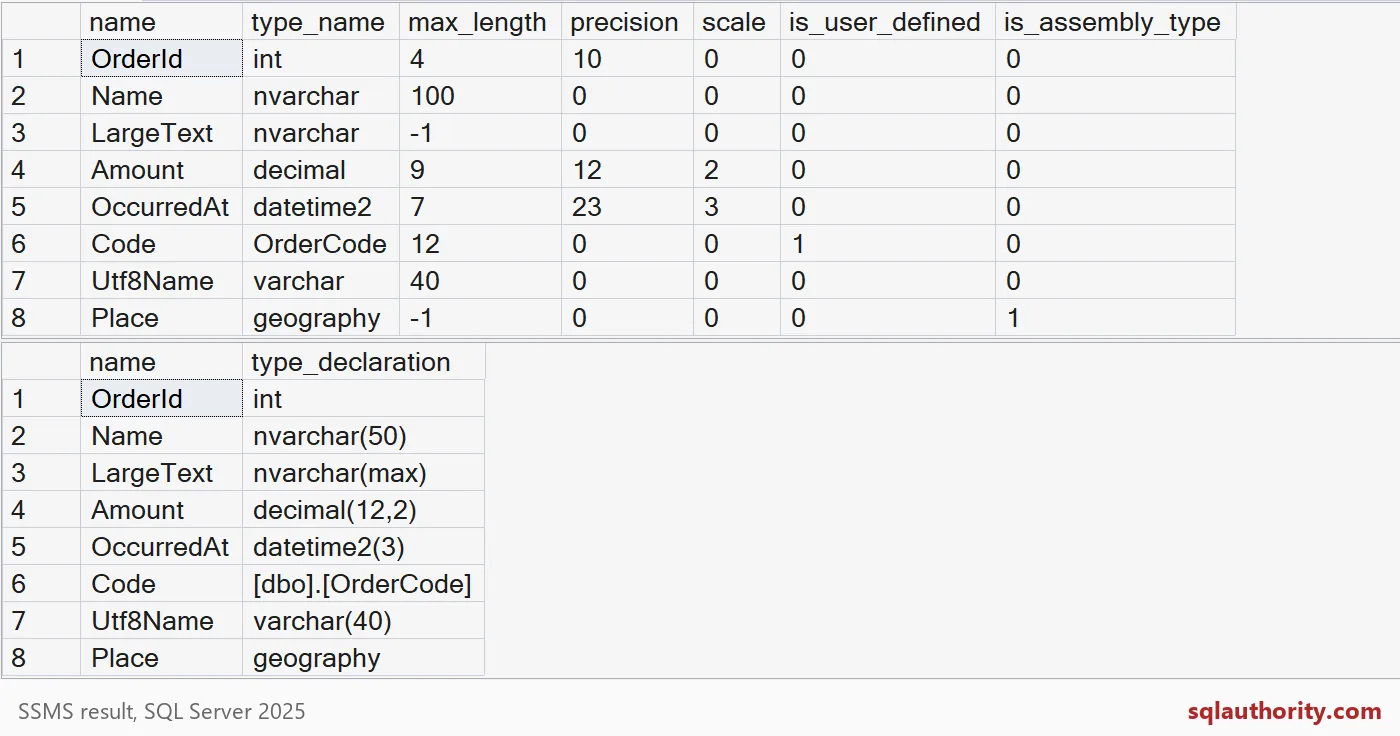
Name is back to nvarchar(50). Amount is decimal(12,2). OccurredAt is datetime2(3). The alias comes out as [dbo].[OrderCode], and the spatial column stays geography. Text, ntext and image are older types, so keep them out of a generator like this.

See through the alias, or keep it
Code has max_length 12 and a type named OrderCode. That is an alias over varchar(12) NOT NULL. A generator can keep the alias name, or look through it to the base type. Either is fine if you choose on purpose.
SELECT t.name AS alias_name, b.name AS base_type,
       t.max_length, t.is_nullable
FROM sys.types AS t
JOIN sys.types AS b ON b.user_type_id = t.system_type_id
WHERE t.is_user_defined = 1;
INFORMATION_SCHEMA.COLUMNS takes the other route. It already divides by two for you, and it shows Code as plain varchar 12. That is handy, but it hides the alias.
SELECT COLUMN_NAME, DATA_TYPE, CHARACTER_MAXIMUM_LENGTH,
       NUMERIC_PRECISION, NUMERIC_SCALE
FROM INFORMATION_SCHEMA.COLUMNS
WHERE TABLE_SCHEMA = N'dbo' AND TABLE_NAME = N'Orders'
ORDER BY ORDINAL_POSITION;
Bytes are still not always characters
One more trap. An nvarchar(50) holds 50 byte-pairs, and some characters, like an emoji, need two pairs. A UTF-8 varchar(40) holds 40 bytes, and an accented letter takes two. So a declared length is a storage limit, not a promise of 50 or 40 visible characters.
DECLARE @Smile nvarchar(10) = NCHAR(0xD83D) + NCHAR(0xDE00);
SELECT LEN(@Smile) AS len_value, DATALENGTH(@Smile) AS bytes;

INSERT dbo.Orders (OrderId, Code, Utf8Name) VALUES (1, 'A1', NCHAR(233));
SELECT DATALENGTH(Utf8Name) AS utf8_bytes FROM dbo.Orders WHERE OrderId = 1;
The smiley is one character to a person, yet LEN reports 2 and it uses 4 bytes. The accented letter uses 2 bytes in the UTF-8 column.
Collation, nullability, identity and defaults still need their own handling. Create the generated table once and compare it with the original before you trust it.
DROP TABLE IF EXISTS dbo.Orders;
DROP TYPE IF EXISTS dbo.OrderCode;
Next time a catalog value looks like it is double what you declared, check the type first.
A catalog length is not a character count, it is bytes read through a data type.
Published by Pinal Dave on SQLAuthority. More of my work at pinaldave.com.
Discover more from SQL Authority with Pinal Dave
Subscribe to get the latest posts sent to your email.