
In-Memory OLTP keeps chosen tables entirely in memory and replaces locks with row versions. The feature exists for tables that many sessions write to at the same moment. The test below builds a small database and measures where the feature helps and where it doesn’t.

What In-Memory OLTP Changes
A normal table lives on disk pages, and the buffer pool caches the pages that are in use. Readers and writers take locks and short latches on those pages. A memory-optimized table has no pages. Each row sits in memory. The engine keeps several versions of a changing row, so a reader never waits for a writer.
Two parts make up the feature. Memory-optimized tables hold the data. Natively compiled procedures are T-SQL procedures that SQL Server translates to machine code when you create them. It needs SQL Server 2014 or later. Before SQL Server 2016 SP1 it needed Enterprise edition. Since then it’s available in every edition, with memory limits in Standard edition. The project’s first name was Hekaton, which still shows up in documents.
Set Up a Test Database
A database needs a special filegroup before it can hold memory-optimized tables. The filegroup stores the checkpoint files that SQL Server reads at startup. Its container is a folder, not a file. The script builds the folder name from the instance’s default data path, so it runs anywhere. It also switches on an option that lets ordinary transactions use these tables without table hints.
IF DB_ID(N'InMemoryOltpDemo') IS NULL CREATE DATABASE InMemoryOltpDemo;
GO
IF NOT EXISTS (SELECT 1 FROM InMemoryOltpDemo.sys.filegroups WHERE type = 'FX')
BEGIN
    DECLARE @path nvarchar(260) = CONVERT(nvarchar(260), SERVERPROPERTY('InstanceDefaultDataPath'));
    DECLARE @sql nvarchar(max) = N'ALTER DATABASE InMemoryOltpDemo ADD FILEGROUP DemoMemoryFG CONTAINS MEMORY_OPTIMIZED_DATA;
ALTER DATABASE InMemoryOltpDemo ADD FILE (NAME = N''DemoMemoryFile'', FILENAME = N''' + @path + N'InMemoryOltpDemo_mod'') TO FILEGROUP DemoMemoryFG;';
    EXEC (@sql);
END;
GO
ALTER DATABASE InMemoryOltpDemo SET MEMORY_OPTIMIZED_ELEVATE_TO_SNAPSHOT = ON;
Create a Disk Table and Two Memory-Optimized Tables
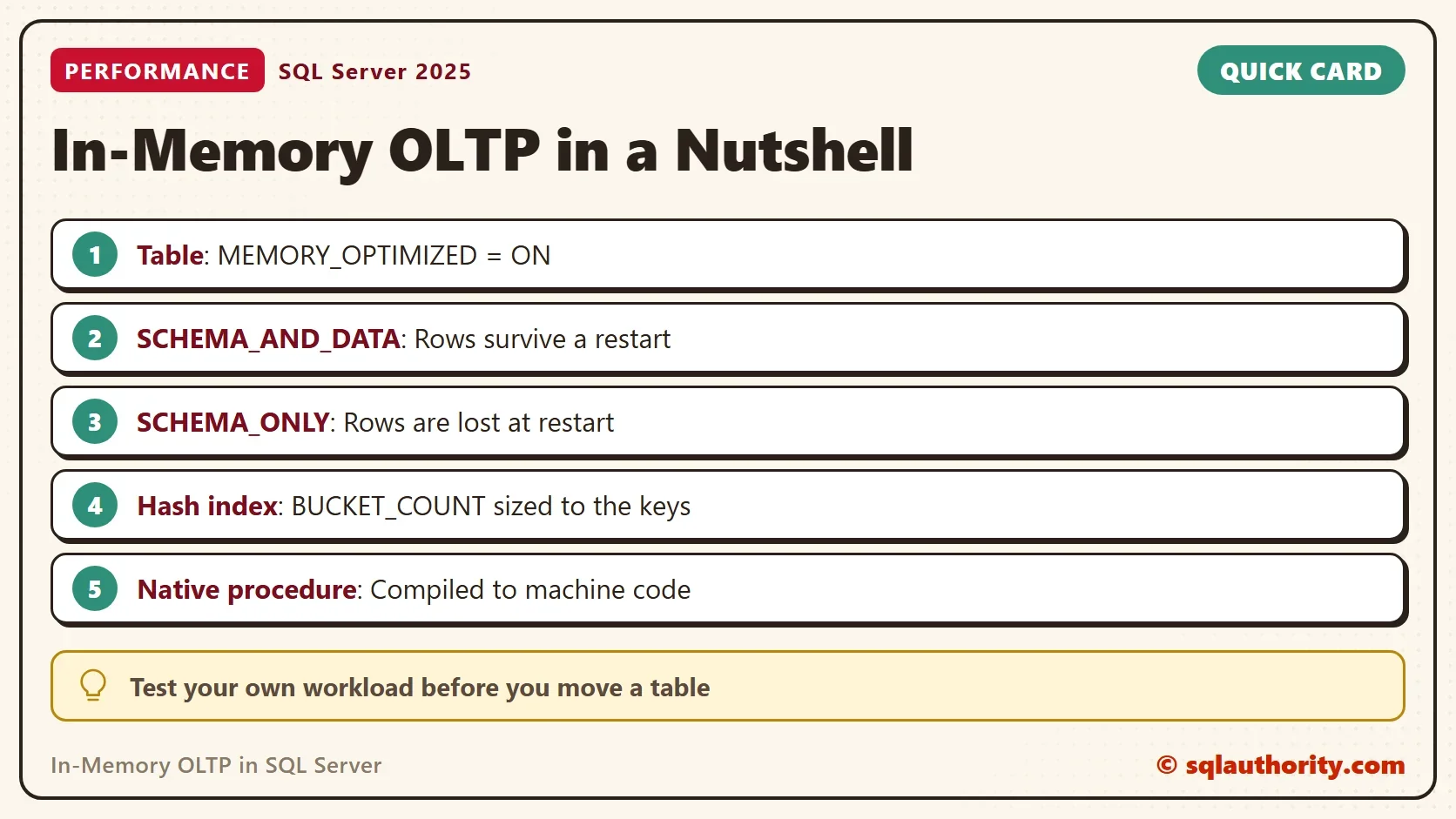
All three tables have the same columns. The disk table uses a nonclustered key so that all three match. The difference is in the options. MEMORY_OPTIMIZED = ON moves the table into memory. DURABILITY decides what happens at a restart. SCHEMA_AND_DATA writes changes to the log and keeps the rows. SCHEMA_ONLY keeps only the table definition, so the rows are gone after a restart. That fits a cache or a staging area, and nothing that you must keep.
On the memory-optimized tables, the primary key is a hash index. A hash index finds one row by its exact key quickly. It needs a BUCKET_COUNT, the size of its hash table. A common rule is one to two times the number of distinct keys. SQL Server rounds the count up to a power of two. The index memory then depends on the bucket count, not on the row count. A nonclustered index without the HASH keyword is the choice for ranges and sorting.
USE InMemoryOltpDemo;
GO
DROP TABLE IF EXISTS dbo.DiskOrders, dbo.MemOrdersDurable, dbo.MemOrdersSchemaOnly;
CREATE TABLE dbo.DiskOrders (OrderID int NOT NULL PRIMARY KEY NONCLUSTERED, Note char(40) NOT NULL);
CREATE TABLE dbo.MemOrdersDurable (OrderID int NOT NULL PRIMARY KEY NONCLUSTERED HASH WITH (BUCKET_COUNT = 40000), Note char(40) NOT NULL) WITH (MEMORY_OPTIMIZED = ON, DURABILITY = SCHEMA_AND_DATA);
CREATE TABLE dbo.MemOrdersSchemaOnly (OrderID int NOT NULL PRIMARY KEY NONCLUSTERED HASH WITH (BUCKET_COUNT = 40000), Note char(40) NOT NULL) WITH (MEMORY_OPTIMIZED = ON, DURABILITY = SCHEMA_ONLY);
Test the Speed
The first test inserts 20,000 rows into each table, one insert per loop pass. Without an explicit transaction, every insert commits on its own. Each commit of a logged table must wait until the log record is on disk.
SET NOCOUNT ON;
DECLARE @i int = 1, @t0 datetime2 = SYSDATETIME(), @disk int, @durable int, @schemaonly int;
WHILE @i <= 20000 BEGIN INSERT dbo.DiskOrders VALUES (@i, 'order'); SET @i += 1; END;
SET @disk = DATEDIFF(MILLISECOND, @t0, SYSDATETIME());
SELECT @i = 1, @t0 = SYSDATETIME();
WHILE @i <= 20000 BEGIN INSERT dbo.MemOrdersDurable VALUES (@i, 'order'); SET @i += 1; END;
SET @durable = DATEDIFF(MILLISECOND, @t0, SYSDATETIME());
SELECT @i = 1, @t0 = SYSDATETIME();
WHILE @i <= 20000 BEGIN INSERT dbo.MemOrdersSchemaOnly VALUES (@i, 'order'); SET @i += 1; END;
SET @schemaonly = DATEDIFF(MILLISECOND, @t0, SYSDATETIME());
SELECT @disk AS DiskMs, @durable AS MemoryDurableMs, @schemaonly AS MemorySchemaOnlyMs;
The result surprises many people. The durable memory-optimized table is no faster than the disk table, because both wait for the log on every commit. Only the schema-only table skips the log, and it’s far faster. Now repeat the test with one transaction around each loop, so each table commits once.
SET NOCOUNT ON;
TRUNCATE TABLE dbo.DiskOrders;
DELETE FROM dbo.MemOrdersDurable;
DELETE FROM dbo.MemOrdersSchemaOnly;
DECLARE @i int = 1, @t0 datetime2 = SYSDATETIME(), @disk int, @durable int, @schemaonly int;
BEGIN TRANSACTION;
WHILE @i <= 20000 BEGIN INSERT dbo.DiskOrders VALUES (@i, 'order'); SET @i += 1; END;
COMMIT TRANSACTION;
SET @disk = DATEDIFF(MILLISECOND, @t0, SYSDATETIME());
SELECT @i = 1, @t0 = SYSDATETIME();
BEGIN TRANSACTION;
WHILE @i <= 20000 BEGIN INSERT dbo.MemOrdersDurable VALUES (@i, 'order'); SET @i += 1; END;
COMMIT TRANSACTION;
SET @durable = DATEDIFF(MILLISECOND, @t0, SYSDATETIME());
SELECT @i = 1, @t0 = SYSDATETIME();
BEGIN TRANSACTION;
WHILE @i <= 20000 BEGIN INSERT dbo.MemOrdersSchemaOnly VALUES (@i, 'order'); SET @i += 1; END;
COMMIT TRANSACTION;
SET @schemaonly = DATEDIFF(MILLISECOND, @t0, SYSDATETIME());
SELECT @disk AS DiskMs, @durable AS MemoryDurableMs, @schemaonly AS MemorySchemaOnlyMs;
| Test | Disk table (ms) | Memory durable (ms) | Memory schema only (ms) |
|---|---|---|---|
| One commit per row | 3559 | 3440 | 364 |
| One transaction | 276 | 161 | 131 |
One transaction changes the picture for every table. The memory-optimized tables are now the faster ones, but the numbers are small for a test with one session. The design pays off most under many concurrent writers, because they don’t block each other. This test doesn’t measure that, so test your own workload. Your timings will differ, but the memory-optimized tables should beat the disk table in the one-transaction test.
A Natively Compiled Procedure
The loop above is interpreted T-SQL. A natively compiled procedure runs the same loop as machine code. It needs SCHEMABINDING and an atomic block, which is one transaction that either completes or rolls back as a whole.
CREATE OR ALTER PROCEDURE dbo.LoadOrders @Rows int
WITH NATIVE_COMPILATION, SCHEMABINDING
AS
BEGIN ATOMIC WITH (TRANSACTION ISOLATION LEVEL = SNAPSHOT, LANGUAGE = N'us_english')
    DECLARE @i int = 1;
    WHILE @i <= @Rows
    BEGIN
        INSERT INTO dbo.MemOrdersDurable (OrderID, Note) VALUES (@i + 100000, 'native');
        SET @i += 1;
    END;
END;
GO
DECLARE @t0 datetime2 = SYSDATETIME();
EXEC dbo.LoadOrders @Rows = 20000;
SELECT DATEDIFF(MILLISECOND, @t0, SYSDATETIME()) AS NativeMs;
In the test, the procedure inserted 20,000 durable rows in 17 milliseconds. That’s several times faster than the interpreted loop with one transaction (161 ms in the run above). The gain is largest for short procedures with simple logic, which is where this feature is meant to be used.
Memory Is the Price
Every row you keep in a memory-optimized table lives in RAM, and so do its indexes. A durable table is also loaded from disk into memory at each startup. A restart takes longer as the data grows. Plan RAM for the data, the row versions and the indexes. The next view shows the memory use of each table. SQL Server prints a join order warning for it, which you can ignore.
SELECT OBJECT_NAME(object_id) AS TableName,
       memory_used_by_table_kb AS TableKB,
       memory_allocated_for_indexes_kb AS IndexKB
FROM sys.dm_db_xtp_table_memory_stats
WHERE object_id > 0
ORDER BY TableName;| TableName | TableKB | IndexKB |
|---|---|---|
| MemOrdersDurable | 4687 | 512 |
| MemOrdersSchemaOnly | 3125 | 512 |
The durable table holds 40,000 rows, and the schema-only table holds 20,000. The durable table uses more memory. The index memory is the same, because both hash indexes have the same bucket count, whatever the row count.
Is It Always Worth It?
You could argue that faster hardware solves the same problem without a redesign. For many databases it does. In-Memory OLTP asks for memory, a special filegroup and care with restrictions, so it needs a reason. Good reasons are heavy concurrent inserts, a hot lookup table or a session state table. A table that you scan for reports is a poor fit.
What to Remember
Memory-optimized tables remove locks and latches. They don’t remove the log. Durable tables still wait for it at every commit, so batch your work in transactions. Use SCHEMA_ONLY only for data you can lose.
Start with one hot table, measure with your own workload, and watch the memory. When you finish, run the cleanup script. It drops the demo database.
USE master;
GO
ALTER DATABASE InMemoryOltpDemo SET SINGLE_USER WITH ROLLBACK IMMEDIATE;
DROP DATABASE InMemoryOltpDemo;
In-Memory OLTP is not a faster disk, it is a different way of letting many writers share one table.
Published by Pinal Dave on SQLAuthority. More of my work at pinaldave.com.
Discover more from SQL Authority with Pinal Dave
Subscribe to get the latest posts sent to your email.



3 Comments. Leave new
Nice Introduction about sql server 2014. I’m using sql server 2013 version, so is that have any chance to made some minor changes in commands?
Thank you for your kind note.
WHILE @i_t <= 100000 ??