Conditional counts let one grouped query answer two questions at once. Does this maker have a PC? And does it have no laptop? The trick is to count each kind of row separately, then judge the whole group in HAVING.

The question that sounds simple
A buyer asks, “Which makers sell PCs but no laptops?” It sounds like one WHERE clause. It is not. The condition is about the maker’s whole catalog, not about any single row.
Most of us write the wrong query first. We say ProductType is PC and not Laptop, and the result looks fine. Then a maker who sells both shows up in the answer, and the buyer calls. Let me show you why, with a tiny catalog.
A small catalog to test with
The catalog has six rows. Maker A has two PCs. Maker B has a PC and a laptop. Maker C has one product with an unknown type, which is NULL. Maker D has only a laptop. Only A should qualify. The demo uses a temp table, so nothing stays behind.
DROP TABLE IF EXISTS #Products;
CREATE TABLE #Products (Id int PRIMARY KEY, Maker varchar(20), ProductType varchar(20));

INSERT #Products
VALUES (1, 'A', 'PC'), (2, 'A', 'PC'), (3, 'B', 'PC'), (4, 'B', 'Laptop'), (5, 'C', NULL), (6, 'D', 'Laptop');

SELECT Id, Maker, ProductType FROM #Products ORDER BY Id;
Three ways to ask it
The first query is the conditional count. SUM(CASE …) adds 1 for each PC row and 0 for every other row. It does the same for laptops. HAVING then asks for at least one PC and exactly zero laptops. You cannot use the aliases in HAVING, so the expressions are written out.
The second uses NOT EXISTS. It takes the PC makers and throws away any maker that has a laptop row. The subquery must match on Maker, or you are asking a different question. DISTINCT keeps A from appearing twice. The third uses EXCEPT, which subtracts the laptop makers from the PC makers. All three return only A.
SELECT Maker
FROM #Products
GROUP BY Maker
HAVING SUM(CASE WHEN ProductType = 'PC' THEN 1 ELSE 0 END) > 0
   AND SUM(CASE WHEN ProductType = 'Laptop' THEN 1 ELSE 0 END) = 0
ORDER BY Maker;

SELECT DISTINCT p.Maker
FROM #Products AS p
WHERE p.ProductType = 'PC'
  AND NOT EXISTS (SELECT 1 FROM #Products AS l
                  WHERE l.Maker = p.Maker AND l.ProductType = 'Laptop')
ORDER BY p.Maker;

SELECT Maker FROM #Products WHERE ProductType = 'PC'
EXCEPT
SELECT Maker FROM #Products WHERE ProductType = 'Laptop'
ORDER BY Maker;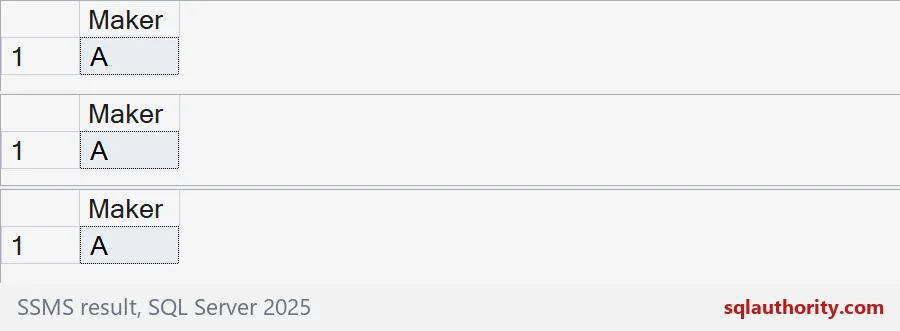

The tempting wrong query
Now the mistake. A row cannot be both a PC and a laptop, so this filter keeps every PC row, including B’s. The result is A and B. B sells a laptop, so B should not be there. A WHERE clause judges rows one at a time. You need a test that looks at the group.
SELECT DISTINCT Maker
FROM #Products
WHERE ProductType = 'PC' AND ProductType <> 'Laptop'
ORDER BY Maker;
Decide what unknown means
NULL counts as neither a PC nor a laptop. That is usually fine, but think about it. Say maker E has a PC and one product with an unknown type. The unknown product might be a laptop. The first query below returns both A and E.
If an unknown type should disqualify a maker, say so in the query. The second query adds a count of NULL types and requires it to be zero. Now only A comes back. This is a business rule, so ask the person who owns the catalog.
INSERT #Products VALUES (7, 'E', 'PC'), (8, 'E', NULL);

SELECT Maker
FROM #Products
GROUP BY Maker
HAVING SUM(CASE WHEN ProductType = 'PC' THEN 1 ELSE 0 END) > 0
   AND SUM(CASE WHEN ProductType = 'Laptop' THEN 1 ELSE 0 END) = 0
ORDER BY Maker;

SELECT Maker
FROM #Products
GROUP BY Maker
HAVING SUM(CASE WHEN ProductType = 'PC' THEN 1 ELSE 0 END) > 0
   AND SUM(CASE WHEN ProductType = 'Laptop' THEN 1 ELSE 0 END) = 0
   AND SUM(CASE WHEN ProductType IS NULL THEN 1 ELSE 0 END) = 0
ORDER BY Maker;
Compare the reads on more rows
Which version is fastest? It depends on your data, so measure. The block below builds 100,000 products for 2,000 makers and counts the answer three ways. All three return 1200 makers.
Look at the reads on #BigProducts. The conditional count scans the table once, with 283 logical reads. NOT EXISTS and EXCEPT each scan it twice, with 566. Your indexes will change the picture, so repeat the test on your own table before choosing.
DROP TABLE IF EXISTS #BigProducts;
CREATE TABLE #BigProducts (Id int PRIMARY KEY, Maker int NOT NULL, ProductType varchar(20) NULL);

INSERT #BigProducts
SELECT value, value % 2000,
       CASE WHEN value % 5 IN (0, 1, 2) THEN 'PC'
            WHEN value % 5 = 3 AND value % 7 = 0 THEN 'Laptop'
            WHEN value % 5 = 3 THEN 'Printer' END
FROM GENERATE_SERIES(1, 100000);

SET STATISTICS IO ON;

SELECT COUNT(*) AS makers FROM
    (SELECT Maker FROM #BigProducts GROUP BY Maker
     HAVING SUM(CASE WHEN ProductType = 'PC' THEN 1 ELSE 0 END) > 0
        AND SUM(CASE WHEN ProductType = 'Laptop' THEN 1 ELSE 0 END) = 0) AS x;

SELECT COUNT(*) AS makers FROM
    (SELECT DISTINCT p.Maker FROM #BigProducts AS p
     WHERE p.ProductType = 'PC'
       AND NOT EXISTS (SELECT 1 FROM #BigProducts AS l
                       WHERE l.Maker = p.Maker AND l.ProductType = 'Laptop')) AS x;

SELECT COUNT(*) AS makers FROM
    (SELECT Maker FROM #BigProducts WHERE ProductType = 'PC'
     EXCEPT
     SELECT Maker FROM #BigProducts WHERE ProductType = 'Laptop') AS x;

SET STATISTICS IO OFF;
The last block drops both temp tables.
DROP TABLE IF EXISTS #BigProducts;
DROP TABLE IF EXISTS #Products;
Test with duplicates and NULLs before you trust any absence query.
An absence test is not a row filter, it is a rule over the whole group.
Published by Pinal Dave on SQLAuthority. More of my work at pinaldave.com.
Discover more from SQL Authority with Pinal Dave
Subscribe to get the latest posts sent to your email.