A nested loops join is not a defect. It is the right choice when the outer input is small and each inner lookup is cheap. Count the inner executions before you blame it.

Why people blame the loops
A slow query lands on your desk. You open the plan and see Nested Loops. Someone on the team says, “Loops are slow, force a hash join.” It sounds wise. It is also a coin flip.
A nested loops join reads the outer input one row at a time. For each row it goes to the inner side and looks something up. That is wonderful for three rows and painful for three million. The join type is not the problem. The number of trips is.
Build a small lookup case
The demo has 10,000 customers and three orders. The customer table has an index on its key, so each lookup is a quick seek. Both tables are temp tables, so nothing is left behind.
DROP TABLE IF EXISTS #Customers;
DROP TABLE IF EXISTS #Orders;

CREATE TABLE #Customers (CustomerId int PRIMARY KEY, CustomerName varchar(30));
CREATE TABLE #Orders (OrderId int PRIMARY KEY, CustomerId int);

INSERT #Customers
SELECT value, CONCAT('Customer ', value) FROM GENERATE_SERIES(1, 10000);

INSERT #Orders VALUES (1, 100), (2, 200), (3, 100);
Count the inner executions
Run the join with the actual plan switched on. I add OPTION (LOOP JOIN) so the plan is the same on every server. The query returns three rows: orders 1, 2 and 3 with Customer 100, Customer 200 and Customer 100.
STATISTICS IO adds the reads. The inner table shows 6 logical reads for three lookups. That is two page reads per seek. In SSMS, click the plan link, click an operator and press F4 to see its properties.
SET STATISTICS XML ON;
SET STATISTICS IO ON;

SELECT o.OrderId, c.CustomerName
FROM #Orders AS o
JOIN #Customers AS c ON c.CustomerId = o.CustomerId
ORDER BY o.OrderId
OPTION (LOOP JOIN);

SET STATISTICS IO OFF;
SET STATISTICS XML OFF;
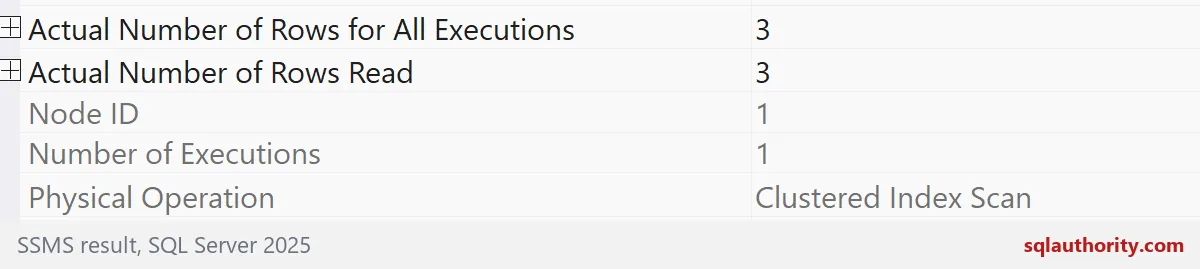
The outer side is a Clustered Index Scan on #Orders. It runs once and returns three rows.
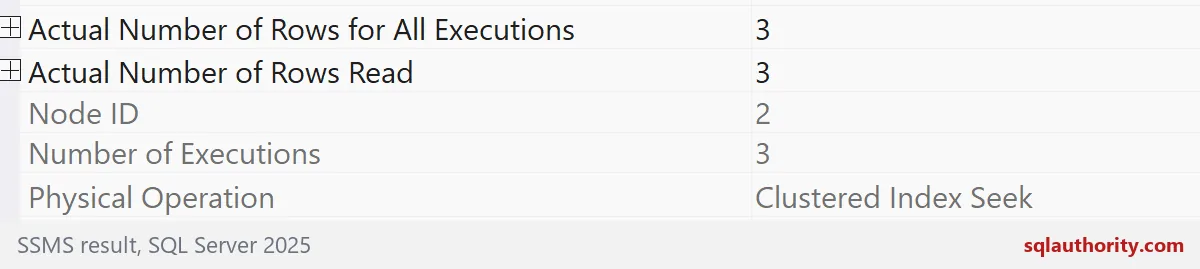
The inner side is a Clustered Index Seek on #Customers. It runs three times, once per outer row, and returns three rows in total. That is the number to watch. Executions on the inner side tell you how much repeated work you bought.
Let the optimizer choose
Hints are for demos. In real life, start without one. The next block asks for the estimated plan as text. Without any hint, the optimizer picks Nested Loops with a Clustered Index Seek on the inner side. It chose the loop on its own.
SET SHOWPLAN_TEXT ON;
GO
SELECT o.OrderId, c.CustomerName
FROM #Orders AS o
JOIN #Customers AS c ON c.CustomerId = o.CustomerId
ORDER BY o.OrderId;
GO
SET SHOWPLAN_TEXT OFF;
Grow the outer input
Now add 5,000 more orders, so there are 5,003. Ask for the plan again. The optimizer walks away from the loop. It now sorts the orders and uses a Merge Join. It changed its mind because the numbers changed.
INSERT #Orders (OrderId, CustomerId)
SELECT 3 + value, 1 + (value * 7) % 10000
FROM GENERATE_SERIES(1, 5000);
GO
SET SHOWPLAN_TEXT ON;
GO
SELECT o.OrderId, c.CustomerName
FROM #Orders AS o
JOIN #Customers AS c ON c.CustomerId = o.CustomerId
ORDER BY o.OrderId;
GO
SET SHOWPLAN_TEXT OFF;
Force the loop and watch the reads
Here is what the team’s fear looks like. The first query forces a loop join over 5,003 orders. The second forces a hash join. Look at the logical reads on #Customers. The loop makes 10,327 of them. The hash join makes 40.
So the fear has a real basis. A loop with a large outer input and an inner lookup per row adds up. But the cure is not “ban loops.” The cure is to compare the numbers for your own data. If a plan estimated three rows and five thousand showed up, the plan was built for the wrong crowd. Fix the estimate first.
SET STATISTICS IO ON;

SELECT COUNT(*) AS joined_rows
FROM #Orders AS o
JOIN #Customers AS c ON c.CustomerId = o.CustomerId
OPTION (LOOP JOIN);

SELECT COUNT(*) AS joined_rows
FROM #Orders AS o
JOIN #Customers AS c ON c.CustomerId = o.CustomerId
OPTION (HASH JOIN);

SET STATISTICS IO OFF;
Hash joins have their own price. They need memory and can spill when the estimate is off. So do not replace every loop. Check the actual rows and the reads, then decide. The last block drops the temp tables.
DROP TABLE IF EXISTS #Orders;
DROP TABLE IF EXISTS #Customers;
Next time you meet a loop in a plan, count its trips before you call it guilty.
A loop join is not a defect, it is a choice whose cost depends on its inputs.
Published by Pinal Dave on SQLAuthority. More of my work at pinaldave.com.
Discover more from SQL Authority with Pinal Dave
Subscribe to get the latest posts sent to your email.