
INNER JOIN vs JOIN comes down to one optional word: INNER means the same thing as leaving it out. In an ordinary join both spellings return the rows that satisfy the ON condition.

I wrote this after a reader discussion about the two not-equal operators. Developers were using both join spellings, so I asked whether the shorter form changed the meaning. It doesn’t, and a small example shows it.
Run Both Queries in SSMS
The first table contains 1 and 2. The second contains 2 and 3. Only 2 appears in both, so each query should return one matching pair.
Run this complete script in one query window. It uses table variables, so you don’t need a sample database. The only difference between the two SELECT statements is the word INNER.
DECLARE @Table1 TABLE (Col1 int);
DECLARE @Table2 TABLE (Col1 int);
INSERT INTO @Table1 VALUES (1), (2);
INSERT INTO @Table2 VALUES (2), (3);

SELECT t1.Col1 AS left_value, t2.Col1 AS right_value
FROM @Table1 AS t1
INNER JOIN @Table2 AS t2 ON t1.Col1 = t2.Col1
ORDER BY t1.Col1, t2.Col1;

SELECT t1.Col1 AS left_value, t2.Col1 AS right_value
FROM @Table1 AS t1
JOIN @Table2 AS t2 ON t1.Col1 = t2.Col1
ORDER BY t1.Col1, t2.Col1;
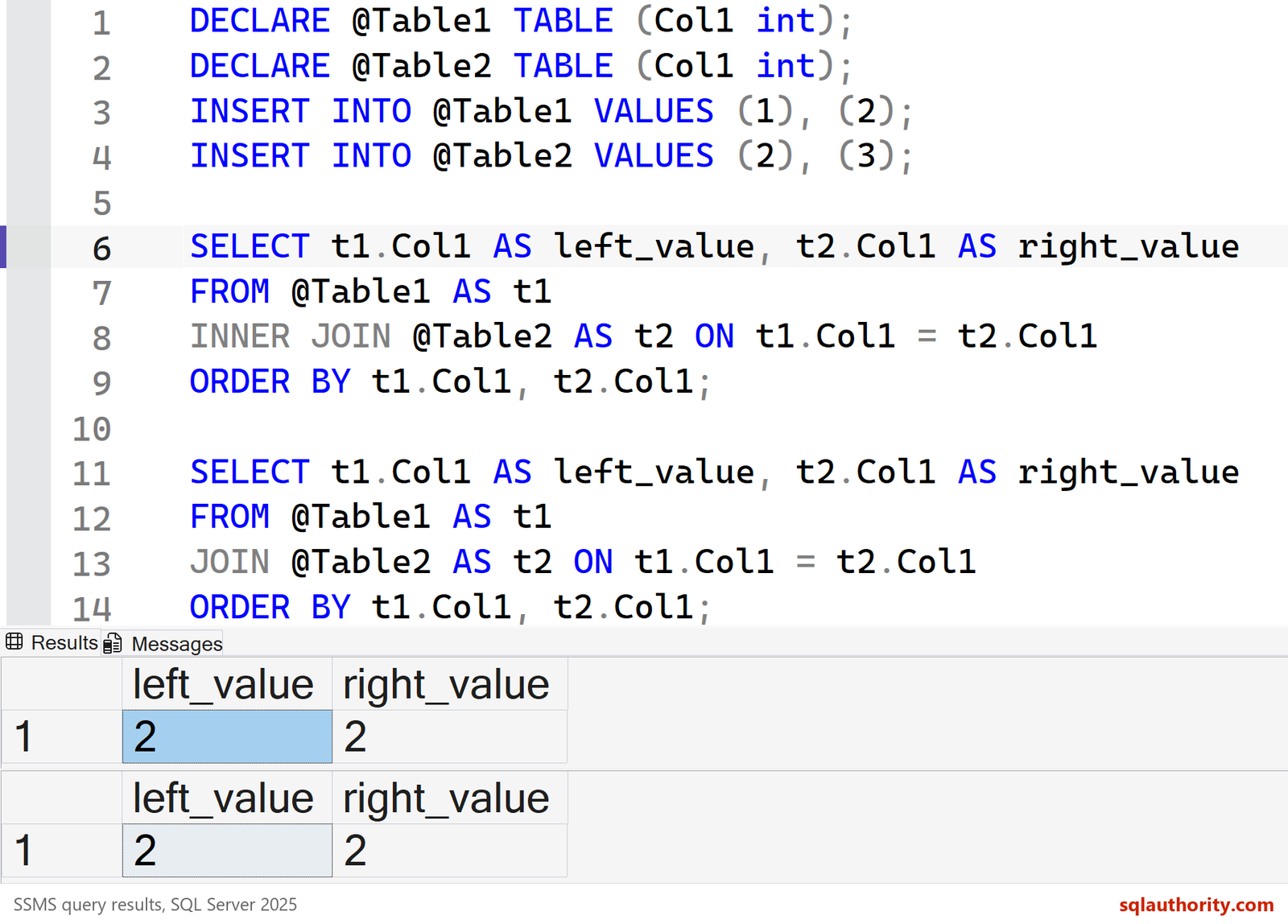
The value 1 has no match in the second table, and the value 3 has none in the first. Neither appears, because an inner join keeps matching pairs only. If a value appears twice on one side, you get two pairs. Adding or removing INNER never removes those duplicates.
The Optimizer Sees the Same Query
Matching rows prove the result, not the plan. I built two small tables and ran five spellings, each tagged with a comment. Then I read the hashes that SQL Server stores for every statement.
CREATE TABLE dbo.Customers (CustomerId int PRIMARY KEY, CustomerName varchar(40) NOT NULL);
CREATE TABLE dbo.Orders (OrderId int PRIMARY KEY, CustomerId int NOT NULL, Item varchar(40) NOT NULL);
INSERT INTO dbo.Customers VALUES (1, 'Asha'), (2, 'Bharat'), (3, 'Chitra');
INSERT INTO dbo.Orders VALUES (10, 1, 'Paneer wrap'), (11, 1, 'Mango lassi'), (12, 3, 'Veg biryani');
SELECT c.CustomerName, o.Item FROM dbo.Customers AS c INNER JOIN dbo.Orders AS o ON o.CustomerId = c.CustomerId /*q-inner*/ ORDER BY c.CustomerName, o.Item;
SELECT c.CustomerName, o.Item FROM dbo.Customers AS c JOIN dbo.Orders AS o ON o.CustomerId = c.CustomerId /*q-plain*/ ORDER BY c.CustomerName, o.Item;
SELECT c.CustomerName, o.Item FROM dbo.Customers AS c, dbo.Orders AS o WHERE o.CustomerId = c.CustomerId /*q-comma*/ ORDER BY c.CustomerName, o.Item;
SELECT c.CustomerName, o.Item FROM dbo.Customers AS c LEFT JOIN dbo.Orders AS o ON o.CustomerId = c.CustomerId /*q-left*/ ORDER BY c.CustomerName, o.Item;
SELECT c.CustomerName, o.Item FROM dbo.Customers AS c LEFT OUTER JOIN dbo.Orders AS o ON o.CustomerId = c.CustomerId /*q-leftouter*/ ORDER BY c.CustomerName, o.Item;
SELECT CASE WHEN st.stmt LIKE N'%q-inner%' THEN 'INNER JOIN' WHEN st.stmt LIKE N'%q-plain%' THEN 'JOIN' WHEN st.stmt LIKE N'%q-comma%' THEN 'comma join'
            WHEN st.stmt LIKE N'%q-leftouter%' THEN 'LEFT OUTER JOIN' WHEN st.stmt LIKE N'%q-left%' THEN 'LEFT JOIN' END AS spelling,
       CONVERT(varchar(20), s.query_hash, 1) AS query_hash, CONVERT(varchar(20), s.query_plan_hash, 1) AS query_plan_hash
FROM sys.dm_exec_query_stats AS s CROSS APPLY sys.dm_exec_sql_text(s.sql_handle) AS t
CROSS APPLY (SELECT SUBSTRING(t.text, s.statement_start_offset / 2 + 1, (CASE WHEN s.statement_end_offset = -1 THEN DATALENGTH(t.text) ELSE s.statement_end_offset END - s.statement_start_offset) / 2 + 1) AS stmt) AS st
WHERE st.stmt LIKE N'%/*q-%' AND st.stmt NOT LIKE N'%dm_exec_query_stats%'
ORDER BY spelling;| spelling | query_hash | query_plan_hash |
|---|---|---|
| comma join | 0xF60C05B3E58A1FC7 | 0x8A5B3C575113620F |
| INNER JOIN | 0x65CBED57D6F1E267 | 0x8A5B3C575113620F |
| JOIN | 0x65CBED57D6F1E267 | 0x8A5B3C575113620F |
| LEFT JOIN | 0x63D26AAE9A9E54D0 | 0x06612AFAC0737E44 |
| LEFT OUTER JOIN | 0x63D26AAE9A9E54D0 | 0x06612AFAC0737E44 |
INNER JOIN and JOIN share the same query hash and the same plan hash. They are one query. The old comma join got a different query hash but the same plan. The optimizer still reached the same inner join. LEFT JOIN and LEFT OUTER JOIN match each other the same way.
Does INNER JOIN Perform Better?
No. Adding INNER doesn’t give SQL Server a faster way to run the query, and the identical plan hash says so. A small elapsed-time difference between two runs is noise from caching, compilation and other activity. When I investigate performance, I compare plans and reads, not keywords.
Where INNER Is Required
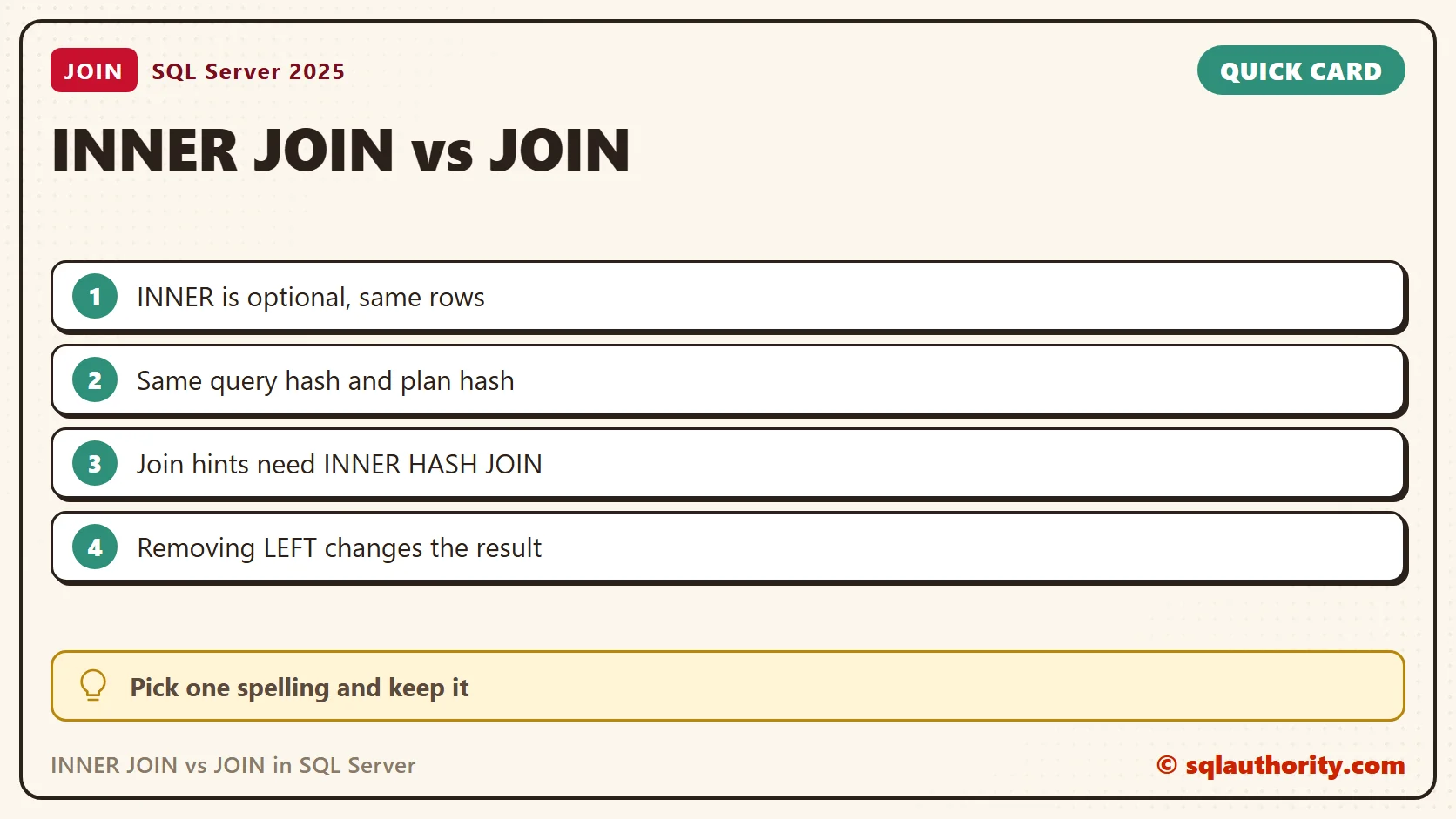
One syntax detail matters. A join hint needs the full form, such as INNER HASH JOIN. It ran, with the warning that the join order has been enforced. Without INNER it failed with Msg 102, incorrect syntax near HASH. A left join takes its hint as LEFT HASH JOIN.
SELECT c.CustomerName, o.Item
FROM dbo.Customers AS c
INNER HASH JOIN dbo.Orders AS o ON o.CustomerId = c.CustomerId
ORDER BY c.CustomerName, o.Item;
SELECT c.CustomerName, o.Item
FROM dbo.Customers AS c
HASH JOIN dbo.Orders AS o ON o.CustomerId = c.CustomerId;
A Join Needs an ON Clause
A bare JOIN followed by no ON clause is a syntax error. I got Msg 102 when I tried it. If you want every pairing, say so with CROSS JOIN. Three customers and three orders gave nine rows.
SELECT COUNT(*) AS cross_join_rows
FROM dbo.Customers AS c
CROSS JOIN dbo.Orders AS o;
That count is a good check for a missing join condition. If a normal query returns the product of both tables, the ON clause isn’t doing its job.
JOIN and LEFT JOIN Are Different
The optional word in INNER JOIN is INNER. The word LEFT changes which rows survive. A left join also keeps unmatched rows from the first table. Run this script to compare. The unmatched value 1 stays, with NULL for the missing value on the right.
DECLARE @Table1 TABLE (Col1 int);
DECLARE @Table2 TABLE (Col1 int);
INSERT INTO @Table1 VALUES (1), (2);
INSERT INTO @Table2 VALUES (2), (3);

SELECT t1.Col1 AS left_value, t2.Col1 AS right_value
FROM @Table1 AS t1
LEFT JOIN @Table2 AS t2 ON t1.Col1 = t2.Col1
ORDER BY t1.Col1, t2.Col1;
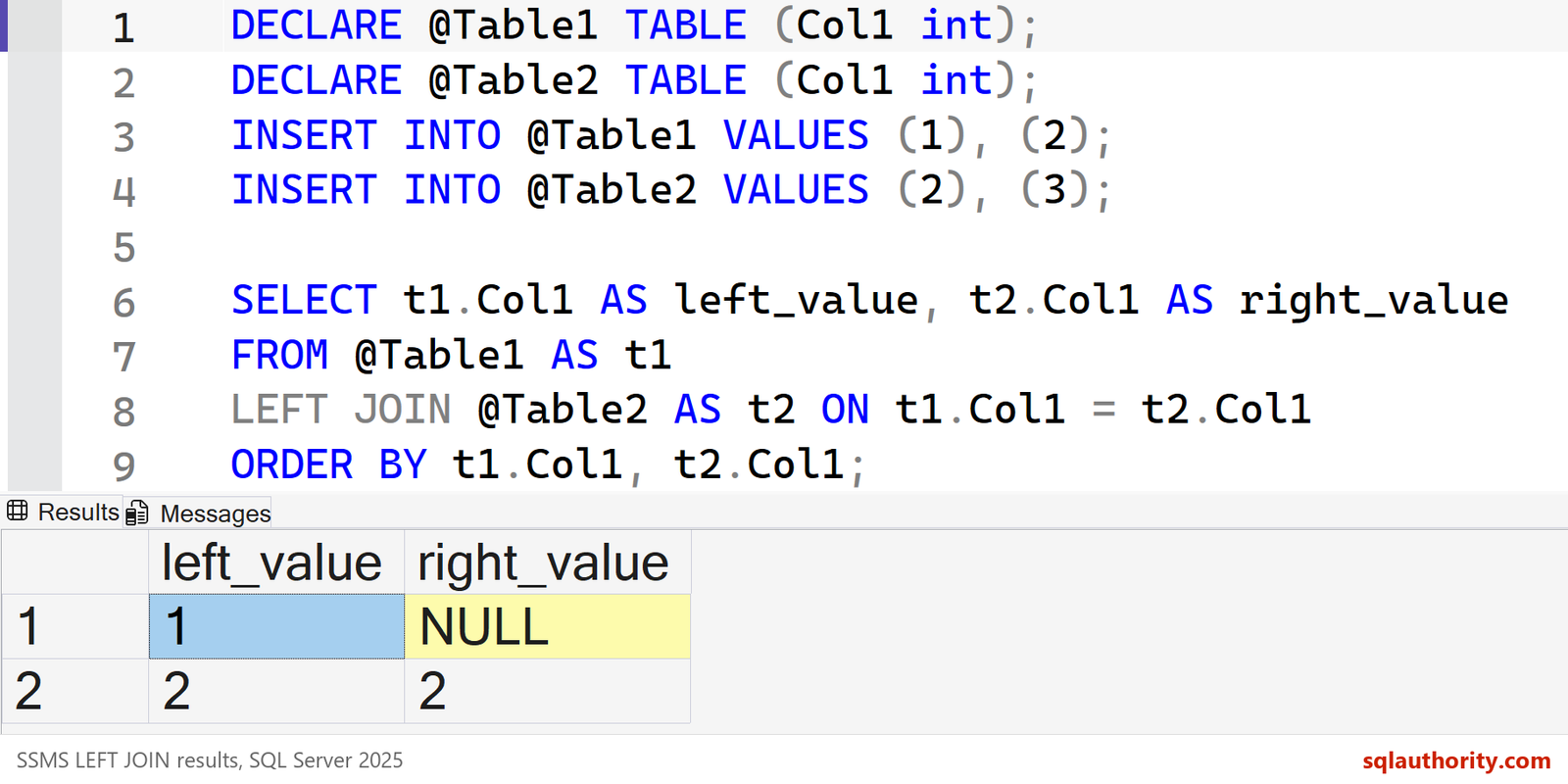
LEFT JOIN and LEFT OUTER JOIN are equivalent, because OUTER is optional. Removing LEFT changes the query to an inner join, and the unmatched row disappears again.
A LEFT JOIN Can Turn Into an Inner Join
A second trap catches people who keep LEFT in the text. Where you put a filter on the right table matters. In the ON clause, the filter only limits which orders match, so all three customers stay. In the WHERE clause, the filter removes the NULL rows, and only one customer was left.
SELECT c.CustomerName, o.Item
FROM dbo.Customers AS c
LEFT JOIN dbo.Orders AS o ON o.CustomerId = c.CustomerId AND o.Item = 'Mango lassi'
ORDER BY c.CustomerName;
SELECT c.CustomerName, o.Item
FROM dbo.Customers AS c
LEFT JOIN dbo.Orders AS o ON o.CustomerId = c.CustomerId
WHERE o.Item = 'Mango lassi'
ORDER BY c.CustomerName;
Which Spelling Do I Use?
I write INNER JOIN, because it names the join type next to the other joins. A team that consistently writes JOIN is also writing valid SQL. The shared convention matters more than the choice.
Related Reading
The optional INNER keyword is not a different join, it is the same join with its type spelled out.
Published by Pinal Dave on SQLAuthority. More of my work at pinaldave.com.
Discover more from SQL Authority with Pinal Dave
Subscribe to get the latest posts sent to your email.



38 Comments. Leave new
i always using ‘ join ‘ now i understood what is the diff between join and inner join
so because of professionalism i am going to use ‘inner join’…
Good answer!
all joins names are same like left , right , inner join so not for confussion we use inner join rather then join yes they both are same
Use Inner join only because when we use JOIN doesn’t know which join operation perform.
I was shocked.! and I was curious to know what is the difference……! But got more shocked while reading the blog……..! I always use JOIN…….!
I write “JOIN” because “INNER JOIN” has 5 more letters, then i spend more time writing “INNER JOIN”. XD
I use JOIN! why? because “INNER JOIN” has 5 more letters, then it takes more time to be writen. :p
You shouldn’t be writing code to save yourself typing. You should write code that is easier to read. Why leave ambiguity to save yourself a few keystrokes. I can honestly say that if you just specify “JOIN” and not “INNER JOIN” that it’s not obvious what it means. This is probably more true if you jump from Oracle to SQL Server to mySQL a lot or if you are a beginner. In the end, being ambiguous for the sake of a few keystrokes is usually not a good idea. In fact, I’m troubleshooting code right now where a jr programmer used JOIN and meant for it to be an outer join. When reading his code, I can’t be sure what he meant. I know what it is doing, but his intention isn’t clear. If it said INNER JOIN, his intention, at least, would be clear.
Hello Sir,
request you to help me for below query.
For SQL Developer:
We have a table movie with two columns naming Seat_id and Seat_Available ,
We are three friends trying to select three continues seats for movie. Write a query.
Seat_Id Seat_Available
1 Y
2 N
3 Y
4 Y
5 N
6 N
7 Y
8 N
9 Y
10 N
11 Y
12 Y
13 Y
14 Y
15 N
16 Y
17 Y
18 Y
19 N
Ashish,
You can use below queries for the same and pivot the result as you required.
Answer1:
SELECT M1.Seat_ID S1, M2.Seat_ID S2,M3.Seat_ID S3,M1.Seat_Avail S1A, M2.Seat_Avail S2A , M3.Seat_Avail S3A
FROM Movie M1
INNER JOIN Movie M2 ON M1.Seat_ID + 1 = M2.Seat_ID AND M1.Seat_Avail = ‘Y’ AND M2.Seat_Avail = ‘Y’
INNER JOIN Movie M3 ON M1.Seat_ID + 2 = M3.Seat_ID AND M3.Seat_Avail = ‘Y’
Answer2:
;WITH AvailableSeats AS
(
SELECT Seat_ID, Seat_Avail FROM Movie WHERE Seat_Avail = ‘Y’
),
ConsecutiveSeats AS (
SELECT A1.Seat_ID S1, A2.Seat_ID S2,A3.Seat_ID S3,A1.Seat_Avail S1A, A2.Seat_Avail S2A , A3.Seat_Avail S3A
FROM AvailableSeats A1
INNER JOIN AvailableSeats A2 ON A1.Seat_ID + 1 = A2.Seat_ID
INNER JOIN AvailableSeats A3 ON A1.Seat_ID + 2 = A3.Seat_ID
)
SELECT * FROM ConsecutiveSeats
SELECT M1.Seat_ID S1, M2.Seat_ID S2,M3.Seat_ID S3,M1.Seat_Avail S1A, M2.Seat_Avail S2A , M3.Seat_Avail S3A
FROM Movie M1
INNER JOIN Movie M2 ON M1.Seat_ID + 1 = M2.Seat_ID AND M1.Seat_Avail = ‘Y’ AND M2.Seat_Avail = ‘Y’
INNER JOIN Movie M3 ON M1.Seat_ID + 2 = M3.Seat_ID AND M3.Seat_Avail = ‘Y’
If you want you can pivot the result as required.
you can use either of below queries and pivot it if required.
SELECT M1.Seat_ID S1, M2.Seat_ID S2,M3.Seat_ID S3,M1.Seat_Avail S1A, M2.Seat_Avail S2A , M3.Seat_Avail S3A
FROM Movie M1
INNER JOIN Movie M2 ON M1.Seat_ID + 1 = M2.Seat_ID AND M1.Seat_Avail = ‘Y’ AND M2.Seat_Avail = ‘Y’
INNER JOIN Movie M3 ON M1.Seat_ID + 2 = M3.Seat_ID AND M3.Seat_Avail = ‘Y’
;WITH AvailableSeats AS
(
SELECT Seat_ID, Seat_Avail FROM Movie WHERE Seat_Avail = ‘Y’
),
ConsecutiveSeats AS (
SELECT A1.Seat_ID S1, A2.Seat_ID S2,A3.Seat_ID S3,A1.Seat_Avail S1A, A2.Seat_Avail S2A , A3.Seat_Avail S3A
FROM AvailableSeats A1
INNER JOIN AvailableSeats A2 ON A1.Seat_ID + 1 = A2.Seat_ID
INNER JOIN AvailableSeats A3 ON A1.Seat_ID + 2 = A3.Seat_ID
)
SELECT * FROM ConsecutiveSeats
Yes, but it’s not ambiguous. It’s the same thing. It’s clear to anyone who knows the language. You’re just expressing a preference.
good one
relatable