You can rebuild one partition online instead of the whole index, and on a big table that can save hours. The catch is finding the right partition. A partition number is a position in the partition function, not a month name, and positions move.

Why not rebuild everything
Imagine a large table partitioned by month. Last month’s data was loaded in a hurry, and its index pages are scattered. The nightly job rebuilds the whole index, and it grinds through years of old data that nobody has touched. Only one partition needed attention.
ALTER INDEX can rebuild a single partition, and it can do it online. Let me show the mechanics on a small partitioned table. The demo creates a partition function, a scheme and a table, and the last block drops them.
Build a small partitioned table
I use RANGE RIGHT with two boundaries, January 1 and February 1. With RANGE RIGHT, a row dated exactly on a boundary belongs to the partition on its right. The last query shows which partition each row lands in.
DROP TABLE IF EXISTS dbo.PartitionRebuildDemo;
IF EXISTS (SELECT 1 FROM sys.partition_schemes WHERE name = N'psRebuildDemo') DROP PARTITION SCHEME psRebuildDemo;
IF EXISTS (SELECT 1 FROM sys.partition_functions WHERE name = N'pfRebuildDemo') DROP PARTITION FUNCTION pfRebuildDemo;
GO
CREATE PARTITION FUNCTION pfRebuildDemo (date) AS RANGE RIGHT FOR VALUES ('20260101', '20260201');
CREATE PARTITION SCHEME psRebuildDemo AS PARTITION pfRebuildDemo ALL TO ([PRIMARY]);

CREATE TABLE dbo.PartitionRebuildDemo (OrderDate date, Id int, Payload char(100));
CREATE CLUSTERED INDEX CX_PartitionRebuildDemo
    ON dbo.PartitionRebuildDemo (OrderDate, Id) ON psRebuildDemo (OrderDate);

INSERT dbo.PartitionRebuildDemo (OrderDate, Id, Payload)
VALUES ('20251231', 1, 'old'), ('20260101', 2, 'January'), ('20260201', 3, 'February');

SELECT OrderDate, Id, $PARTITION.pfRebuildDemo(OrderDate) AS PartitionNumber
FROM dbo.PartitionRebuildDemo ORDER BY OrderDate, Id;
December 31 is in partition 1. January 1 is in partition 2, and February 1 is in partition 3. Notice that the boundary date itself goes to the right-hand partition.
Rebuild one partition online
Now rebuild only partition 3, the February one. The ONLINE option keeps the table available for reads and writes while the rebuild runs. Afterwards I check the row count per partition and the statistics on the table.
ALTER INDEX CX_PartitionRebuildDemo ON dbo.PartitionRebuildDemo
REBUILD PARTITION = 3 WITH (ONLINE = ON);

SELECT partition_number, rows
FROM sys.partitions
WHERE object_id = OBJECT_ID(N'dbo.PartitionRebuildDemo') AND index_id = 1
ORDER BY partition_number;

SELECT name, is_incremental, STATS_DATE(object_id, stats_id) AS StatisticsUpdated
FROM sys.stats
WHERE object_id = OBJECT_ID(N'dbo.PartitionRebuildDemo')
ORDER BY name;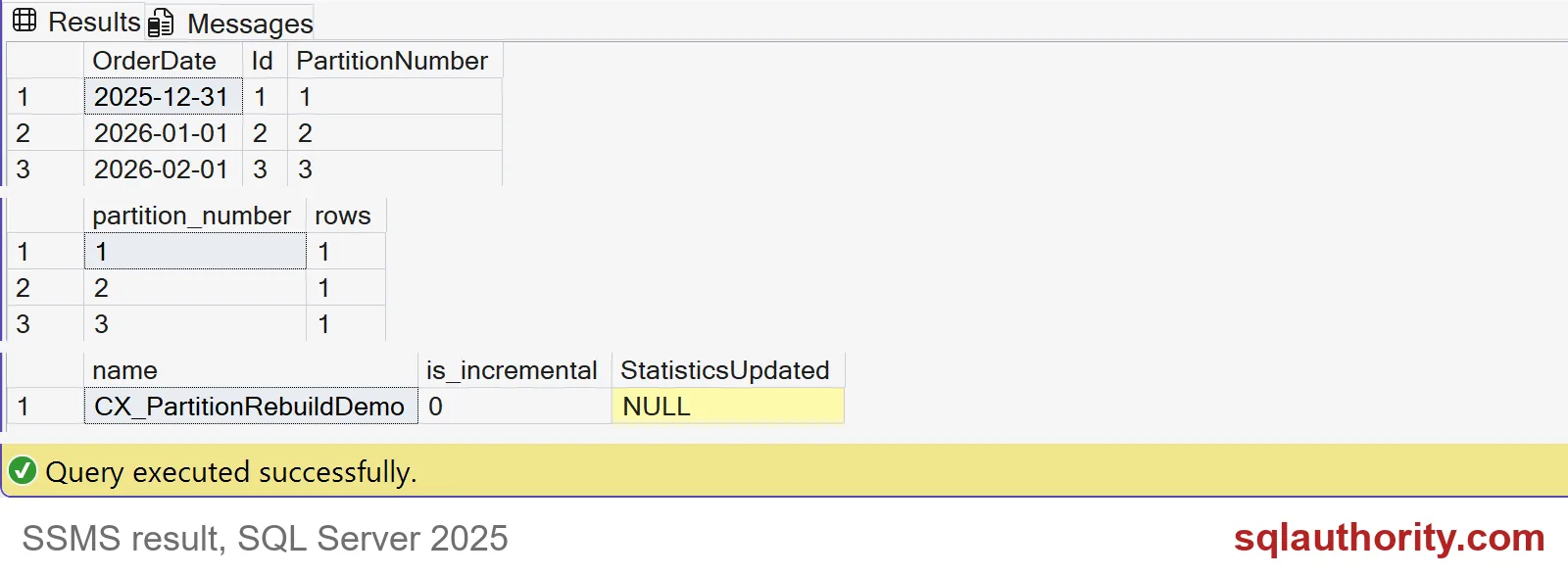
The screenshot shows the results of this block and the previous one. Each partition still holds one row, so the rebuild lost nothing. The statistics row shows is_incremental 0 and no update date in this tiny demo. So I would not count on a partition rebuild to refresh statistics. Keep that in your regular maintenance.
Look before you rebuild
Don’t rebuild by habit. Ask about that one partition first. The physical stats function takes a partition number, so you can inspect just the one you care about.
SELECT partition_number, index_level, page_count, avg_fragmentation_in_percent
FROM sys.dm_db_index_physical_stats(DB_ID(), OBJECT_ID(N'dbo.PartitionRebuildDemo'), 1, 3, 'DETAILED')
WHERE index_level = 0;

SELECT SERVERPROPERTY('Edition') AS Edition;
Partition 3 has 1 page and 0.0 percent fragmentation. A rebuild here would be pointless, and a high percentage on a partition this small would not matter either. Size and workload decide, not the percentage alone. The second query matters too: online index operations need an edition that supports them. My test server reports a Developer edition, so check yours before you rely on ONLINE.
Partition numbers move
Here is the trap. February is partition 3 today. Add a boundary for an earlier month and every number after it shifts. A job that says PARTITION = 3 will quietly rebuild the wrong month. So ask SQL Server for the number from the date, every time.
SELECT $PARTITION.pfRebuildDemo('20260201') AS FebruaryPartitionBefore;

ALTER PARTITION SCHEME psRebuildDemo NEXT USED [PRIMARY];
ALTER PARTITION FUNCTION pfRebuildDemo() SPLIT RANGE ('20251201');

SELECT $PARTITION.pfRebuildDemo('20260201') AS FebruaryPartitionAfter;

DECLARE @p int = $PARTITION.pfRebuildDemo('20260201');
ALTER INDEX CX_PartitionRebuildDemo ON dbo.PartitionRebuildDemo
REBUILD PARTITION = @p WITH (ONLINE = ON);

SELECT partition_number, rows
FROM sys.partitions
WHERE object_id = OBJECT_ID(N'dbo.PartitionRebuildDemo') AND index_id = 1
ORDER BY partition_number;
February moves from partition 3 to partition 4 after the split. The variable finds it, and the rebuild targets the right one. The last result shows four partitions now, with one row in each of partitions 2, 3 and 4.
On your own server, measure the log space, the locking and the query benefit on real data before you change a maintenance job. Then clean up.
DROP TABLE IF EXISTS dbo.PartitionRebuildDemo;
IF EXISTS (SELECT 1 FROM sys.partition_schemes WHERE name = N'psRebuildDemo') DROP PARTITION SCHEME psRebuildDemo;
IF EXISTS (SELECT 1 FROM sys.partition_functions WHERE name = N'pfRebuildDemo') DROP PARTITION FUNCTION pfRebuildDemo;
Find the partition from the date, then rebuild only that one.
A partition number is not a month name, it is a position that can move.
Published by Pinal Dave on SQLAuthority. More of my work at pinaldave.com.
Discover more from SQL Authority with Pinal Dave
Subscribe to get the latest posts sent to your email.