
SQL Server architecture terminology is easier to follow when you can see each term in a running instance. This introduction preserves the original contribution by Anil Kumar, whom I invited to explain the subject.

Instance and Database
The queries in this refresh show each term and were tested on SQL Server 2025. An instance is a running SQL Server Database Engine environment. It manages connections and hosts databases. A database holds related objects and data, with its own files and configuration. Several databases can share one instance’s resources, and a database is not the machine that hosts it. Keep those boundaries clear when you discuss memory, CPU, storage or security.
SELECT @@SERVERNAME AS InstanceName, DB_NAME() AS DatabaseName;
SELECT DB_NAME() AS DatabaseName, name AS LogicalFileName, type_desc AS FileType,
       CAST(size / 128.0 AS decimal(19,2)) AS AllocatedMB
FROM sys.database_files ORDER BY file_id;
The first query names the instance and the database. The second lists the database’s files. A new database in my test had one data file and one log file, each 8 MB.
Relational Engine
The relational engine is also called the query processor. It parses and binds a query, optimizes an execution plan and coordinates execution. It works with the storage engine to obtain or change data.
The optimizer chooses among plans using estimates and available information. A plan describes operations such as scans, joins and sorts. It doesn’t mean every query reads its data from disk.
Storage Engine and Files
The storage engine manages access to stored data and supports transactions. In a conventional disk-based database, data files hold data and index pages. Transaction log files record information used for recovery.
The buffer pool caches database pages in memory. A cached page can serve a request without another physical disk read. Changes to cached pages and durable log writes have different roles.
Pages and Extents
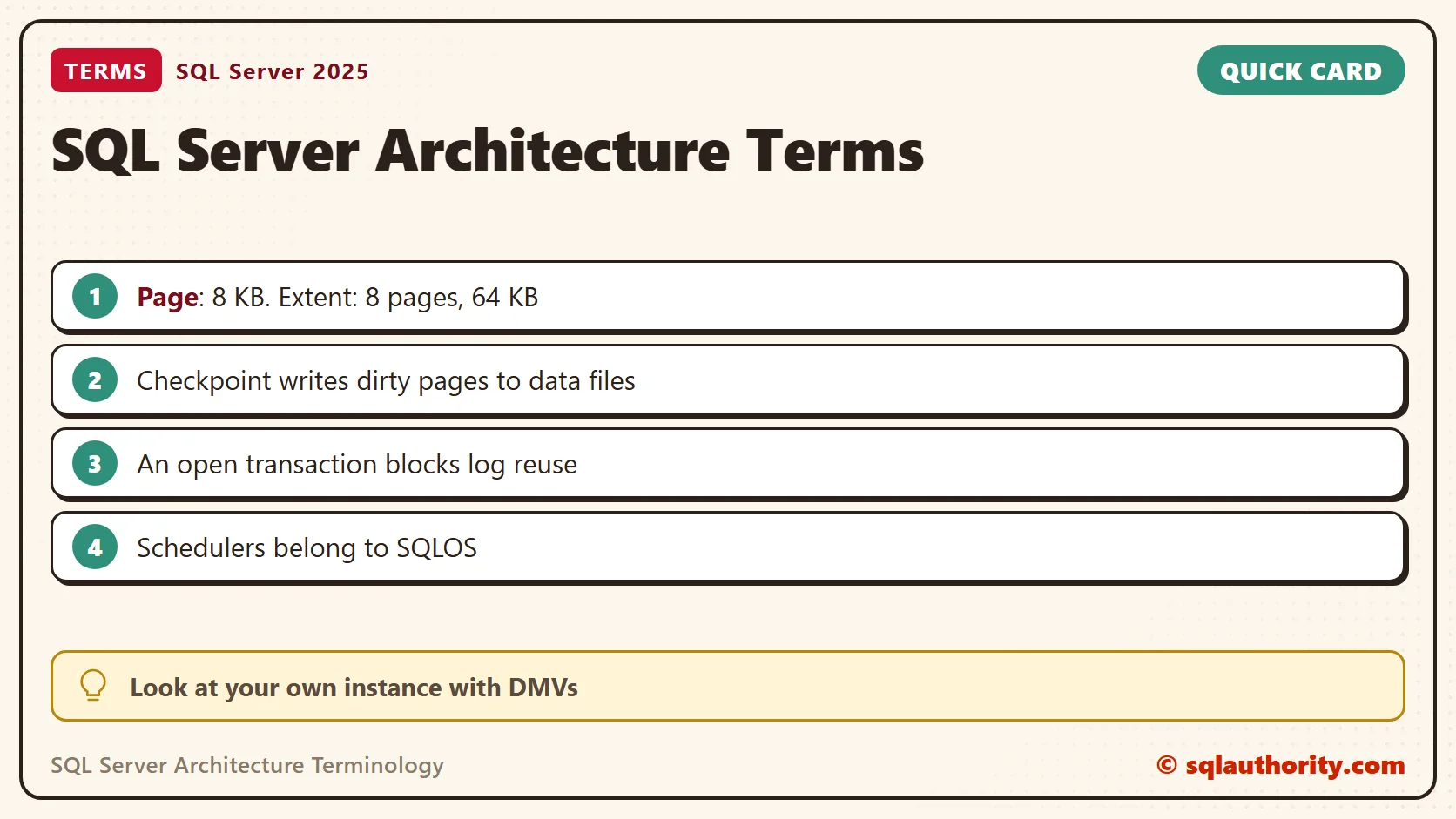
A regular SQL Server data page is 8 KB. An extent consists of eight contiguous pages, totaling 64 KB. These terms describe disk-based storage. They aren’t a complete model for every storage feature.
Uniform extents allocate their pages to one object. Mixed extents can serve multiple objects. Allocation behavior depends on version and configuration, so the existence of both types doesn’t imply equal use.
Large-value columns don’t always live entirely outside the row. Values can stay in-row when they fit and the storage rules allow it. Larger values and overflowing rows need additional storage structures.
See Pages and Extents in a Small Table
This table holds one row, then 2,000 more. After the first row, the table had 9 pages in total and 2 used. The data page came from a uniform extent. Only the IAM page came from a mixed extent.
CREATE TABLE dbo.Items (ItemId int IDENTITY(1,1) PRIMARY KEY CLUSTERED, ItemName char(100) NOT NULL DEFAULT 'sample');
INSERT INTO dbo.Items DEFAULT VALUES;
INSERT INTO dbo.Items (ItemName) SELECT TOP (2000) 'sample' FROM sys.all_objects AS a CROSS JOIN sys.all_objects AS b;
SELECT p.rows AS RowCnt, au.type_desc AS AllocationUnit, au.total_pages, au.used_pages, au.data_pages
FROM sys.partitions AS p JOIN sys.allocation_units AS au ON au.container_id = p.partition_id
WHERE p.object_id = OBJECT_ID(N'dbo.Items');
SELECT page_type_desc, is_mixed_page_allocation, COUNT(*) AS pages
FROM sys.dm_db_database_page_allocations(DB_ID(), OBJECT_ID(N'dbo.Items'), 1, NULL, 'DETAILED')
GROUP BY page_type_desc, is_mixed_page_allocation ORDER BY page_type_desc;
With 2,001 rows the allocation unit had 49 total pages and 31 used. Of those, 29 were data pages, one was an index page and one was the IAM page. A page with no type is unused space inside an extent the table owns. The mixed page allocation setting was off, so the data pages came from uniform extents.
Common Page and Allocation Terms
- Data and index pages: store rows and index structures.
- LOB pages: store large values that need separate storage.
- GAM and SGAM: track extent allocation and mixed-extent availability.
- PFS: tracks page allocation and free-space information.
- IAM: maps extents used by an allocation unit.
- DCM: tracks changed extents for differential backups.
- BCM: tracks extents changed by bulk operations for bulk-logged recovery processing.
These structures help SQL Server find space and track changes. They aren’t tables that an application should update. DCM tracking relates to the differential base, not every arbitrary BACKUP DATABASE command.
Transaction Log and Write-Ahead Logging
Write-ahead logging requires the relevant log records to reach durable storage before changed data pages are written there. The log supports rollback and crash recovery. A log file is not a second copy of the database’s data files.
Log truncation makes eligible log space reusable. It doesn’t shrink the physical file. Recovery model and outstanding recovery requirements affect when space becomes reusable. An active transaction can prevent reuse even when backups are running.
Watch a Checkpoint and the Log
Changed pages sit in the buffer pool as dirty pages. A checkpoint writes them to the data file. In my run, the scratch database had 102 dirty pages before the checkpoint and none after it.
SELECT COUNT(*) AS pages_cached, SUM(CASE WHEN is_modified = 1 THEN 1 ELSE 0 END) AS dirty_pages
FROM sys.dm_os_buffer_descriptors WHERE database_id = DB_ID();
CHECKPOINT;
SELECT COUNT(*) AS pages_cached, SUM(CASE WHEN is_modified = 1 THEN 1 ELSE 0 END) AS dirty_pages
FROM sys.dm_os_buffer_descriptors WHERE database_id = DB_ID();
The next test uses the simple recovery model. It starts a transaction, adds rows and runs a checkpoint. The log couldn’t be reused, and the reason was ACTIVE_TRANSACTION. After the commit and another checkpoint the reason was NOTHING. The log file stayed 8 MB, so reusable space is not a smaller file.
ALTER DATABASE CURRENT SET RECOVERY SIMPLE;
BEGIN TRANSACTION;
INSERT INTO dbo.Items (ItemName) SELECT TOP (3000) 'sample' FROM sys.all_objects AS a CROSS JOIN sys.all_objects AS b;
CHECKPOINT;
SELECT log_reuse_wait_desc FROM sys.databases WHERE name = DB_NAME();
COMMIT TRANSACTION;
CHECKPOINT;
SELECT log_reuse_wait_desc FROM sys.databases WHERE name = DB_NAME();
SELECT CAST(size / 128.0 AS decimal(9,2)) AS log_file_MB FROM sys.database_files WHERE type = 1;
SQLOS
SQLOS provides internal services used by the Database Engine, including scheduling and memory management. Tasks and workers perform query work through schedulers. SQLOS cooperates with the host operating system, and it isn’t a replacement for Windows.
This query counts the schedulers by status. My 16-processor PC showed 16 visible online schedulers. Hidden ones handle internal work, and one serves the dedicated administrator connection. Your numbers follow your hardware.
SELECT status, COUNT(*) AS schedulers FROM sys.dm_os_schedulers GROUP BY status ORDER BY status;
SELECT cpu_count, scheduler_count, max_workers_count FROM sys.dm_os_sys_info;
Thanks to Anil Kumar for the original introduction. Once these terms are clear, execution plans, waits and storage behavior are easier to discuss. Each topic deserves more detail than a terminology page can provide.
Architecture is not a list of labels, it is an explanation of how the parts work together.
Published by Pinal Dave on SQLAuthority. More of my work at pinaldave.com.
Discover more from SQL Authority with Pinal Dave
Subscribe to get the latest posts sent to your email.



36 Comments. Leave new
i need more on architecture can anybody help me on that plz…
Buy a book on SQL Internals.
it is very good and nice article to learn sql developer. Thank you so much for your post
Hi Pinal
Those Above information is useful for beginner and experience developer. But give information below of the topics,
>> Query Processing
>> Memory Management
>> Thread and Task Management
>> Buffer Management
>> Distributed Query Processing.
Architecture Updates helps us a lot.. But if SQL diagram is there, We will understand the points very quickly. Can you pls post it ?
Thanks verry much for the Post.
It is great!
Why there are 2 architectures in Sqlserver instead of only 1 ? (connected & Disconnected)
Hi Pinal
Those Above information is helped me alot to understand the architecture. But please give information below of the topics,
>> Query Processing
>> Memory Management
>> Thread and Task Management
>> Buffer Management
>> Distributed Query Processing
Thanks A Lot Sir , for making our day to day life easy with the most helpful and understandable articles.