Non-updating updates are UPDATE statements that write a value the column already holds. SQL Server still counts the row as modified. Your sync job looks busy, and nothing actually changed.

The nightly sync that touches everything
Your nightly job copies a staging table into the real table. It reports millions of rows updated. You feel good. Then someone checks and finds that only a small fraction of the values were new.
The job wrote the same value over itself, again and again. That means log writes, lock time and more. It can even confuse tools that watch for changes. Let me build a tiny version of the problem.
Row 1 already agrees. Row 2 changes from NULL to a value. Row 3 changes from a value to NULL. The target also gets a rowversion column, which I will use in a minute.
DROP TABLE IF EXISTS #Staging;
DROP TABLE IF EXISTS #Target;

CREATE TABLE #Target (Id int PRIMARY KEY, Label nvarchar(30) NULL, RowVer rowversion);
CREATE TABLE #Staging (Id int PRIMARY KEY, Label nvarchar(30) NULL);

INSERT #Target (Id, Label) VALUES (1, N'Same'), (2, NULL), (3, N'Old');
INSERT #Staging (Id, Label) VALUES (1, N'Same'), (2, N'New'), (3, NULL);
The comparison that misses NULL changes
The obvious filter is WHERE target is not equal to staging. Let me count how many rows each kind of comparison would pick up.
SELECT COUNT(*) AS MatchedRows,
       SUM(CASE WHEN t.Label <> s.Label THEN 1 ELSE 0 END) AS PlainInequality,
       SUM(CASE WHEN t.Label IS DISTINCT FROM s.Label THEN 1 ELSE 0 END) AS DistinctFrom
FROM #Target AS t
JOIN #Staging AS s ON s.Id = t.Id;
Three rows match by key. The plain inequality finds zero changes. It misses both NULL transitions, because comparing with NULL is never true. IS DISTINCT FROM finds the two real changes. It treats NULL as an ordinary value, so NULL against NULL is the same and NULL against New is different.

What a pointless update does
Now look at row 1, which already says Same. I update it to Same anyway and compare the rowversion before and after.
DECLARE @Before binary(8) = (SELECT RowVer FROM #Target WHERE Id = 1);

UPDATE #Target SET Label = N'Same' WHERE Id = 1;

SELECT CASE WHEN RowVer = @Before THEN 'rowversion unchanged'
            ELSE 'rowversion moved' END AS AfterPointlessUpdate
FROM #Target
WHERE Id = 1;
The rowversion moved. The label is exactly what it was, yet SQL Server stamped the row as modified. Anything that watches rowversion, such as a sync tool, now thinks row 1 changed.
Update only the distinct rows
Now the real update, with IS DISTINCT FROM in the WHERE clause. I run it twice. The count after each run tells the story.
UPDATE t SET Label = s.Label
FROM #Target AS t
JOIN #Staging AS s ON s.Id = t.Id
WHERE t.Label IS DISTINCT FROM s.Label;

SELECT @@ROWCOUNT AS FirstChangedRows;

SELECT Id, Label FROM #Target ORDER BY Id;

UPDATE t SET Label = s.Label
FROM #Target AS t
JOIN #Staging AS s ON s.Id = t.Id
WHERE t.Label IS DISTINCT FROM s.Label;

SELECT @@ROWCOUNT AS SecondChangedRows;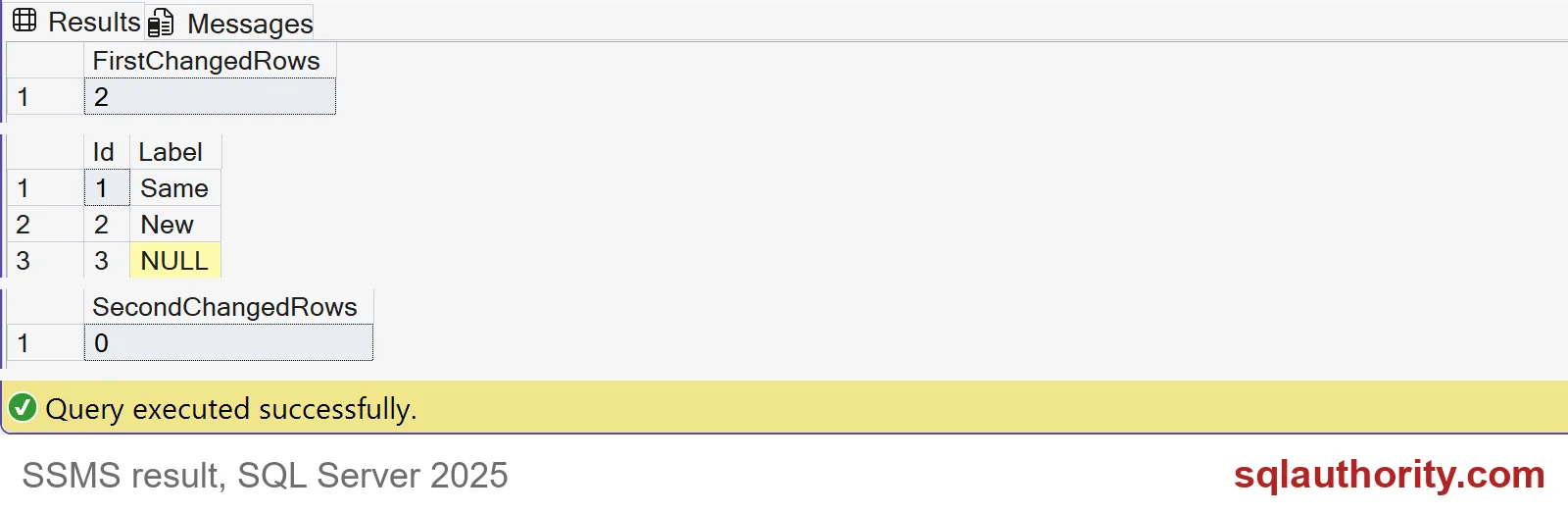
The first pass changes two rows. The labels are now Same, New and NULL, in key order. The second pass changes zero rows, because there is nothing left to change. That zero is the sign of a healthy sync.
A real job has bigger numbers, but the shape is the same. The first run does the work and the second run finds nothing to do. If your second run still reports thousands of rows, either your comparison is wrong or something keeps changing the data.
Two habits that keep this honest
Put every column you assign into the comparison. If you assign three columns and compare two, a change in the third will never be copied. For wide tables, test each column on its own line so the next reader can check it.
And do not turn “rows affected” into “log bytes saved.” Indexes, triggers and table design change the math. Time the whole job before and after, and compare the final data.
DROP TABLE IF EXISTS #Staging;
DROP TABLE IF EXISTS #Target;
Next time your job says millions of rows, ask how many really changed.
A row counted as updated is not a row that changed, it is a row that was written.
Published by Pinal Dave on SQLAuthority. More of my work at pinaldave.com.
Discover more from SQL Authority with Pinal Dave
Subscribe to get the latest posts sent to your email.