Time-limited access only works when the query itself checks the end date. A ValidUntil column is just a number in a table. Nothing expires until the read path refuses to show the row.

The date column that nobody reads
Here is a story you may know. A contractor gets access to a set of documents for two weeks of audit work. Someone adds a ValidUntil column, types the end date and feels good about it. Three months later the contractor can still open every file.
The date was stored. Nobody ever compared it with the clock. A stored end date is a note to yourself, not a lock.
The fix is to put the comparison where the reader goes through: a view. The reader gets permission on the view only, and the view filters on the validity window every time it runs. Let me build it so you can test all three situations: active, expired and not yet started.
Build the documents, the grants and the view
There are two tables. One holds the documents. The other says who may see which document, and between which moments. The view joins them and compares the window with the current UTC time. USER_NAME() gives the database user who is running the query.
DROP VIEW IF EXISTS dbo.MyDemoDocuments;
DROP TABLE IF EXISTS dbo.DemoAccess, dbo.DemoDocuments;
DROP USER IF EXISTS DemoReader;
GO
CREATE TABLE dbo.DemoDocuments (Id int PRIMARY KEY, Content nvarchar(100));
CREATE TABLE dbo.DemoAccess (
    UserName sysname NOT NULL,
    DocumentId int NOT NULL REFERENCES dbo.DemoDocuments (Id),
    ValidFrom datetime2 NOT NULL,
    ValidUntil datetime2 NOT NULL,
    PRIMARY KEY (UserName, DocumentId),
    CHECK (ValidUntil > ValidFrom));

INSERT dbo.DemoDocuments (Id, Content) VALUES (1, N'Review document');

DECLARE @Now datetime2 = SYSUTCDATETIME();
INSERT dbo.DemoAccess (UserName, DocumentId, ValidFrom, ValidUntil)
VALUES (N'DemoReader', 1, DATEADD(hour, -1, @Now), DATEADD(hour, 1, @Now));
GO
CREATE VIEW dbo.MyDemoDocuments AS
SELECT d.Id, d.Content
FROM dbo.DemoDocuments AS d
WHERE EXISTS (SELECT 1 FROM dbo.DemoAccess AS a
              WHERE a.DocumentId = d.Id
                AND a.UserName = USER_NAME()
                AND a.ValidFrom <= SYSUTCDATETIME()
                AND a.ValidUntil > SYSUTCDATETIME());
GO
CREATE USER DemoReader WITHOUT LOGIN;
GRANT SELECT ON dbo.MyDemoDocuments TO DemoReader;
The CHECK constraint stops a window that ends before it starts. ValidFrom is inclusive and ValidUntil is exclusive, so two back-to-back grants never overlap. The user has no login, so it exists only for this demo. It gets SELECT on the view and nothing else.
Test the three windows as the restricted user
Now the part people skip. Run the queries as the reader, not as yourself. You have full rights, so your own SELECT proves nothing. EXECUTE AS lets you step into the reader’s shoes. REVERT steps back out.
Between the tests I move the window with an UPDATE: first into the past, then into the future.
DECLARE @Now datetime2 = SYSUTCDATETIME();

EXECUTE AS USER = N'DemoReader';
SELECT COUNT(*) AS ActiveWindowRows FROM dbo.MyDemoDocuments;
BEGIN TRY
    SELECT * FROM dbo.DemoDocuments;
END TRY
BEGIN CATCH
    SELECT ERROR_NUMBER() AS DirectReadError;
END CATCH;
REVERT;

UPDATE dbo.DemoAccess SET ValidFrom = DATEADD(day, -2, @Now), ValidUntil = DATEADD(day, -1, @Now);
EXECUTE AS USER = N'DemoReader';
SELECT COUNT(*) AS ExpiredWindowRows FROM dbo.MyDemoDocuments;
REVERT;

UPDATE dbo.DemoAccess SET ValidFrom = DATEADD(day, 1, @Now), ValidUntil = DATEADD(day, 2, @Now);
EXECUTE AS USER = N'DemoReader';
SELECT COUNT(*) AS FutureWindowRows FROM dbo.MyDemoDocuments;
REVERT;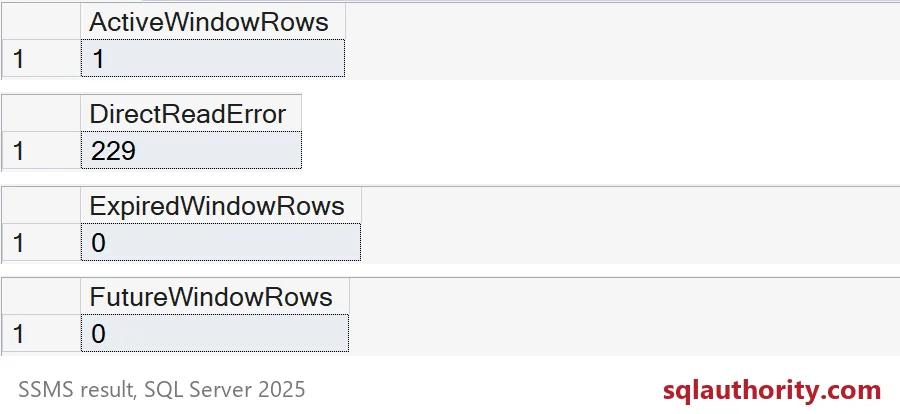
Read the four results from top to bottom. In the active window the reader sees 1 row. A direct read of the table fails with error 229, so the view is the only door. After the window ends, the same query returns 0 rows. Before a future window starts, it also returns 0.
Here is the error text, so you know what a denied request looks like. It reads: The SELECT permission was denied on the object ‘DemoDocuments’. It then names your database and schema.
EXECUTE AS USER = N'DemoReader';
BEGIN TRY
    SELECT * FROM dbo.DemoDocuments;
END TRY
BEGIN CATCH
    SELECT ERROR_MESSAGE() AS DirectReadMessage;
END CATCH;
REVERT;
Know what the view does not do
The view checks the clock on every query, so expired rows can stay in the table for audit. You do not need a cleanup job to deny access. But the view does not disconnect anyone, disable a login or remove other permissions. Retire accounts through your normal process.
Also think about identity. USER_NAME() works when each person has their own database user. If an application connects as one shared user, every person looks the same to the view. You then need a trusted way to pass the real person’s identity. Finally, hunt for side doors: a table grant someone made last year, or a stored procedure that reads the table directly. The view is only as strong as the paths around it.
Last, clean up the demo objects.
DROP VIEW IF EXISTS dbo.MyDemoDocuments;
DROP TABLE IF EXISTS dbo.DemoAccess, dbo.DemoDocuments;
DROP USER IF EXISTS DemoReader;
Next time someone adds a ValidUntil column, ask which query reads it and test as the restricted user.
An expiration date is not enforcement, it is a condition the read path must apply.
Published by Pinal Dave on SQLAuthority. More of my work at pinaldave.com.
Discover more from SQL Authority with Pinal Dave
Subscribe to get the latest posts sent to your email.