
Recently, one of my friends sent me email that he is having some problem with his very small database. We talked for a few minutes and we agreed that to further investigation, I will need access to the whole database. As the database was very big he dropped it in a common location. Let us learn about error Database diagram support objects cannot be installed because this database does not have a valid owner.
I was able to install the database successfully. He informed me that he has created a database diagram so I can easily understand his database tables. As soon as I tried to open the database diagram I faced following error. For a while I could not figure out how to resolve the error.
Error:
Database diagram support objects cannot be installed because this database does not have a valid owner. To continue, first use the Files page of the Database Properties dialog box or the ALTER AUTHORIZATION statement to set the database owner to a valid login, then add the database diagram support objects.
Workaround / Fix / Solution :
Well, for a while I attempted few things and nothing worked. After that I carefully read the error and I realized that a solution was proposed in the error only. I just have to read it carefully. Here are the steps I did to make this work.
-- Replace YourDatabaseName in following script
ALTER AUTHORIZATION ON DATABASE::YourDatabaseName TO sa
GO
- Select your database >> Right Click >> Select Properties
- Select FILE in left side of page
- In the OWNER box, select button which has three dots (…) in it
- Now select user ‘sa’ or NT AUTHORITY\SYSTEM and click OK.
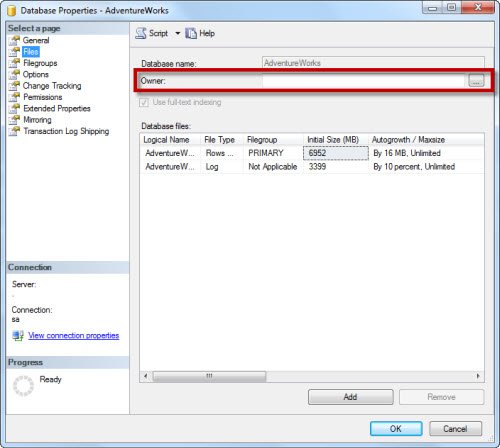
This should solve your problem.
Please note, I suggest you check your security policies before changing authorization. I did this to quickly solve my problem on my development server. If you are on production server, you may open yourself to potential security compromise.
Published by Pinal Dave on SQLAuthority. More of my work at pinaldave.com.
Discover more from SQL Authority with Pinal Dave
Subscribe to get the latest posts sent to your email.




184 Comments. Leave new
You are awesome, Thank you buddy!
Thank you. It works
It works like a magic. You are the best. My sql server is 2022 and the sql studio manager is 2017. I thought that was the problem but now i see it wasn’t and everything is working fine.