A certificate-signed procedure lets someone read one server DMV without holding the server permission. The caller gets EXECUTE on the procedure. The certificate carries the extra authority.

The request that sounds small
A developer pings you: “Can I see lock waits on production?” The view that holds them, sys.dm_os_wait_stats, needs VIEW SERVER PERFORMANCE STATE. That permission opens many other views too, not only the one the developer wants.
You could say no, and watch the developer ask again every Friday. Or you can wrap the one query in a stored procedure, sign it with a certificate, and grant EXECUTE on the procedure. The developer sees lock waits and nothing else.
Let me build it step by step. The demo creates a database, two logins and a certificate. Logins and certificates live at server level, so the last block removes all of them.
Set the stage
The first block clears leftovers from an earlier run, creates the demo database, a login called DemoCaller, and the procedure. It reads one row of lock-wait statistics. The caller gets EXECUTE on the procedure and nothing more. The password in the script is a test value, so use your own.
USE master;
GO
IF SUSER_ID(N'DemoCaller') IS NOT NULL DROP LOGIN DemoCaller;
IF SUSER_ID(N'DemoCertLogin') IS NOT NULL DROP LOGIN DemoCertLogin;
IF EXISTS (SELECT 1 FROM sys.certificates WHERE name = N'DemoCert') DROP CERTIFICATE DemoCert;
DROP DATABASE IF EXISTS SqlAuthorityDemo;
GO
CREATE DATABASE SqlAuthorityDemo;
GO
CREATE LOGIN DemoCaller WITH PASSWORD = N'Demo#Caller-2026-xQ', CHECK_POLICY = OFF;
GO
USE SqlAuthorityDemo;
GO
CREATE USER DemoCaller FOR LOGIN DemoCaller;
GO
CREATE PROCEDURE dbo.ReadLockWaits
AS
BEGIN
    SET NOCOUNT ON;
    SELECT wait_type, waiting_tasks_count, wait_time_ms
    FROM sys.dm_os_wait_stats
    WHERE wait_type = N'LCK_M_S'
    ORDER BY wait_type;
END;
GO
GRANT EXECUTE ON dbo.ReadLockWaits TO DemoCaller;
GO
First, the call that fails
Now run the procedure as DemoCaller. The login can execute the procedure, but the procedure reads a server-level view, and the caller has no right to that view.
EXECUTE AS LOGIN = 'DemoCaller';

BEGIN TRY
    EXEC dbo.ReadLockWaits;
END TRY
BEGIN CATCH
    SELECT N'Unsigned call' AS Test, ERROR_NUMBER() AS ErrorNumber;
END CATCH;

REVERT;
The first result in the picture below shows error number 300. That is the permission-denied error. Nothing is broken. This is the starting point we want to fix.
Sign the procedure
Signing takes a few steps. Create a certificate in the database. Copy its public part into master, without the private key. Create a login from that certificate and give that login VIEW SERVER PERFORMANCE STATE. Then sign the procedure with the certificate.
CREATE CERTIFICATE DemoCert
    ENCRYPTION BY PASSWORD = N'Demo#Cert-2026-xQ'
    WITH SUBJECT = 'Narrow lock wait reader';
GO
DECLARE @Encoded nvarchar(max) = CONVERT(nvarchar(max), CERTENCODED(CERT_ID(N'DemoCert')), 1);
DECLARE @Sql nvarchar(max) = N'USE master; CREATE CERTIFICATE DemoCert FROM BINARY = ' + @Encoded + N';';
EXEC sys.sp_executesql @Sql;
GO
USE master;
GO
CREATE LOGIN DemoCertLogin FROM CERTIFICATE DemoCert;
GRANT VIEW SERVER PERFORMANCE STATE TO DemoCertLogin;
GO
USE SqlAuthorityDemo;
GO
ADD SIGNATURE TO OBJECT::dbo.ReadLockWaits
    BY CERTIFICATE DemoCert WITH PASSWORD = N'Demo#Cert-2026-xQ';
GO
Notice who holds the permission. It is the certificate login, not DemoCaller. Now call the procedure again as DemoCaller. I also check whether the caller has the server permission directly.
EXECUTE AS LOGIN = 'DemoCaller';

SELECT HAS_PERMS_BY_NAME(NULL, NULL, N'VIEW SERVER PERFORMANCE STATE') AS DirectServerPermission;
EXEC dbo.ReadLockWaits;

REVERT;

SELECT COUNT(*) AS SignatureCount
FROM sys.crypt_properties
WHERE major_id = OBJECT_ID(N'dbo.ReadLockWaits');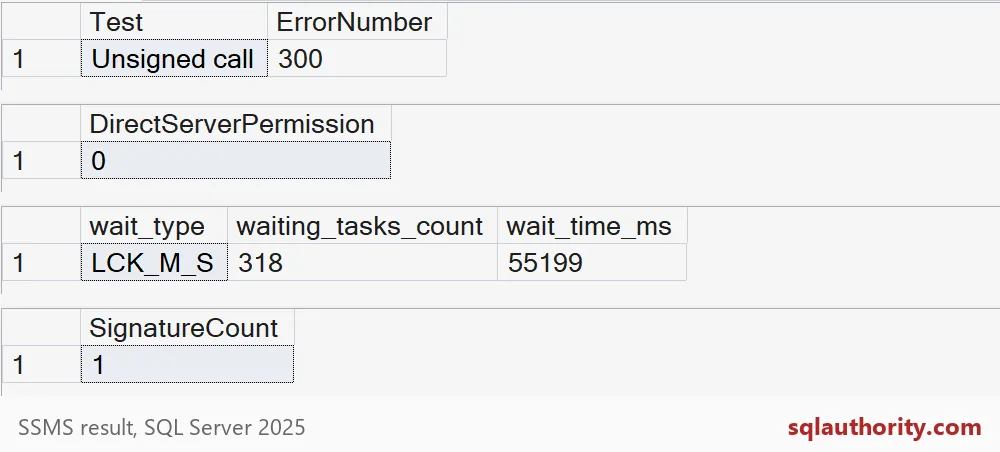
Read the picture from the top. The unsigned call raised error 300. The direct server permission check returned 0, so the caller still has no right of their own. The signed call returned a row for the LCK_M_S wait type. The signature count is 1.
The two wait counters in my capture belong to my server. Yours will differ, and that is fine. What matters is that the row came back at all.

What happens when someone edits the procedure
Here is the part that protects you. A signature belongs to the exact text of the procedure. Change the text, and SQL Server throws the signature away. Watch it happen. I widen the query to include one more wait type.
ALTER PROCEDURE dbo.ReadLockWaits
AS
BEGIN
    SET NOCOUNT ON;
    SELECT wait_type, waiting_tasks_count, wait_time_ms
    FROM sys.dm_os_wait_stats
    WHERE wait_type IN (N'LCK_M_S', N'LCK_M_X')
    ORDER BY wait_type;
END;
GO
SELECT COUNT(*) AS SignatureCountAfterAlter
FROM sys.crypt_properties
WHERE major_id = OBJECT_ID(N'dbo.ReadLockWaits');

EXECUTE AS LOGIN = 'DemoCaller';

BEGIN TRY
    EXEC dbo.ReadLockWaits;
END TRY
BEGIN CATCH
    SELECT N'Edited procedure' AS Test, ERROR_NUMBER() AS ErrorNumber;
END CATCH;

REVERT;
The signature count drops to 0, and the caller gets error 300 again. Nobody can quietly turn your narrow window into a wide one, because the new version has no signature until you sign it again. That also means any legitimate edit needs a re-sign step. Add it to your deployment checklist, or you will get the 2 AM call.
Clean up
The last block drops the demo database and the server-level objects. Run it, even if something above failed.
USE master;
GO
DROP DATABASE IF EXISTS SqlAuthorityDemo;
DROP LOGIN DemoCaller;
DROP LOGIN DemoCertLogin;
DROP CERTIFICATE DemoCert;
A few habits keep this safe. Keep the procedure narrow. Never let it run arbitrary SQL that a caller passes in. Guard the certificate password. Test with the real application login too, because an old server-level grant on that login could hide a broken signature.
Next time a developer asks for a server permission, offer a signed procedure first.
A signature is not a broad grant, it is authority tied to reviewed code.
Published by Pinal Dave on SQLAuthority. More of my work at pinaldave.com.
Discover more from SQL Authority with Pinal Dave
Subscribe to get the latest posts sent to your email.