Large IN lists are fine until they get really large, and then SQL Server spends more time reading your query than answering it. A temp table holding the same IDs often fixes that. It also brings a few traps, so let me walk through them.

The spreadsheet that became a query
Picture a colleague who sends you a spreadsheet with 2,500 order IDs. “Can you pull these quickly?” Of course. You paste the column into an IN list, press F5, and it works. So the next person pastes 20,000.
The query is not wrong. It is just a very long sentence that SQL Server has to read, parse and plan every time the list changes. Let me build a small example and see where the time goes.
Build a target and a list of keys
The target has 5,000 rows. The selection holds the 2,500 even keys, in a table with a primary key. Use one SSMS window for all the blocks, because temp tables belong to your session.
SET NOCOUNT ON;
DROP TABLE IF EXISTS #Target;
DROP TABLE IF EXISTS #Selected;
CREATE TABLE #Target (Id int NOT NULL PRIMARY KEY, Payload char(10) NOT NULL);
INSERT #Target SELECT value, 'sample' FROM GENERATE_SERIES(1, 5000);
CREATE TABLE #Selected (Id int NOT NULL PRIMARY KEY);
INSERT #Selected SELECT Id FROM #Target WHERE Id % 2 = 0;
SELECT (SELECT COUNT(*) FROM #Target) AS TargetRows,
       (SELECT COUNT(*) FROM #Selected) AS SelectedRows;
The counts are 5000 and 2500. Both queries in the next step use these same tables.
Compare the long list with a join
The first query builds a real IN list with 2,500 literal numbers and runs it. The second joins to the temp table. The dynamic SQL here uses only numbers from our own test table. In real code, never glue user input into a statement like this.
DECLARE @list nvarchar(max), @sql nvarchar(max);
SELECT @list = STRING_AGG(CONVERT(nvarchar(max), Id), N',')
    WITHIN GROUP (ORDER BY Id)
FROM #Selected;
SET @sql = N'SELECT COUNT(*) AS LiteralMatches FROM #Target WHERE Id IN ('
    + @list + N');';
SET STATISTICS TIME ON;
SET STATISTICS IO ON;
EXEC sys.sp_executesql @sql;
SELECT COUNT(*) AS JoinMatches
FROM #Target AS t
JOIN #Selected AS s ON s.Id = t.Id;
SET STATISTICS IO OFF;
SET STATISTICS TIME OFF;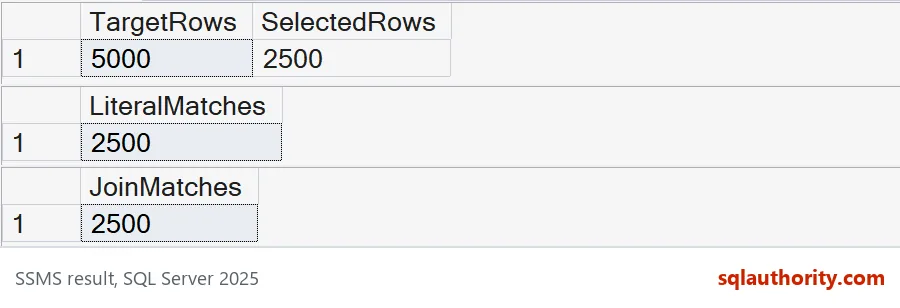
Both queries find 2500 rows, so the answers agree. Now open the Messages tab. For the IN list, the line “parse and compile time” is far bigger than its execution time. On my run, SQL Server worked longer on reading the text than on finding the rows. Your numbers will differ, so check your own.
The join shows no big compile time. It reads two small tables, and the IDs are just data. This one-line check shows how long the text was.
SELECT LEN(STRING_AGG(CONVERT(nvarchar(max), Id), N',')) AS ListCharacters,
       COUNT(*) AS Ids
FROM #Selected;
It returns 11947 characters for 2500 IDs. Double the list and the text doubles with it.

Do not let a join change the answer
IN asks whether a row is in the list. A join returns one row for every match. With duplicates in the list, those are different questions. Here is a loose list with the number 2 three times.
DROP TABLE IF EXISTS #Loose;
CREATE TABLE #Loose (Id int NOT NULL);
INSERT #Loose VALUES (2), (2), (2), (4);

SELECT COUNT(*) AS InRows
FROM #Target AS t
WHERE t.Id IN (SELECT Id FROM #Loose);

SELECT COUNT(*) AS JoinRows
FROM #Target AS t
JOIN #Loose AS l ON l.Id = t.Id;
IN returns 2 rows, one for ID 2 and one for ID 4. The join returns 4, because ID 2 matched three times. That is how a report quietly gets inflated. The primary key on #Selected is the fix, since it refuses duplicates in the first place.
BEGIN TRY
    INSERT #Selected VALUES (2);
END TRY
BEGIN CATCH
    SELECT ERROR_NUMBER() AS DuplicateError;
END CATCH;
The error is 2627, a primary key violation. If your list comes from a file and may contain repeats, load it with DISTINCT or use EXISTS instead of a join.
Check the empty list, then clean up
Test the empty list too. Someone will eventually send you a spreadsheet with no rows. Both forms should return zero, and they do.
TRUNCATE TABLE #Selected;

SELECT COUNT(*) AS EmptyMembership
FROM #Target AS t
WHERE t.Id IN (SELECT Id FROM #Selected);

SELECT COUNT(*) AS EmptyJoin
FROM #Target AS t
JOIN #Selected AS s ON s.Id = t.Id;

DROP TABLE IF EXISTS #Loose;
DROP TABLE IF EXISTS #Selected;
DROP TABLE IF EXISTS #Target;
Both queries return 0. The last three lines remove the temp tables.
How I decide on my own server
I keep a short IN list when it is short and readable. Ten values do not need a temp table. When the list grows into the hundreds or thousands, I load it into a keyed temp table. Then I compare parse and compile time, execution time and total round trip. I also test a few IDs, many IDs, duplicates and an empty list.
A faster query that returns a different answer is not an improvement.
Next time a spreadsheet arrives, ask how many rows it has before you paste it.
A long list of IDs is not query text, it is data that belongs in a table.
Published by Pinal Dave on SQLAuthority. More of my work at pinaldave.com.
Discover more from SQL Authority with Pinal Dave
Subscribe to get the latest posts sent to your email.