Return codes describe procedure status, while result sets and output parameters carry application values. A returned status of zero does not mean the calculated value is zero. Treating these channels alike can quietly break the caller.

Give each return channel a clear contract
A procedure can send rows, assign an output parameter and return an integer status. The caller handles each channel separately. A client must also handle raised errors independently of normal return values.
The example doubles an optional integer input. Its result set and output parameter contain the doubled number. Status zero means work completed, while status one means the caller supplied no work. An invalid doubling range raises an error.
Use a temporary procedure for the demonstration
The local temporary procedure #ADReturnContract changes no application table, user or permanent procedure. Run the blocks below in order in one connection, because a local temporary procedure disappears when its connection closes.
CREATE PROCEDURE #ADReturnContract
    @Input int = NULL,
    @Doubled int OUTPUT
AS
BEGIN
    SET @Doubled = NULL;
    -- NULL means the caller intentionally supplied no work.
    IF @Input IS NULL RETURN 1;
    IF @Input < -1073741824 OR @Input > 1073741823
        THROW 51301, 'The doubled value would exceed the int range.', 1;
    SET @Doubled = @Input * 2;
    SELECT @Doubled AS computed_value;
    RETURN 0;
END;
The procedure clears its output variable before handling optional input. It rejects values that cannot be doubled within the int range. Therefore, ordinary completion and a raised exception have different contracts.
Capture return codes separately from the value
The assignment before the procedure name receives the integer status. The OUTPUT keyword after the argument retrieves the assigned value. The procedure also emits a result set containing that value.
DECLARE @Status int, @Value int = 999;
EXEC @Status = #ADReturnContract
    @Input = 21, @Doubled = @Value OUTPUT;
SELECT @Status AS return_code, @Value AS caller_output;
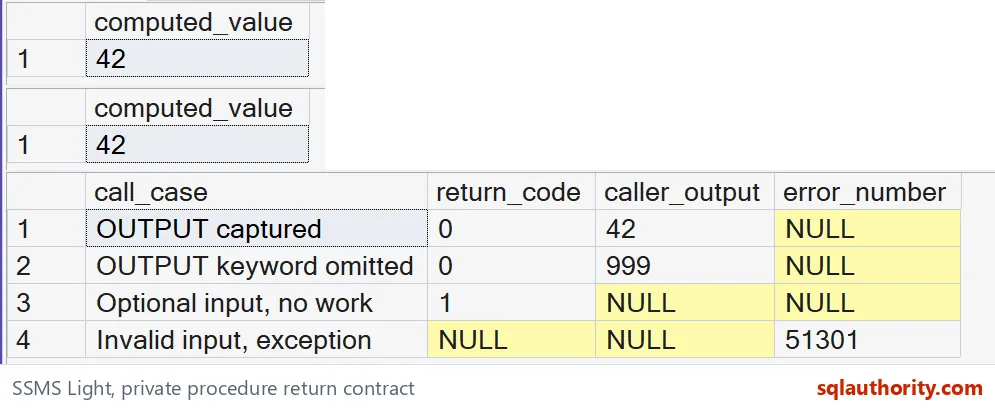
For input 21, the calculation produces 42. The status remains zero because that value describes completion. In an application, read returned rows through the driver’s result-set interface. Do not assume the return variable contains those rows.

Omitting OUTPUT changes the caller’s result
Declaring a parameter as OUTPUT inside the procedure does not update every caller automatically. The caller must request output copying too. This next call intentionally omits that keyword.
DECLARE @Status int, @Value int = 999;
EXEC @Status = #ADReturnContract
    @Input = 21, @Doubled = @Value;
SELECT @Status AS return_code, @Value AS caller_output;
The caller starts with 999 in its variable. Without the caller’s OUTPUT keyword, that variable retains 999. The procedure’s emitted row still contains 42. Successful execution does not repair an incorrectly captured output parameter.
Keep normal no-work status distinct from an exception
Here, optional NULL input is deliberately a normal no-work request. The procedure returns status one and a NULL output without producing a calculated row. That convention belongs to this procedure, rather than SQL Server generally.
| Call | Status | Caller output | Error |
|---|---|---|---|
| 21, with OUTPUT | 0 | 42 | None |
| 21, without OUTPUT | 0 | 999 | None |
| NULL optional input | 1 | NULL | None |
| 2147483647 input | No normal contract | No normal contract | 51301 |
The last input exceeds the accepted doubling range. The block below catches error 51301 and records it separately. It deliberately reports no normal status or output for that exception. Do not interpret a stale caller variable as a successful return.
DECLARE @Results table
(
    call_case varchar(35),
    return_code int NULL,
    caller_output int NULL,
    error_number int NULL
);
DECLARE @Status int, @Value int;
SET @Value = 999;
EXEC @Status = #ADReturnContract @Input = 21, @Doubled = @Value OUTPUT;
INSERT @Results VALUES ('OUTPUT captured', @Status, @Value, NULL);
SET @Value = 999;
EXEC @Status = #ADReturnContract @Input = 21, @Doubled = @Value;
INSERT @Results VALUES ('OUTPUT keyword omitted', @Status, @Value, NULL);
SET @Value = 999;
EXEC @Status = #ADReturnContract @Input = NULL, @Doubled = @Value OUTPUT;
INSERT @Results VALUES ('Optional input, no work', @Status, @Value, NULL);
BEGIN TRY
    EXEC @Status = #ADReturnContract @Input = 2147483647, @Doubled = @Value OUTPUT;
END TRY
BEGIN CATCH
    INSERT @Results VALUES ('Invalid input, exception', NULL, NULL, ERROR_NUMBER());
END CATCH;
SELECT call_case, return_code, caller_output, error_number FROM @Results;
DROP PROCEDURE #ADReturnContract;
Return codes cannot replace error handling
Use exceptions for genuine failures. Returning a nonzero integer alone can leave an application treating a failed operation as ordinary completion. Document normal statuses, output nullability and emitted result sets alongside the procedure.
Keep the three channels apart, and the caller always knows where to look.
A return code is not the answer, it is the status of the call.
Published by Pinal Dave on SQLAuthority. More of my work at pinaldave.com.
Discover more from SQL Authority with Pinal Dave
Subscribe to get the latest posts sent to your email.