smalldatetime rounds the supplied time to a minute and can move it into the next day. I inspect the complete timestamp instead of treating the change as hidden seconds.

The type stores minute resolution
smalldatetime has one-minute accuracy. Its seconds are zero and it has no stored fractional seconds. The supported date range is also narrower than datetime2. This example uses ordinary dates well inside that range.
The newer temporal types are the better choice for new work. An existing smalldatetime field can still need accurate interpretation. Understanding its conversion behavior is therefore useful without promoting it as a new default. The script examines a bounded set of casts.
I’d distinguish rounding from a report format that suppresses seconds. Formatting can leave the stored timestamp intact. Casting to smalldatetime changes its representable value. Later widening doesn’t restore the original seconds.
Compare before and after the minute boundary
The literal input includes 12:34:29 and 12:34:30 on the same date. Each text value is first converted to datetime2(3) with explicit ISO style 126. It is then cast to smalldatetime. Both original and rounded values remain visible.
The first selected time rounds to 12:34:00. The second rounds to 12:35:00. This isn’t simple truncation of the seconds. The selected thirty-second case advances the minute rather than keeping the original minute unchanged.
Another input is 23:59:30 on December 31. Its rounded value is midnight on January 1 of the next year. The output also extracts that rounded date. A reader can therefore see the day change without inspecting a shortened time-only display.
WITH Inputs AS
(
    SELECT Id, CONVERT(datetime2(3), DateText, 126) AS OriginalTime
    FROM (VALUES (1, '2026-01-01T12:34:29.000'),
                 (2, '2026-01-01T12:34:30.000'),
                 (3, '2026-12-31T23:59:30.000'),
                 (4, '2026-01-01T00:00:00.000'), (5, NULL)) AS v(Id, DateText)
)
SELECT i.Id, i.OriginalTime, a.RoundedTime,
       CAST(a.RoundedTime AS date) AS RoundedDate
FROM Inputs AS i
CROSS APPLY (VALUES (CAST(i.OriginalTime AS smalldatetime))) AS a(RoundedTime)
ORDER BY i.Id;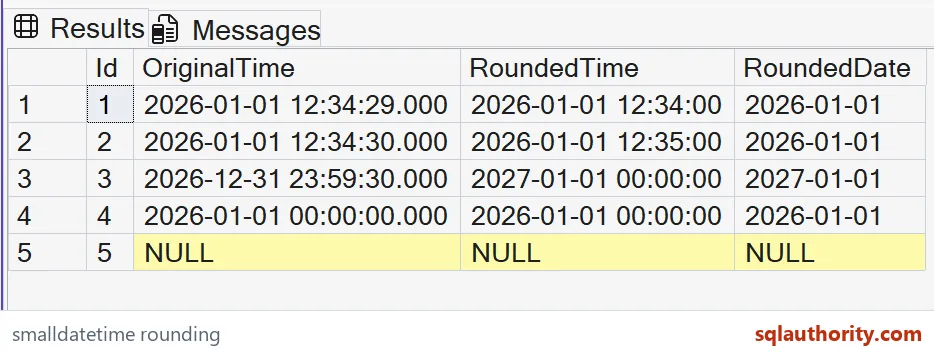

Do not move a reporting boundary accidentally
A report grouping by the original date and another grouping after narrowing can assign that last event to different days. Neither cast decides which reporting rule is intended. That choice belongs to the data contract. Rounding placement can affect more than displayed seconds.
I can justify minute resolution when the source itself records only minute-level values. Converting a more precise event stream needs another review. Records separated by seconds can become equal after narrowing. A unique event sequence may need a separate stable key.
The precise rounding threshold includes fractional-second detail near thirty seconds. This example uses whole seconds safely on either side. It doesn’t invent a general threshold from only two rows. Check the type’s full range and rounding rules when validating actual input.
Keep missingness and range explicit
An exact midnight input stays midnight. NULL remains missing in both the rounded timestamp and derived date. The script doesn’t substitute a day. Those cases separate real boundaries from absent input.
The selected values fit smalldatetime’s range. A datetime2 source can hold dates that don’t fit this destination. Successful casts of these values therefore don’t prove every source row is convertible. Validate the actual permitted range before narrowing a stored column.
The complete CTE and SELECT change no objects or connection settings. ORDER BY fixes five cases. Compare every original temporal value with its converted counterpart. Keep the near-midnight case visible so a changed date cannot disappear behind the minute display.
Run the thirty-second case once and the year-end surprise will make sense.
Minute resolution is not hidden seconds, it is a rounded timestamp that can carry across a calendar boundary.
Published by Pinal Dave on SQLAuthority. More of my work at pinaldave.com.
Discover more from SQL Authority with Pinal Dave
Subscribe to get the latest posts sent to your email.