DATETIME2FROMPARTS interprets the fraction argument using the requested fractional precision. I choose those two arguments together. The same integer fraction can describe very different parts of a second.
Make the complete date and time explicit
The examples construct a leap-day timestamp with separate year, month and day components. They also provide hour, minute and second explicitly. No regional date string is needed for the constructor.
The selected date is valid in 2024. A different year could make the same February day invalid. Fraction precision does not relax the constructor’s calendar requirements.
I use fixed valid date and time components throughout the comparison. That leaves the fraction arguments as the deliberate variable. The examples do not change session settings or supply a current server time.
Compare the same fraction at two precisions
The first query supplies seven as the fraction argument twice. At precision three, the expected fraction is seven milliseconds. At precision seven, it represents seven units of one hundred nanoseconds.
The expected displayed endings are .007 and .0000007 respectively. Those values are not two formatting versions of an identical timestamp. They identify different instants within the same displayed second.
The conversion to style 126 text makes the fractional result readable. A varchar length of twenty-seven provides enough room for both outputs. The constructor itself returns datetime2 with the selected precision.
I wouldn’t copy a fractions value from one precision contract into another unchanged. That would change its unit. A component import needs both the integer and the precision to describe the intended fraction.
SELECT
    CONVERT(varchar(27),DATETIME2FROMPARTS(2024,2,29,12,34,56,7,3),126) AS PrecisionThree,
    CONVERT(varchar(27),DATETIME2FROMPARTS(2024,2,29,12,34,56,7,7),126) AS PrecisionSeven;
Represent the same half second deliberately
The second query supplies five hundred at precision three. It supplies five million at precision seven. Both are expected to describe the same half second.
Their displayed endings are .500 and .5000000. The number of printed digits differs because the result types have different scales. This comparison changes the argument values intentionally to preserve the temporal meaning.
The ResultScale column inspects the precision-three constructed value. Its expected result is three. It checks type information without inferring precision from a client’s preferred timestamp display.
A client may hide or add displayed zeros. I’d keep the declared precision in an interface contract instead. Display alone should not decide how another component system interprets the integer fraction.
SELECT
    CONVERT(varchar(27),DATETIME2FROMPARTS(2024,2,29,12,34,56,500,3),126) AS HalfSecondThree,
    CONVERT(varchar(27),DATETIME2FROMPARTS(2024,2,29,12,34,56,5000000,7),126) AS HalfSecondSeven,
    CAST(SQL_VARIANT_PROPERTY(CAST(DATETIME2FROMPARTS(2024,2,29,12,34,56,500,3)
        AS sql_variant),'Scale') AS int) AS ResultScale;
Treat missing components and invalid arguments separately
The final query supplies a missing year and then a missing fraction. Each expected result is NULL because a required component is absent. The precision argument remains the explicit integer three.
A missing precision is different from these missing required components. It produces an error. This example does not deliberately execute that invalid path.
Invalid calendar dates and impossible time components also produce errors. At precision zero, fractions must be zero. These requirements belong to construction, even when a desired output display appears simpler.
Validate incoming component records before applying a constructor to untrusted combinations. A valid fraction does not prove that February contains the supplied day. Keep separate rejection reasons for the calendar and fractional parts.
The fraction’s unit comes from the supplied precision. A valid time also needs valid calendar components. Keep both requirements visible instead of inspecting only the decimal digits after the seconds.
When adapting the query, document the precision beside the source fraction field. Include a nonzero fraction and a leap-day boundary. Those cases prevent an all-zero timestamp from hiding a unit mistake.
SELECT
    CONVERT(varchar(27),DATETIME2FROMPARTS(NULL,2,29,12,34,56,7,3),126) AS MissingYear,
    CONVERT(varchar(27),DATETIME2FROMPARTS(2024,2,29,12,34,56,NULL,3),126) AS MissingFraction;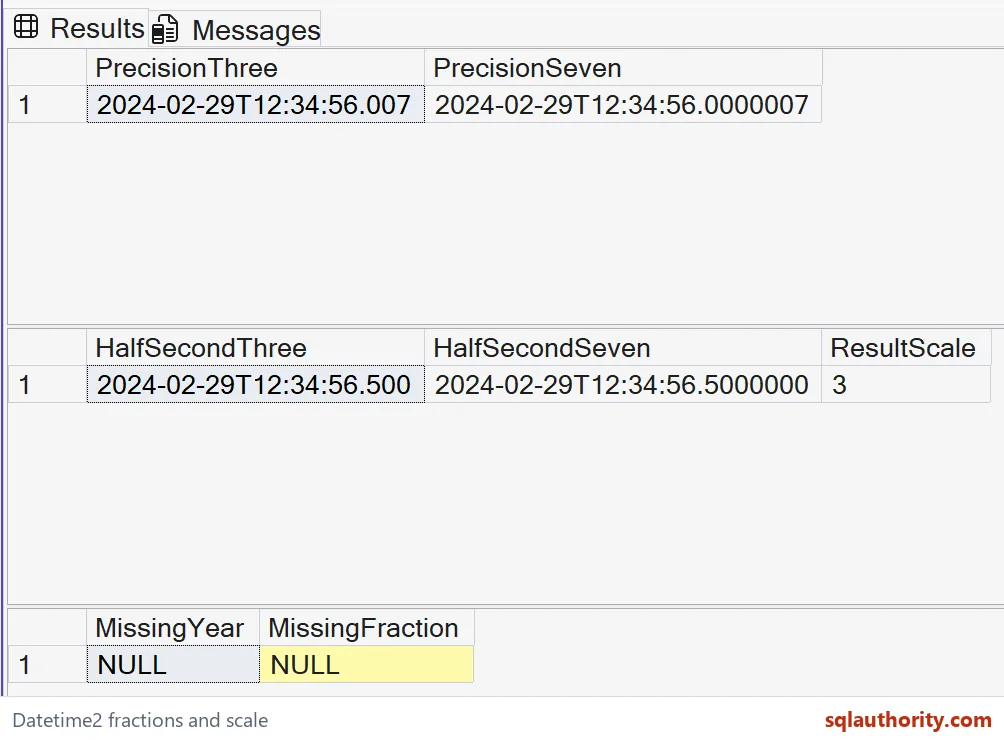
State the precision beside the fraction, and the unit stays clear.
A fraction integer is not a time unit, it is a number that needs its precision.
Published by Pinal Dave on SQLAuthority. More of my work at pinaldave.com.
Discover more from SQL Authority with Pinal Dave
Subscribe to get the latest posts sent to your email.