
Many developers picture a table variable in memory and a temp table in TempDB, but both actually live in TempDB. Recently, I have been conducting many training sessions at a leading technology company in India. During the discussion of temp table and table variable, I quite commonly hear that Table Variables are stored in memory and Temp Tables are stored in TempDB. I would like to bust this misconception by suggesting following:
Temp Table and Table Variable — both are created in TempDB and not in memory.
Let us prove this concept by running the following T-SQL script.
/* Check the difference between Temp Table and Memory Tables */
-- Get Current Session ID
SELECT @@SPID AS Current_SessionID
-- Check the space usage in page files
SELECT user_objects_alloc_page_count
FROM sys.dm_db_session_space_usage
WHERE session_id = (SELECT @@SPID )
GO
-- Create Temp Table and insert three thousand rows
CREATE TABLE #TempTable (Col1 INT)
INSERT INTO #TempTable (Col1)
SELECT TOP 3000 ROW_NUMBER() OVER(ORDER BY a.name)
FROM sys.all_objects a
CROSS JOIN sys.all_objects b
GO
-- Check the space usage in page files
SELECT user_objects_alloc_page_count
FROM sys.dm_db_session_space_usage
WHERE session_id = (SELECT @@SPID )
GO
-- Create Table Variable and insert three thousand rows
DECLARE @temp TABLE(Col1 INT)
INSERT INTO @temp (Col1)
SELECT TOP 3000 ROW_NUMBER() OVER(ORDER BY a.name)
FROM sys.all_objects a
CROSS JOIN sys.all_objects b
GO
-- Check the space usage in page files
SELECT user_objects_alloc_page_count
FROM sys.dm_db_session_space_usage
WHERE session_id = (SELECT @@SPID )
GO
-- Clean up
DROP TABLE #TempTable
GO
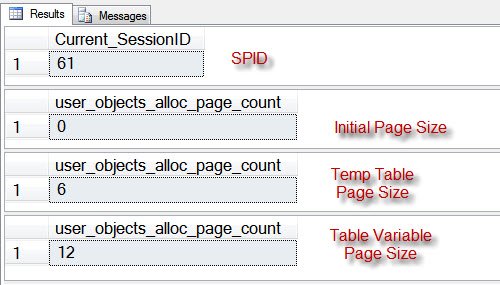
Let us see the resultset. It is very clear that the size of the table variable and temp table is the same and created in TempDb.
Have you ever heard of this misconception? Do you know any other method to prove that both Temp Table and TableVariable are created in TempDB.
Beyond the Table Variable in Memory Myth: Real Differences
If both live in TempDB, why pick one over the other? Because they behave differently in ways that matter far more than where the pages sit. Also, small objects of either kind may stay in the buffer pool as cached pages, just like any other table, so ‘memory versus disk’ was never the right way to think about it.
- Statistics. A temp table gets column statistics. A table variable does not, so the optimizer often guesses a tiny row count. In SQL Server 2019 and later, deferred compilation at compatibility level 150 helps by using the actual row count at first compile.
- Transactions. Rows in a table variable stay put after a ROLLBACK. Rows in a temp table roll back with the transaction.
- Scope. A table variable lives only for the batch or procedure. A temp table can be seen by procedures called from the one that created it.
My simple rule: small row counts and simple use, a table variable is fine. Larger sets that get joined or filtered, try a temp table and compare the plans.
If you truly want memory, SQL Server 2014 and later offer memory-optimized table types through In-Memory OLTP. That is the one case where a table variable really does skip TempDB.
Published by Pinal Dave on SQLAuthority. More of my work at pinaldave.com.



68 Comments. Leave new
Good Explanation
About Temp Table & Table Variable
really busted the misconception of many!!!! :)
Hi Pianl,
I want to know the temp table name max length in temp db.
What is the naming convention will be used to store the temp table name?
Please explain the procees which is happening inside the SQL Server while creating temp table?
Thanks in Advance.
Regards
Prasad
Maximum table name length is 128 for any table in SQL Server be it temporary or normal (permanent) tables. There is one thing which is specific to local temp table nomenclature. We don’t get to use all 128 characters in case of local temp tables. SQL Server has reserved first character in local temp table nomenclature as a fixed prefix (#). SQL Server has also reserved last 12 characters in which SQL Server engine puts an auto-incrementing serial number to uniquely identify them across user sessions or SQL connections. Generally when you create a local temp table for.e.g. MyLocalTempTable it will be of the form #MyLocalTempTable_________000000000005 Whatever space remains unused is filled by underscores by SQL Server engine.
Global temp table nomenclature is a bit simpler in that sense. We get to use 126 of 128 characters because first two characters are used to prefix the global temp table name with ##.
Thanks for the explanation; my question now is WHICH ONE IS BETTER?
Regards,
Terry Amusa
temporary table gives better performance than temporary variable.why means when we want to fire any query the temp table with bulk data gives result with max speed . table variable only for small amount of data.
Hi,
That is true, but when we used Temp table in place of table variable, performance much faster.
We didn’t try to prove it. But there should be some difference in storage, that’s why we got better performance.
is it when releasing memory after used?
as usual Great Explanation..
Thanks,
Tejas
Hi Tejas,
1. Yes as far as performance goes table variable does not outperform temp tables necessarily. Here is a quote from sqlmag (SQL Server Magazine)
Table Variables vs. Temporary Tables
By: Brian Moran
Quote:
A senior member of the SQL Server development team told me that table variables use internal metadata in a way that prevents the engine from using a table variable within a parallel query. He also said that SQL Server maintains statistics for queries that use temporary tables but not for queries that use table variables. Without statistics, SQL Server might choose a poor processing plan for a query that contains a table variable. The development team member added that you should limit your use of SQL Server 2000 table variables to reasonably small queries and data sets and use temporary tables for larger data sets.
2. There is a situation using a table variable is preferred.
In a user defined function if you want to access a temp table it is not possible, where you can access a table variable. For example: the following will work: the second example will not work, there will be compilation erors:
CREATE FUNCTION dbo.example1
(
)
RETURNS INT
AS
BEGIN
DECLARE @t1 TABLE (i INT)
INSERT @t1 VALUES(1)
INSERT @t1 VALUES(2)
UPDATE @t1 SET i = i + 5
DELETE @t1 WHERE i < 7
DECLARE @max INT
SELECT @max = MAX(i) FROM @t1
RETURN @max
END
GO
Example 2:
CREATE FUNCTION dbo.example2
(
)
RETURNS INT
AS
BEGIN
CREATE TABLE #t1 (i INT)
INSERT #t1 VALUES(1)
INSERT #t1 VALUES(2)
UPDATE #t1 SET i = i + 5
DELETE #t1 WHERE i < 7
DECLARE @max INT
SELECT @max = MAX(i) FROM #t1
RETURN @max
END
GO
This Q/A on stackoverflow: leads to a few other articles (note the accepted answer), the MS KB article seems to be down right now, but the MSDN blog article above that says that “First, the table variable is NOT necessarily memory resident. Under memory pressure, the pages belonging to a table variable can be pushed out to tempdb.”, which sounds to me like a much smaller test would need to be performed to determine if a table variable, when it is afforded plenty of RAM, will stay in memory…
Hi Pinal,
Good clarification,(there are still articles out there which claim table variables are created in memory).
Thanks for the sql…
Ramdas
Thank you very much Ramdas for your very excellent note.
Hello All,
If you attempt this experiment with very simple and small number of rows, it will still give you same result – which means both of them are created in TempDB and no in memory.
Kind Regards,
Pinal
Hi pinal I run the query of 3000 records ,it gives the same result ,, I want to ask that ,,, is it proved that the great number o f rows can n’t be created in memory?
I did not understand how the page count 6 and 12 for temp table and table variable resp shows that both uses tempdb. Can anyone explain this? Thanks.
Please note that number 6 and 12 really does not matter.
What matters is from 0 to 6 and 6 to 12 so in fact I am talking about they have same difference.
Okay, got you. Many Thanks.
Hi Pinal,
Thanks for the explanation. Have couple of questions haunting me now:
1. If both reside in tempDB, how are table variables different from temp tables? What is the advantage of using table variables in place of temp tables?
2. Why is it adviced to go for temporary tables when there is huge amount of data being stored in table variables?
Request you to throw some light on this to make things more clear which would help us in better understanding on each of these at concept and usability level.
Thanks for all your knowledge sharing.
Regards,
Phani.
Hi Phani,
In the comments section i have attempted to throw some light on the questions you have, look at the reply for tejas shah in the comments section.
Thank you
Hello Phani,
In case of large amount of data temp table is advised because sql server creates, maintains and uses the statistics of temp table while generating the execution plan. Besides this we can create index in tenp tables if that is needed.
Regards,
Pinal Dave
I have tried the sequences and it worked ,but when i drop temp #TempTable the user_objects_alloc_page_count did not clear to 0 ,WHY?
Hello sir,
Great Topic to Discuss on blog.
good explanation with example and very useful too.
Ramdas has also give very good comment and very good explanation.
Used temp (#) in this procedure. Check it out…
alter procedure sp_Insert
(
@vStr varchar(max)
)
as
Begin
Declare @GetLine varchar(max), @GetCol varchar(max)
Declare @p int, @col1 varchar(30), @col2 varchar(30)
— Select @maxid = max(InvID) from tblMaster1
— Delete from tblDetail1 where lid = @maxid
create table #temp1 (col1 varchar(20), col2 varchar(20))
While (len(@vstr) !=0)
Begin
if (len(@vstr) !=0 and charindex(‘^^’,@vstr,0) = 0)
Begin
set @getline = @vstr
set @vstr = ”
End
else
Begin
Select @getline = substring(@vstr,0,charindex(‘^^’,@vstr,0))
End
set @p = 0
While (len(@getline)!=0)
Begin
if (len(@getline) !=0 and charindex(‘^’,@getline,0) = 0)
Begin
set @getcol=@getline
set @getline=”
End
Else
Begin
print @getline
Select @getCol = substring(@getline,0,charindex(‘^’,@getline,0))
print @getcol
End
set @P=@P+1
IF(@p=1)
begin
set @col1= @getcol
end
if (@p=2)
begin
set @col2= @getcol
end
Set @getline = substring(@getline , charindex(‘^’ ,@getline,0)+1, len(@getline))
print @getline
End
— Select @maxid= isnull(max(lid) from tbldet
insert into #temp1 values(@col1,@col2)
Set @vstr = substring(@vstr,charindex(‘^^’,@vstr,0)+2 , len(@vstr))
End
Select * from #temp1
End
On our test/development database server (2 sql server instances) with 4GB memory had a proc using table variabes and was running over 5 minutes. Changed to temp tables and is now running under 30 seconds. In production (single instance with 4GB) ran fine with table variables – around 30 seconds. Assuming memory constraints contributed to poor performance on test/development server, rather than stats.
Hello Jakey,
Table variables performs good only for small resordset. Because there data statistics is not used while creating the execution plan and because of that sometimes fully optimized plan are not created.
Table variable should be used where they are joined with small tables only.
There are many more details which are associated with table variables but this is just one line answer here.
Regards,
Pinal Dave
Hello, In terms of performance, is it better to create the temp table and use it or is it better to create the temp table on the fly?
Is this better to do as below:
create table #tv_target (c11 int, c22 char(100))
go
INSERT INTO #tv_target (c11, c22)
SELECT c1, c2 FROM tv_source
or is it better to do as below:
SELECT c1, c2 into #tv_target
FROM tv_source
Please see this query :-
SELECT TOP 3000 ROW_NUMBER() OVER(ORDER BY a.name)
gives error like
‘ROW_NUMBER’ is not a recognized function name.
when i run ito SQL 2005
Please can u tell me function for gettin rowno in
MS-SQL-2005 or 2008
@Nitin :
I think u r missing table name in the last..
It shud be:
SELECT TOP 3000 ROW_NUMBER() OVER (ORDER BY name) from TEST
Thanks a lot…
it was my mistake…
I want to do replication of two tables having two diff names and (same structure but diff records )
in single table at subscriber side.
Is it possible in SQL server 2008 or 2005.
Please give me solution.