I test SUBSTRING boundaries before using a calculated position. SQL Server numbers the first character as one. A start of zero doesn’t behave like one, even when the requested length looks reasonable.

Start with the ordinary slice
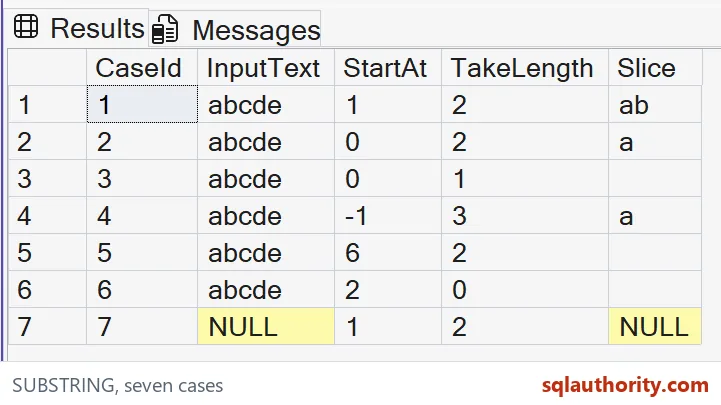
The first row requests two characters starting at position one. Its expected result is ab. This supplies a familiar baseline before the example changes the start position or the requested count.
I keep the input text and both numeric arguments beside the result. A small slice alone can hide why it was returned. Those extra columns make the boundary examples easier to compare without mentally reconstructing several nearly identical expressions.
WITH Cases AS
(
 SELECT CaseId, CAST(InputText AS nvarchar(12)) AS InputText,
        StartAt, TakeLength
 FROM (VALUES
 (1,N'abcde',1,2),(2,N'abcde',0,2),(3,N'abcde',0,1),
 (4,N'abcde',-1,3),(5,N'abcde',6,2),(6,N'abcde',2,0),
 (7,CAST(NULL AS nvarchar(12)),1,2)) v(CaseId,InputText,StartAt,TakeLength)
)
SELECT CaseId, InputText, StartAt, TakeLength,
       CAST(SUBSTRING(InputText,StartAt,TakeLength) AS nvarchar(40)) AS Slice
FROM Cases
ORDER BY CaseId;
Understand a start below one
When the start is below one, SUBSTRING begins at the first available character. Its returned count is reduced by the portion requested before that position. The count returned is the larger of start plus length minus one, or zero.
The second row therefore returns a rather than ab. The third requests a start of zero and length one, so nothing remains to return. Zero doesn’t become an alternate spelling of the first valid character position.

Keep negative starts separate from negative lengths
The fourth row uses start minus one with length three. Its expected result is a because the requested range reaches the first available character. This is different from supplying a negative length.
A negative length raises an error and terminates the statement. The demonstration avoids that error-producing input. I’d reject an invalid calculated length before using it. Starts below one need separate tests if the application’s rules allow them.
Read empty results deliberately
A start beyond the end returns an empty string. A valid start with zero requested length also returns an empty string. The fifth and sixth rows retain both reasons instead of collapsing them into one vague blank case.
A blank native grid cell can be easy to miss. I’d retain the case number and its input arguments during review. If the display needs a visible label for empty text, add that label separately without changing the Slice column’s value.
Preserve the missing-input case
The seventh row supplies typed NULL input and returns NULL. That isn’t the same value as either empty result. The outer cast gives every Slice an explicit nvarchar(40) result contract.
I don’t replace missing text with an empty string unless the business contract asks for that default. The substitution would erase a distinction that this example is trying to preserve. A downstream reader should decide how to display or reject the missing value.
Specify length for a portable example
This demonstration supplies all three arguments. SQL Server 2022 and earlier require the length argument. SQL Server 2025 supports an omitted length, but that is a separate syntax choice with a version requirement.
I’d keep an explicit length when sharing a boundary test across those versions. The focus here is the requested range, not shorthand syntax. If a production expression omits length, its minimum supported engine version should remain visible in the surrounding documentation.
Review the input type and counting rules
These examples use short Unicode text and ordinary characters. Binary inputs count bytes instead of characters. Supplementary-character collations also affect how surrogate pairs are counted.
I’d test representative text before reusing an offset from another encoding or binary format. A byte position isn’t automatically a character position. The query demonstrates these boundaries for its typed inputs. A real parser still needs a complete input-format contract.
Test the edges once, and the middle takes care of itself.
A calculated position is not a valid slice by itself, it is an argument that needs boundary checks.
Published by Pinal Dave on SQLAuthority. More of my work at pinaldave.com.
Discover more from SQL Authority with Pinal Dave
Subscribe to get the latest posts sent to your email.