Splitting a big table into equal key ranges is the quiet trick behind every batch job that finishes on time. Cut the table by key value and one worker gets most of the rows while the others nap. Cut it by row count and everyone finishes together. Let me show you the difference on a table with a gap in its keys.

A table with a hole in the middle
Picture an Orders table where a purge once removed a big slice of old ids. What is left is 500 orders numbered 1 to 500, then a gap, then 502 orders numbered 50001 to 50502. That is 1,002 rows. Run the blocks in order in one query window.
DROP TABLE IF EXISTS #Orders;
CREATE TABLE #Orders (OrderId int PRIMARY KEY, Processed bit NOT NULL DEFAULT 0);
INSERT #Orders (OrderId)
SELECT value FROM GENERATE_SERIES(1, 500)
UNION ALL
SELECT value FROM GENERATE_SERIES(50001, 50502);

SELECT COUNT(*) AS TotalRows, MIN(OrderId) AS LowId, MAX(OrderId) AS HighId FROM #Orders;
GENERATE_SERIES needs SQL Server 2022 or newer. On older versions, any numbers table does the same job.
Equal-width ranges: the obvious plan that fails
The obvious plan is to take the key span, divide it by four, and hand each worker one quarter. It reads nicely and it fails the moment keys have gaps.
DECLARE @Width int = (50502 - 1) / 4 + 1;
SELECT (OrderId - 1) / @Width + 1 AS RangeNo, MIN(OrderId) AS LowId, MAX(OrderId) AS HighId, COUNT(*) AS RowsInRange
FROM #Orders
GROUP BY (OrderId - 1) / @Width
ORDER BY RangeNo;
Only two ranges come back. Range 1 holds 500 rows and range 4 holds 502. Ranges 2 and 3 are empty, so two of four workers have nothing to do. Half the workers sit idle, and the job takes as long as the busiest range.
I have seen this at 2 AM more than once. A nightly cleanup job runs on four workers, and the pager rings because it is still going at sunrise. Nothing is wrong with the server. The cut was wrong.
NTILE: equal row counts, not equal widths
NTILE numbers the rows in key order and cuts them into buckets of nearly equal size. Group by the bucket and you get each range’s lowest and highest key. I save the result in a small table, because the loop in the next section needs it. NTILE has to order and count every key once, so compute the ranges once and keep them, instead of recomputing for every batch.
DROP TABLE IF EXISTS #Ranges;
WITH Numbered AS (
    SELECT OrderId, NTILE(4) OVER (ORDER BY OrderId) AS RangeNo
    FROM #Orders
)
SELECT RangeNo, MIN(OrderId) AS LowId, MAX(OrderId) AS HighId, COUNT(*) AS RowsInRange, CAST(0 AS int) AS RowsDone
INTO #Ranges
FROM Numbered
GROUP BY RangeNo;

SELECT RangeNo, LowId, HighId, RowsInRange FROM #Ranges ORDER BY RangeNo;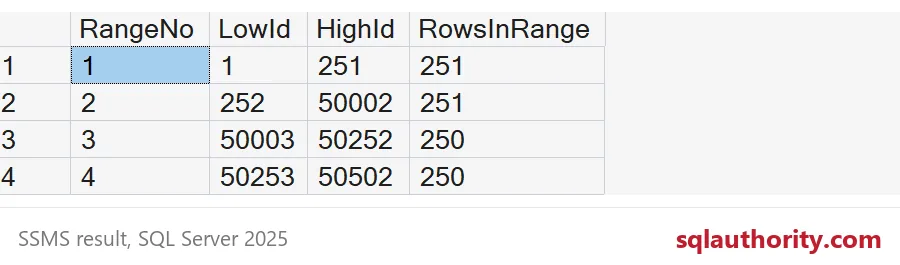
Now every range holds 250 or 251 rows. Because 1,002 does not divide by four, the first two buckets get one extra row each. Range 2 stretches from 252 all the way to 50002, so it jumps across the hole without noticing. That is exactly what you want.

Run the ranges as batches
Each range becomes one unit of work. The loop below is a stand-in for your real job. In production, each worker could take one row from the ranges table. For a big table, choose the bucket count as total rows divided by the batch size you can afford.
DECLARE @n int = 1, @lo int, @hi int;
WHILE @n <= 4
BEGIN
    SELECT @lo = LowId, @hi = HighId FROM #Ranges WHERE RangeNo = @n;
    UPDATE #Orders SET Processed = 1 WHERE OrderId BETWEEN @lo AND @hi;
    UPDATE #Ranges SET RowsDone = @@ROWCOUNT WHERE RangeNo = @n;
    SET @n += 1;
END;

SELECT RangeNo, LowId, HighId, RowsDone FROM #Ranges ORDER BY RangeNo;
SELECT COUNT(*) AS StillUnprocessed FROM #Orders WHERE Processed = 0;
The rows done match the planned counts, and nothing is left unprocessed. The ranges touch every row exactly once.
Where it bites: keys that repeat
This only works on a unique key. NTILE cuts by position, so a repeated key value can land in two buckets. Then two ranges both claim it, and BETWEEN processes those rows twice. Watch what happens with the id 2.
DROP TABLE IF EXISTS #Dupes;
CREATE TABLE #Dupes (Id int NOT NULL);
INSERT #Dupes VALUES (1), (2), (2), (2), (3), (4);

SELECT Id, NTILE(2) OVER (ORDER BY Id) AS RangeNo FROM #Dupes ORDER BY RangeNo, Id;

SELECT Id, NTILE(2) OVER (ORDER BY Id) AS RangeNo
FROM (SELECT DISTINCT Id FROM #Dupes) AS d
ORDER BY RangeNo, Id;
In the first result, the id 2 appears in both range 1 and range 2. Those two ranges would overlap at 2. If your key repeats, apply NTILE to the distinct values, as the second query does. Then each value lives in exactly one range.
DROP TABLE IF EXISTS #Dupes;
DROP TABLE IF EXISTS #Ranges;
DROP TABLE IF EXISTS #Orders;
Next time a batch job drags, look at how you cut the table before you blame the server.
A fair split is not equal key widths, it is equal piles of rows.
Published by Pinal Dave on SQLAuthority. More of my work at pinaldave.com.
Discover more from SQL Authority with Pinal Dave
Subscribe to get the latest posts sent to your email.