
My previous article SQL SERVER – PIVOT Table Example encouraged few of my readers to ask me question about UNPIVOT table. UNPIVOT table is reverse of PIVOT Table.
USE AdventureWorks

GO

CREATE TABLE #Pvt ([CA] INT NOT NULL,

[AZ] INT NOT NULL,

[TX] INT NOT NULL);

INSERT INTO #Pvt ([CA], [AZ], [TX])

SELECT [CA], [AZ], [TX]
FROM

(

SELECT sp.StateProvinceCode

FROM Person.Address a

INNER JOIN Person.StateProvince sp

ON a.StateProvinceID = sp.StateProvinceID

) p

PIVOT

(

COUNT (StateProvinceCode)

FOR StateProvinceCode

IN ([CA], [AZ], [TX])

) AS pvt;

SELECT StateProvinceCode, Customer_Count

FROM

(

SELECT [CA], [AZ], [TX]
FROM #Pvt

) t

UNPIVOT

(

Customer_Count

FOR StateProvinceCode

IN ([CA], [AZ], [TX])

) AS unpvt;

DROP TABLE #Pvt;

GO
What to Know Before You Use an UNPIVOT Table Query
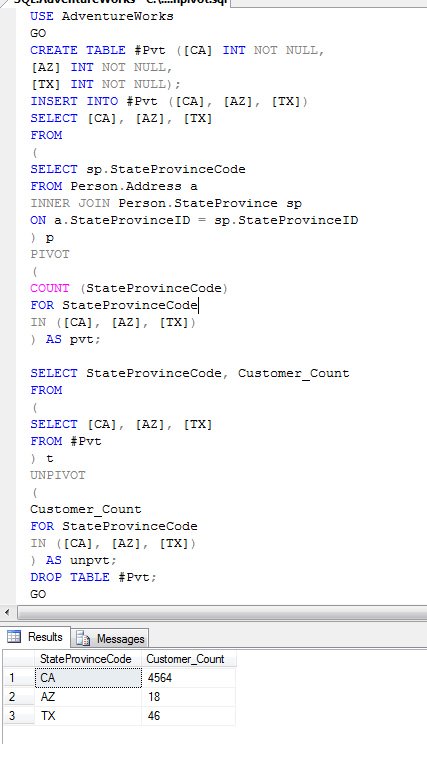
UNPIVOT turns columns into rows. In the example, the three state columns CA, AZ and TX become three rows, each with a state code and a count. It is handy when data arrives in a wide shape, like a spreadsheet with one column per month, and you need it in a normal table with one row per value.
Keep these points in mind:
- All columns in the IN list must have exactly the same data type, including the length. If one column is INT and another is BIGINT, or two varchar columns have different lengths, the query fails. Convert them to one type in the inner query first.
- UNPIVOT quietly drops rows where the value is NULL. If a NULL means something in your data, replace it with ISNULL in the inner query, or use another method.
- The names of the value column and the name column, Customer_Count and StateProvinceCode in the example, are new names you choose. They do not need to exist anywhere.
As I explained in the PIVOT post, UNPIVOT cannot bring back the detail rows once PIVOT has aggregated them. Here the counts come back as three numbers, not as the many addresses behind them. That is expected. Think of UNPIVOT as changing the shape of the data, not as undoing a calculation.
A quick way to check your work is to count. The number of rows UNPIVOT returns should equal the number of source rows times the number of columns in the IN list, minus the NULL values it dropped. If the numbers do not match, look at the NULL values first.
On SQL Server 2008 and later, CROSS APPLY with a VALUES list does the same job and gives you more control. It keeps NULL values, and it can turn several groups of columns into rows at once. I use UNPIVOT for simple cases and CROSS APPLY when the shape gets more complex.
Published by Pinal Dave on SQLAuthority. More of my work at pinaldave.com.



12 Comments. Leave new
this is the original data
Loc_Id doctorName Qualification Dept
——- ————– ————- ——
1 abc M.B.B.S. Op
2 xyz D.H.M.S. DP
3 ppt H.M. CP
I want to convert it like bellow
Loc1 Loc2 Loc3
——– ———- ——-
abc xyz ppt
M.B.B.S. D.H.M.S. H.M.
OP DP CP
please help me
I’m a little confused about your example here. Why go to all this trouble when you could just write this and get the same results.
Select sp.StateProvinceCode
,Count(*) as Customer_count
From Person.Address a
Inner join Person.StateProvince sp
On a.StateProvinceID = sp.StateProvinceID
Where sp.StateProvinceCode in (‘CA’, ‘AZ’, ‘TX’)
Group by sp.StateProvinceCode
Hi Pinal, this is of great use.
But i do have 1 more query that if i have a temp table where rows can have any data and i need to pivot that.
For example i have a output like
Description Subject Marks
FA1 Sub1 10
FA1 Sub2 15
FA1 Sub3 11
FA1 Sub4 12
FA2 Sub1 9
FA2 Sub2 8
FA2 Sub3 12
FA2 Sub4 10
I need output like
Subject FA1 FA2
Sub1 10 9
Sub2 15 8
Sub3 11 12
Sub4 12 10
Then how can i achieve this, as Description can be more then that
Thanks
Sumit Gupta
SELECT [SUBJECT] , FA1 , FA2 FROM FAPIVOT
PIVOT (SUM(MARKS) FOR FAE IN (FA1 , FA2))
AS TBLPIVOT
ABOVE IS THE QUERY
TABLE X (A,B,C) & TABLE Y(A,B,C)
data: TABLE X(1,2,3) , TABLE Y(2,3,4)
PIVOT looks like
X Y
————
A 1 2
B 2 3
C 3 4
Hi required output in following format
INPUT
X Y
1 1
2 2
3 3
4 4
OUTPUT
X 1
X 2
X 3
X 4
Y 1
Y 2
Y 3
Y 4
Why do you want to get this output? You can easily do this in a front end application
Anyway if you need answer, you can try this
Hi
This is my store procedure. I need to store the value into table
There is a error
Msg 213, Level 16, State 1, Procedure usp_pivot_by_Date_Seats, Line 7
Insert Error: Column name or number of supplied values does not match table definition.
But Column and number of column are in order. Below is Store porcedure
USE [SpectrumDB]
GO
SET ANSI_NULLS ON
GO
SET QUOTED_IDENTIFIER ON
GO
ALTER PROCEDURE [dbo].[usp_pivot_by_Date_Seats]
–@WeekNo Numeric
AS
BEGIN
SET NOCOUNT ON;
insert into tbl_Days_TEMP
select * from ( select Title,Qty,WeekName from dbo.vw_RPT_Pivot_Weekly_Seat) DataTable
PIVOT (SUM(Qty) FOR [weekname] IN ([Sunday],[Monday],[Tuesday],[Wednesday],[Thursday],
[Friday],[Saturday])) PivotTable
END
Table tbl_Days_Temp is below
USE [SpectrumDB]
GO
/****** Object: Table [dbo].[tbl_Days_TEMP] Script Date: 03/07/2013 21:49:22 ******/
SET ANSI_NULLS ON
GO
SET QUOTED_IDENTIFIER ON
GO
CREATE TABLE [dbo].[tbl_Days_TEMP](
[Title] [nvarchar](500) NULL,
[WeekName] [nvarchar](50) NULL,
[Value1] [numeric](18, 0) NULL CONSTRAINT [DF_tbl_Days_TEMP_Value1] DEFAULT ((0)),
[Value2] [numeric](18, 0) NULL CONSTRAINT [DF_tbl_Days_TEMP_Value2] DEFAULT ((0)),
[Value3] [numeric](18, 0) NULL CONSTRAINT [DF_tbl_Days_TEMP_Value3] DEFAULT ((0)),
[Value4] [numeric](18, 0) NULL CONSTRAINT [DF_tbl_Days_TEMP_Value4] DEFAULT ((0)),
[Value5] [numeric](18, 0) NULL CONSTRAINT [DF_tbl_Days_TEMP_Value5] DEFAULT ((0)),
[Value6] [numeric](18, 0) NULL CONSTRAINT [DF_tbl_Days_TEMP_Value6] DEFAULT ((0)),
[Value7] [numeric](18, 0) NULL CONSTRAINT [DF_tbl_Days_TEMP_Value7] DEFAULT ((0)),
[Qty] [numeric](18, 0) NULL
) ON [PRIMARY]
Pls help me where i did wrong
Whats the point of putting an image instead of the code, just in case you want to test or play around?
My Bad, the code is also there. thanks for the article
The first part is text which you can copy. Only the second part is image