
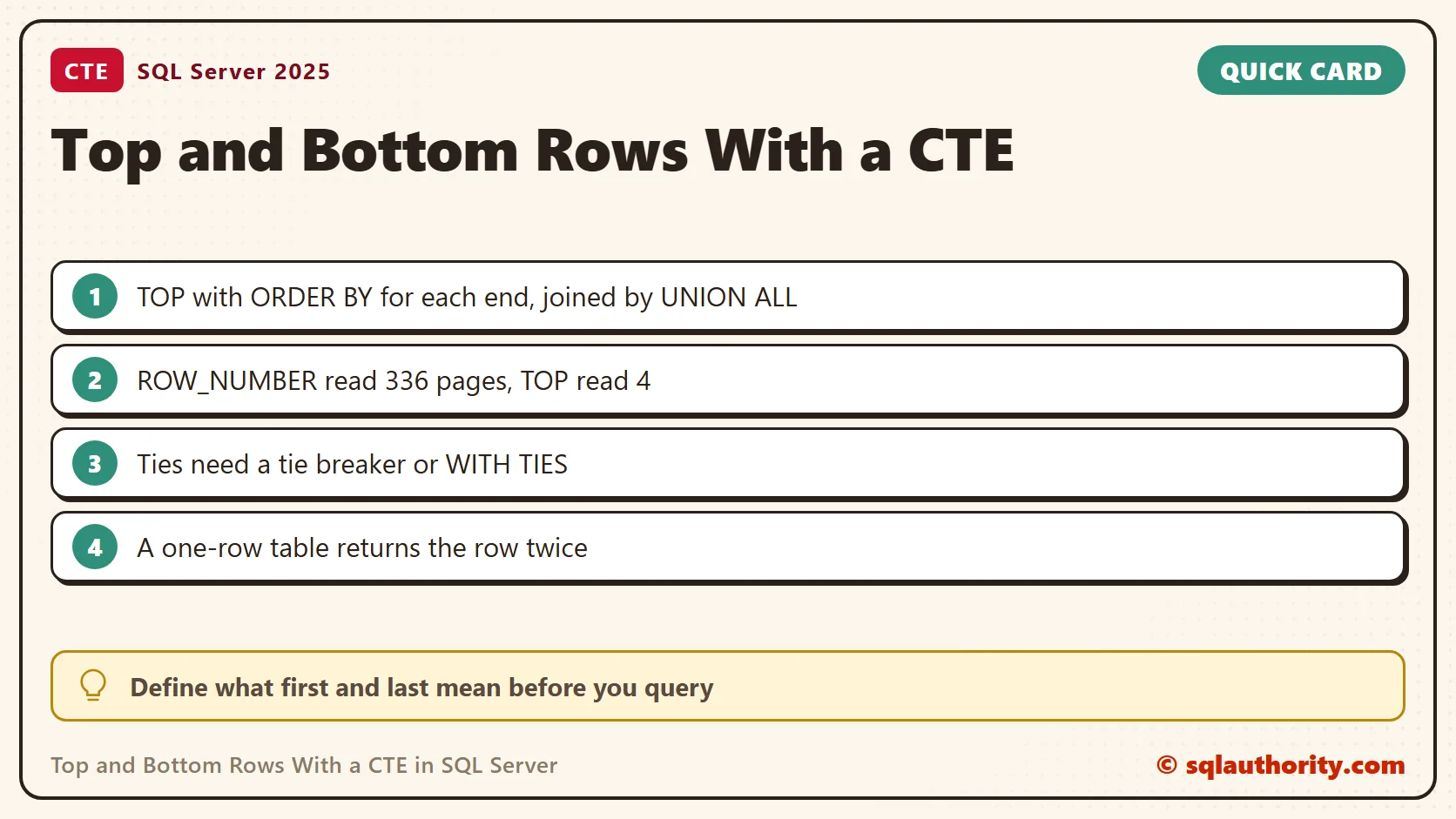
Top and bottom rows with a CTE come from two ordered queries, one for each end of the table. Each query needs its own ordering before the results are combined.

This continues the original TOP and BOTTOM rows question. The question came from an inventory project where I needed the first and last records together. Thanks to Khadar Khan for contributing a CTE approach in the comments. I tested both versions on SQL Server 2025.
A Table to Test With
This table holds 100,000 items with keys 10, 20, 30 and so on up to 1,000,000. The primary key is the clustered index, so the first and last rows are the two ends of the index.
CREATE TABLE dbo.Items (ItemId int NOT NULL PRIMARY KEY, ItemName varchar(30) NOT NULL);
INSERT dbo.Items (ItemId, ItemName)
SELECT n * 10, CONCAT('Item ', n)
FROM (SELECT TOP (100000) ROW_NUMBER() OVER (ORDER BY (SELECT NULL)) AS n
      FROM sys.all_objects AS a CROSS JOIN sys.all_objects AS b) AS t;
The Reader’s Single CTE
The comment put a TOP 1 with ORDER BY on each side of a UNION ALL. All of it sat inside one CTE. Written as a plain statement, that form fails with error 156, as the first post showed. Inside a CTE, SQL Server 2025 accepted it. It returned item 1,000,000 and then item 10, so each ORDER BY applied to its own TOP.
WITH Ends AS
(
    SELECT TOP (1) ItemId, ItemName FROM dbo.Items ORDER BY ItemId DESC
    UNION ALL
    SELECT TOP (1) ItemId, ItemName FROM dbo.Items ORDER BY ItemId ASC
)
SELECT * FROM Ends;
GO
SELECT TOP (1) ItemId, ItemName FROM dbo.Items ORDER BY ItemId DESC
UNION ALL
SELECT TOP (1) ItemId, ItemName FROM dbo.Items ORDER BY ItemId ASC;
The second statement is the same pair of queries without the CTE. It raised error 156. A rule that depends on where the text sits is easy to forget, so I prefer the clearer form below.
Two CTEs, One for Each End
Give each end its own CTE. The ORDER BY inside each one controls which row TOP selects. The final ORDER BY only controls how the combined result appears. Those are separate decisions.
DECLARE @Items TABLE (ItemId int PRIMARY KEY, ItemName varchar(30));
INSERT INTO @Items (ItemId, ItemName)
VALUES (30, 'Notebook'), (10, 'Pencil'), (20, 'Folder');

;WITH FirstItem AS
(
    SELECT TOP (1) ItemId, ItemName
    FROM @Items
    ORDER BY ItemId ASC
),
LastItem AS
(
    SELECT TOP (1) ItemId, ItemName
    FROM @Items
    ORDER BY ItemId DESC
)
SELECT 'First' AS Boundary, ItemId, ItemName FROM FirstItem
UNION ALL
SELECT 'Last', ItemId, ItemName FROM LastItem
ORDER BY ItemId, Boundary;
The result contains item 10, Pencil, as First and item 30, Notebook, as Last. The insertion order does not decide either end. The ItemId ordering does.
Top 2 and Bottom 2
The same shape works for more rows. Change both TOP values and keep one label per end. On the 100,000-row table, this query returned items 10 and 20 as First and items 999990 and 1000000 as Last.
WITH FirstRows AS
(
    SELECT TOP (2) ItemId, ItemName FROM dbo.Items ORDER BY ItemId ASC
),
LastRows AS
(
    SELECT TOP (2) ItemId, ItemName FROM dbo.Items ORDER BY ItemId DESC
)
SELECT 'First' AS Boundary, ItemId, ItemName FROM FirstRows
UNION ALL
SELECT 'Last', ItemId, ItemName FROM LastRows
ORDER BY ItemId;
A ROW_NUMBER Version and Its Cost
Numbering the rows from both directions gives the same four rows with one query. It is tidy, but the cost is different. I counted logical reads for both versions on the 100,000-row table.
SET STATISTICS IO ON;
WITH FirstRows AS (SELECT TOP (2) ItemId, ItemName FROM dbo.Items ORDER BY ItemId ASC),
     LastRows AS (SELECT TOP (2) ItemId, ItemName FROM dbo.Items ORDER BY ItemId DESC)
SELECT COUNT(*) AS TwoCtes FROM (SELECT * FROM FirstRows UNION ALL SELECT * FROM LastRows) AS x;
WITH Numbered AS
(
    SELECT ItemId, ROW_NUMBER() OVER (ORDER BY ItemId ASC) AS FromTop,
           ROW_NUMBER() OVER (ORDER BY ItemId DESC) AS FromBottom
    FROM dbo.Items
)
SELECT COUNT(*) AS RowNumbers FROM Numbered WHERE FromTop <= 2 OR FromBottom <= 2;
SET STATISTICS IO OFF;
The two-CTE version read 4 pages. It walked in from both ends of the index. The ROW_NUMBER version read 336 pages, because it numbered every row first. Both returned four rows. On a large table, the difference matters.
Decide What First and Last Mean
A table has no inherent first or last row. Choose the column that expresses your requirement. If you sort by a column that is not unique, add a tie breaker. I tested five tickets, with two opened on the same date.
CREATE TABLE dbo.Tickets (TicketId int IDENTITY(1,1) PRIMARY KEY, Opened date NOT NULL);
INSERT dbo.Tickets (Opened) VALUES ('20260101'), ('20260101'), ('20260102'), ('20260103'), ('20260103');
SELECT TOP (1) TicketId, Opened FROM dbo.Tickets ORDER BY Opened ASC;
SELECT TOP (1) TicketId, Opened FROM dbo.Tickets ORDER BY Opened ASC, TicketId ASC;
SELECT TOP (1) WITH TIES TicketId, Opened FROM dbo.Tickets ORDER BY Opened ASC;
The first query returned ticket 2 on my run, and nothing promises which tied row you get. The second returned ticket 1, because the key breaks the tie. The third returned both tickets from January 1, so it can return more rows than TOP says.
Watch the Small Tables
An empty table returns no rows. A table with one row returns it twice, once for each end. That is intended here, because the output labels both ends. If you want unique rows instead, drop the labels and combine the ends with UNION.
CREATE TABLE dbo.One (ItemId int PRIMARY KEY, ItemName varchar(30));
INSERT dbo.One VALUES (5, 'Only');
WITH FirstItem AS (SELECT TOP (1) ItemId, ItemName FROM dbo.One ORDER BY ItemId ASC),
     LastItem AS (SELECT TOP (1) ItemId, ItemName FROM dbo.One ORDER BY ItemId DESC)
SELECT 'First' AS Boundary, ItemId, ItemName FROM FirstItem UNION ALL SELECT 'Last', ItemId, ItemName FROM LastItem;
WITH FirstItem AS (SELECT TOP (1) ItemId, ItemName FROM dbo.One ORDER BY ItemId ASC),
     LastItem AS (SELECT TOP (1) ItemId, ItemName FROM dbo.One ORDER BY ItemId DESC)
SELECT ItemId, ItemName FROM FirstItem UNION SELECT ItemId, ItemName FROM LastItem;
The first query returned the single item as both First and Last. The second returned it once. A CTE names a query result for one statement. It does not create a stored temporary table or guarantee a faster plan.
Which Version I Use
I use two CTEs when I need a few rows from each end of an indexed table. They are easy to read, and they read the fewest pages. I use ROW_NUMBER when I also need each row’s position from both ends in the output. In both cases, I name the ordering column in the code. That writes down what first and last mean.
The first row is not the first one inserted, it is the first one in your chosen order.
Published by Pinal Dave on SQLAuthority. More of my work at pinaldave.com.
Discover more from SQL Authority with Pinal Dave
Subscribe to get the latest posts sent to your email.



5 Comments. Leave new
Thanks for sharing this.
I was used to do the same as follows:
SELECT * FROM
(
(SELECT MIN(SalesOrderDetailID) AS ID
FROM Sales.SalesOrderDetail
)
UNION
(SELECT MAX(SalesOrderDetailID) AS ID
FROM Sales.SalesOrderDetail
)
) AS t_TopBottomRow;
Hi ,
I have one query. How to add two row values togather in one table.
Min Max solution would not work for retrieving more than top one or bottom row. The original solution however will be able to retrieve the top 10 as well as bottom 10.
Deep…. There can be multiple scenarios for this. If you want to add values from existing table then you will have to write a statement like….
INSERT INTO TABLE_NAME SELECT EXISTING_ROWS FROM ANOTHER_TABLE/TABLE_NAME
To insert static values, you could do something like this….
INSERT INTO TABLE_NAME
SELECT 1,2,3,4,5
UNION
SELECT 6,7,8,9,10
how to retrieve a particular column.
This is an very helpful solution however, can you show how we can do this with a Group By in the top and bottom queries. It appears I cannot use an OrderBy with a group by. .
WITH TopBottomRow
AS
(
SELECT TOP 1 SalesOrderDetailID, Sum (Sales)
FROM Sales.SalesOrderDetail
Group By SalesOrder
ORDER BY SalesOrderDetailID
UNION ALL
SELECT TOP 1 SalesOrderDetailID, Sum(Sales)
FROM Sales.SalesOrderDetail
Group By SalesOrder
ORDER BY SalesOrderDetailID DESC
)
SELECT *
FROM TopBottomRow