ROUND or truncate is a choice I make before formatting a numeric result. The third argument changes the operation, while the decimal type still controls the result’s available width.

Choose the operation first
A reported amount and a deliberately shortened amount follow different rules. Rounding selects the nearby value at the requested position. Truncation discards the remaining digits. I want that choice visible in the expression rather than hidden in presentation code.
The optional third argument is the operation switch. Omitted or zero means rounding. A nonzero value requests truncation. A negative length works to the left of the decimal point.
That negative length deserves attention when a rounded result gains another digit. A value near one thousand can cross that boundary. The operation doesn’t automatically enlarge a decimal destination. I need enough precision before asking for the result.
Use exact decimal inputs
The example below starts with decimal(7,2). Its values have two decimal places and room for the thousand result. I use exact decimal values to keep this question separate from approximate floating-point representation. Every output remains numeric.
The input rows contain positive and negative counterparts. That makes the direction visible instead of relying on one cheerful positive number. One pair sits halfway between tenths. The other pair exercises a much wider rounding position.
This query contains only literal rows and a SELECT. It changes no database objects or session settings. The output includes both operations at both requested lengths. Keep those columns together when checking the result.
WITH Inputs AS
(
    SELECT Id, CAST(Amount AS decimal(7,2)) AS Amount
    FROM (VALUES (1, 1.25), (2, -1.25),
                 (3, 748.58), (4, -748.58)) AS v(Id, Amount)
)
SELECT Id, Amount, ROUND(Amount, 1) AS RoundedTenths,
       ROUND(Amount, 1, 1) AS TruncatedTenths,
       ROUND(Amount, -3) AS RoundedThousands,
       ROUND(Amount, -3, 1) AS TruncatedThousands
FROM Inputs
ORDER BY Id;

SELECT CONVERT(varchar(20), SQL_VARIANT_PROPERTY(
           ROUND(CAST(748.58 AS decimal(7,2)), -3), 'BaseType')) AS ResultType,
       CONVERT(int, SQL_VARIANT_PROPERTY(
           ROUND(CAST(748.58 AS decimal(7,2)), -3), 'Precision')) AS ResultPrecision,
       CONVERT(int, SQL_VARIANT_PROPERTY(
           ROUND(CAST(748.58 AS decimal(7,2)), -3), 'Scale')) AS ResultScale;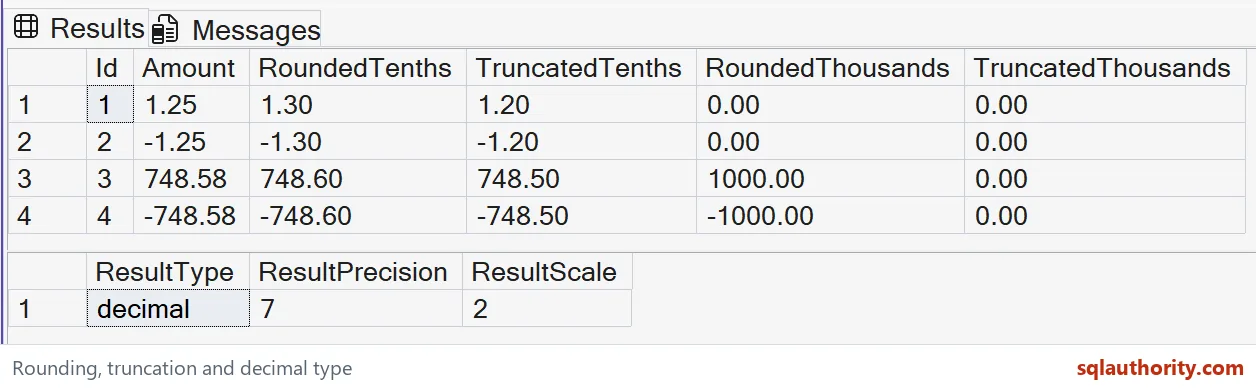
Read the negative values carefully
At one decimal place, 1.25 rounds to 1.30 while truncation gives 1.20. The corresponding negative results are -1.30 and -1.20. The tie rule rounds away from zero. The sign doesn’t disappear.
Truncation discards the fraction beyond the selected position. For these values, that moves a negative amount toward zero. Calling every reduction a round-down operation obscures this behavior. I’d name the intended operation instead of using that shortcut.
At length minus three, 748.58 rounds to 1000.00. Truncating at that position gives 0.00. The negative counterpart rounds to -1000.00 and truncates to zero. Those outcomes reflect different numeric rules, not different text formatting.
Allow room before rounding
A bare decimal literal also has an inferred type. A narrow 748.58 literal overflows when rounded to thousands. Casting the input wider first provides the required room. Casting after the failing operation comes too late.
The copyable example avoids deliberately raising that overflow. It defines sufficient input precision before ROUND runs. Its second result checks the output type’s precision and scale. Those properties belong to the numeric result, even when a grid looks simpler.
I can prefer a shorter displayed amount in a report. That preference doesn’t require changing the stored business amount. Keep numeric calculation and display formatting separate. Repeatedly rounding intermediate amounts introduces a different calculation from rounding one final total.

State the business rule
A billing rule can prescribe a specific rounding stage. A diagnostic display can use another presentation rule. Neither rule should be inferred from the function name alone. Write down the required position and whether discarded digits affect the retained value.
The second result identifies decimal with precision 7 and scale 2. Check negative values and return width alongside the positive rows. A neat-looking grid does not establish the intended rounding contract.
Try a few negative amounts of your own before you settle on a rule.
Rounding is not a display shortcut, it is a numeric rule that needs room.
Published by Pinal Dave on SQLAuthority. More of my work at pinaldave.com.
Discover more from SQL Authority with Pinal Dave
Subscribe to get the latest posts sent to your email.