COUNT_BIG counts rows or non-NULL values and returns bigint. I choose the expression before deciding what the number means. A report can contain two correct counts that answer different questions.

Decide what you want to count
Imagine an intake report with one row per reading. Some readings are missing, and two rows contain the same number. The report needs separate answers for received rows, supplied readings and distinct readings.
I’d name those outputs before writing the query. A label such as Total leaves too much room for interpretation. RowsFound and NonNullReadings make the intended questions easier to check.
COUNT_BIG(*) includes every input row, including duplicates and rows containing NULL. COUNT_BIG(Reading) counts supplied values. COUNT_BIG(DISTINCT Reading) counts different supplied values, so repeated readings contribute once to that last count.

Try the complete comparison
The batch below uses literal inputs, so it doesn’t need an existing table. The first result has four cases. Its three count columns let you compare row presence, missing readings and repeated values together.
;WITH Cases AS
(
    SELECT CaseId, CaseLabel
    FROM (VALUES
        (CAST(1 AS int), CAST('Empty' AS varchar(20))),
        (2, 'All NULL'),
        (3, 'Repeated and NULL'),
        (4, 'Zero and negative')
    ) AS v(CaseId, CaseLabel)
), Input AS
(
    SELECT CaseId, Reading
    FROM (VALUES
        (CAST(2 AS int), CAST(NULL AS int)),
        (2, NULL),
        (3, 7),
        (3, 7),
        (3, NULL),
        (4, 0),
        (4, -1)
    ) AS v(CaseId, Reading)
)
SELECT c.CaseId, c.CaseLabel,
       n.RowsFound, n.NonNullReadings, n.DistinctReadings
FROM Cases AS c
CROSS APPLY
(
    SELECT COUNT_BIG(*) AS RowsFound,
           COUNT_BIG(i.Reading) AS NonNullReadings,
           COUNT_BIG(DISTINCT i.Reading) AS DistinctReadings
    FROM Input AS i
    WHERE i.CaseId = c.CaseId
) AS n
ORDER BY c.CaseId;

;WITH Input AS
(
    SELECT CaseId, Reading
    FROM (VALUES (CAST(2 AS int), CAST(NULL AS int)), (3, 7)) AS v(CaseId, Reading)
)
SELECT COUNT_BIG(*) AS RowsFound,
       COUNT_BIG(Reading) AS NonNullReadings
FROM Input
WHERE CaseId = 1;

;WITH Input AS
(
    SELECT CaseId, Reading
    FROM (VALUES (CAST(2 AS int), CAST(NULL AS int)), (3, 7)) AS v(CaseId, Reading)
)
SELECT CaseId, COUNT_BIG(*) AS RowsFound
FROM Input
WHERE CaseId = 1
GROUP BY CaseId
ORDER BY CaseId;

;WITH Input AS
(
    SELECT Reading
    FROM (VALUES (CAST(7 AS int)), (7), (NULL)) AS v(Reading)
)
SELECT COUNT_BIG(*) AS BigCount,
       CAST(SQL_VARIANT_PROPERTY(COUNT_BIG(*), 'BaseType') AS varchar(10)) AS BigCountType,
       COUNT(*) AS IntCount,
       CAST(SQL_VARIANT_PROPERTY(COUNT(*), 'BaseType') AS varchar(10)) AS IntCountType
FROM Input;
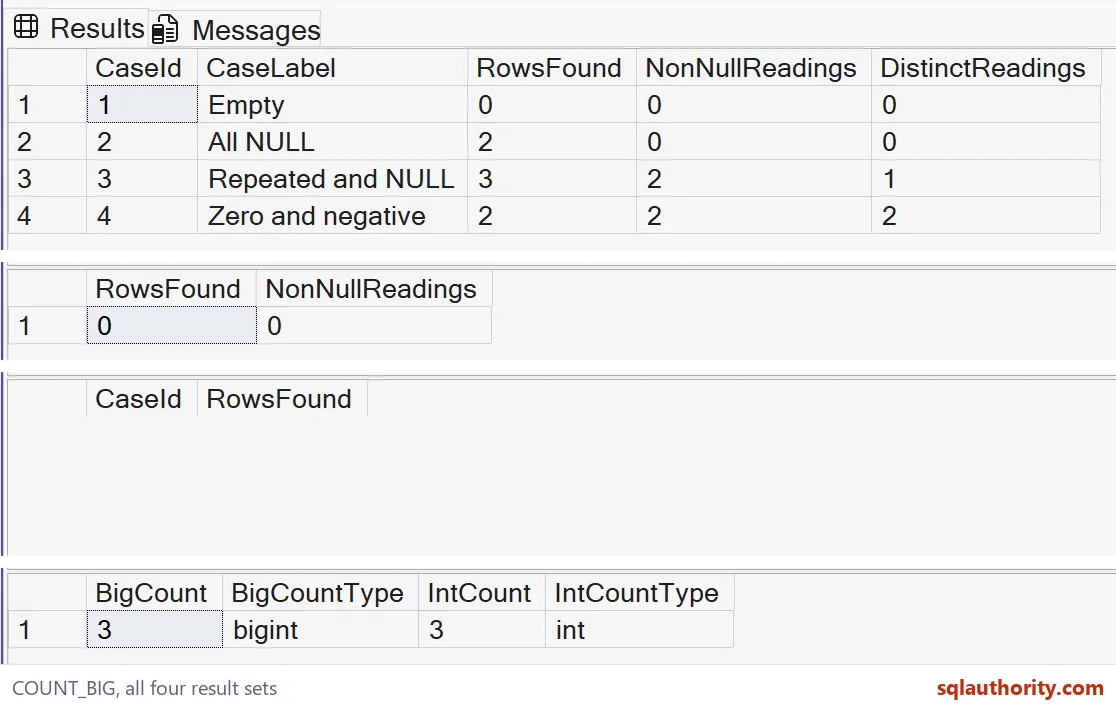
The empty case has no input rows and produces three zero counts. The all-NULL case has two rows but no supplied readings. The repeated-value case has three rows, two supplied readings and one distinct reading.
Zero and negative one are both supplied values. They contribute to all three counts in the final case. NULL doesn’t mean zero, and an expression count doesn’t discard zero because it looks like an empty measurement.
The Cases list gives the example its four named cases. CROSS APPLY evaluates a scalar aggregate for each case. That design keeps the empty case visible without adding a pretend reading to its input.
Check the empty result shape
The second query returns one row with two zeros after its filter removes every input row. The third query adds GROUP BY. Its empty input produces no groups, so it returns no rows.
Those result shapes matter to a report or application. A zero in a returned row and an absent row need different handling. I don’t assume that adding grouping preserves the scalar query’s single-row result.
Keep the result type through the application
COUNT_BIG returns bigint, while COUNT returns int. The final query exposes those types beside identical small counts. Small input values don’t shrink COUNT_BIG’s declared result type.
The maximum positive int is 2,147,483,647. A count expected to exceed that range needs COUNT_BIG before aggregation. Casting COUNT’s completed result afterward doesn’t change the type used to perform the count.
I’d also check the receiving column, application property and report calculation. A bigint result still needs a destination that can hold it. Changing the aggregate alone doesn’t correct a later narrowing conversion.
Use the count for the question it answers
A bigint result doesn’t prove that a count query is faster. This example establishes counting rules and types, without timing a workload. An operational decision about cost still needs the relevant query and execution evidence.
I wouldn’t replace every COUNT merely because COUNT_BIG has more range. The expected scale and receiving contract should drive that choice. These examples target SQL Server T-SQL and use no objects or session-setting changes.
Name the count first, and the number will mean what you think it means.
A count is not just a number, it is a type plus a row rule.
Published by Pinal Dave on SQLAuthority. More of my work at pinaldave.com.
Discover more from SQL Authority with Pinal Dave
Subscribe to get the latest posts sent to your email.