GROUPING_ID helps me distinguish a stored NULL from a subtotal created by ROLLUP. Both can appear in the same column. I keep the grouping bits beside the numbers before adding presentation labels.
A report can contain unknown regions, missing channels and legitimate totals. Calling every NULL value a total changes the meaning of those records. This example keeps those cases visible without changing the source data.

Build a small reporting example
The source has five sales rows and two reporting dimensions. The unknown region contributes seven units through the Online channel. North also has five units whose channel is missing.
The two South rows share the same region and channel. Their detail group therefore contains five units. Detail means a grouped reporting row here, rather than one original sales record.
I use ROLLUP with Region first and Channel second. That order creates detail groups, region subtotals and a grand total. The example is a read-only query with no tables to create or clean up.
WITH Sales AS
(
    SELECT Region, Channel, Amount
    FROM (VALUES
        (CAST(NULL AS nvarchar(10)), CAST(N'Online' AS nvarchar(10)), 7),
        (N'North', NULL, 5),
        (N'North', N'Online', 10),
        (N'South', N'Store', 3),
        (N'South', N'Store', 2)
    ) AS v(Region, Channel, Amount)
)
SELECT Region, Channel, SUM(Amount) AS SalesAmount,
       GROUPING_ID(Region, Channel) AS GroupingId,
       GROUPING(Region) AS RegionIsTotal,
       GROUPING(Channel) AS ChannelIsTotal,
       CASE GROUPING_ID(Region, Channel)
           WHEN 3 THEN N'Grand total'
           WHEN 1 THEN N'Region subtotal'
           ELSE N'Detail'
       END AS RowMeaning
FROM Sales
GROUP BY ROLLUP(Region, Channel)
ORDER BY GroupingId, Region, Channel;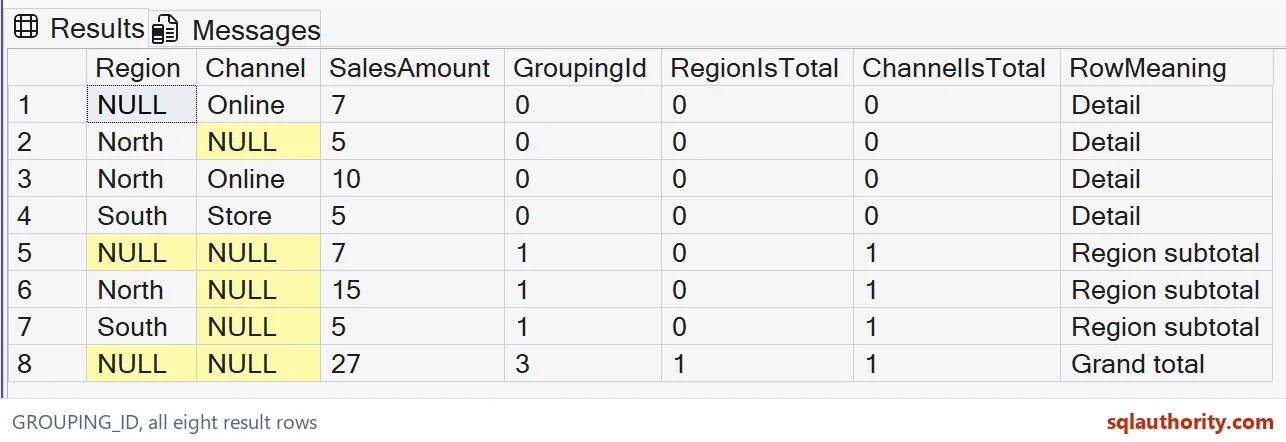
Read the grouping bits
The expected result contains eight rows. Four represent detail groups, three represent region subtotals, and one represents the grand total. The SalesAmount column should total 27 only on the grand-total row.
A GroupingId of zero marks both dimensions as participating in that detail group. North’s missing channel still has zero. Its NULL value came from the source, so ChannelIsTotal remains zero too.
A GroupingId of one marks the region subtotal. ChannelIsTotal is one, while RegionIsTotal stays zero. The last GROUPING_ID argument supplies the lowest bit, which explains this particular value.
The grand total has GroupingId three because both grouping bits are set. Region and Channel appear as NULL there. Those placeholders mean the dimensions were aggregated away at that level.

Keep unknown values and totals separate
The unknown-region subtotal is a useful boundary case. Its Region is NULL, but RegionIsTotal is zero. That row summarizes the unknown-region group; it does not summarize every region.
North provides another deliberate collision. Its missing-channel detail and region subtotal both display North with a NULL channel. Their amounts and grouping bits identify two different reporting meanings.
I avoid replacing raw dimension values before checking those bits. A label such as All channels belongs only on subtotal rows. A label such as Unknown channel belongs on the source-NULL detail instead.
Keep both the raw values and grouping indicators when exporting the report. Downstream tools can then separate levels without guessing from display text. Filtering by the indicators also avoids relying on translated labels.
Limits worth keeping in the query
GROUPING_ID expressions must match the expressions in GROUP BY. Changing their argument order changes the bitmap meaning. Copying a numeric filter from another report can therefore select the wrong level.
The ordering in this example is explicit, including the grouping level. A different report may prefer each subtotal beside its details. That presentation choice does not change the meaning of the grouping bits.
This example demonstrates grouping semantics, not a performance comparison. Larger reports still need appropriate grouping dimensions and a clear definition of each measure. Adding detail totals and subtotals together would count the same sales repeatedly.
Keep the bits beside the numbers, and the report stays honest.
A NULL in a ROLLUP result is not always a total, it is sometimes missing data.
Published by Pinal Dave on SQLAuthority. More of my work at pinaldave.com.
Discover more from SQL Authority with Pinal Dave
Subscribe to get the latest posts sent to your email.