TRY_CONVERT integer validation starts with the integer you need, rather than a general numeric label. I also decide what blank input means before treating a successful conversion as an acceptable value.

Name the destination
An import field called quantity needs a precise contract. Does it accept a negative count, a leading plus sign or surrounding spaces? Those are business choices. A conversion function can’t decide them for me.
TRY_CONVERT attempts a conversion to the requested destination type. A failed permitted conversion produces NULL. ISNUMERIC instead checks whether the text fits a numeric type. Its accepted types include more than integers.
I wouldn’t use an ISNUMERIC result as permission for a later integer cast. A positive result doesn’t name the successful numeric type. Exponent notation and decimal text belong in the comparison. An integer destination still has its own range.
Before: a blank quantity becomes zero
Imagine an order import with a quantity field. A customer leaves it empty. Direct integer conversion turns that blank into 0, even though the customer never entered zero. The following four inputs make the problem visible.
SELECT v.Id, CAST(v.RawText AS varchar(30)) AS RawText,
       TRY_CONVERT(int, CAST(v.RawText AS varchar(30))) AS RawInteger
FROM (VALUES (1, '42'), (4, ''), (5, '   '), (12, ' 12 '))
     AS v(Id, RawText)
ORDER BY v.Id;| Input text | RawInteger |
|---|---|
[42] | 42 |
'' (empty) | 0 |
[ ] (3 spaces) | 0 |
[ 12 ] | 12 |
After: keep a missing quantity missing
Trim surrounding spaces, then use NULLIF to turn an empty string into NULL before conversion. Ordinary numbers still convert. Empty and spaces-only input now stay missing.
SELECT v.Id, CAST(v.RawText AS varchar(30)) AS RawText,
       TRY_CONVERT(int, NULLIF(LTRIM(RTRIM(CAST(v.RawText AS varchar(30)))), '')) AS PolicyInteger
FROM (VALUES (1, '42'), (4, ''), (5, '   '), (12, ' 12 '))
     AS v(Id, RawText)
ORDER BY v.Id;| Input text | PolicyInteger |
|---|---|
[42] | 42 |
'' (empty) | NULL |
[ ] (3 spaces) | NULL |
[ 12 ] | 12 |
The change is small but useful: an empty field changes from 0 to NULL. The text [ 12 ] still becomes 12. Square brackets in the result tables make spaces visible; they are not part of the input. If the customer actually enters 0, this expression preserves that zero.

Read the complete comparison
Run the following example on SQL Server 2012 or later. It contains only a SELECT over literal inputs and common table expressions. Nothing creates a table or changes session options. Keep the input column beside both conversion columns.
The policy column first trims ordinary surrounding spaces. It then replaces an empty trimmed string with NULL. The raw conversion remains visible for comparison. This distinction matters because SQL Server converts empty integer text to zero.
A zero quantity and an absent quantity shouldn’t become indistinguishable during import. I therefore normalize a blank before conversion. That is a stated policy for this example. It isn’t a claim that every application should reject blanks.
WITH Inputs AS
(
    SELECT Id, CAST(RawText AS varchar(30)) AS RawText
    FROM (VALUES
        (1, '42'), (2, '+12'), (3, '-12'),
        (4, ''), (5, '   '), (6, '+'),
        (7, '1e3'), (8, '12.5'),
        (9, '2147483647'), (10, '2147483648'),
        (11, CAST(NULL AS varchar(30))), (12, ' 12 ')
    ) AS v(Id, RawText)
)
SELECT Id, RawText, ISNUMERIC(RawText) AS NumericFlag,
       TRY_CONVERT(int, RawText) AS RawInteger,
       TRY_CONVERT(int, NULLIF(LTRIM(RTRIM(RawText)), '')) AS PolicyInteger
FROM Inputs
ORDER BY Id;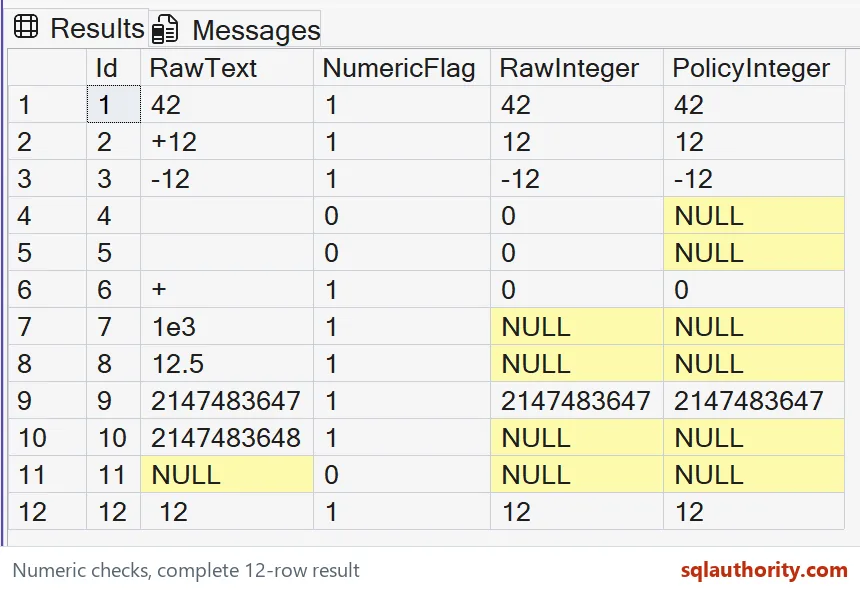
| Id | Input text | ISNUMERIC | RawInteger | PolicyInteger |
|---|---|---|---|---|
1 | [42] | 1 | 42 | 42 |
2 | [+12] | 1 | 12 | 12 |
3 | [-12] | 1 | -12 | -12 |
4 | '' (empty) | 0 | 0 | NULL |
5 | [ ] (3 spaces) | 0 | 0 | NULL |
6 | [+] | 1 | 0 | 0 |
7 | [1e3] | 1 | NULL | NULL |
8 | [12.5] | 1 | NULL | NULL |
9 | [2147483647] | 1 | 2147483647 | 2147483647 |
10 | [2147483648] | 1 | NULL | NULL |
11 | NULL | 0 | NULL | NULL |
12 | [ 12 ] | 1 | 12 | 12 |
Check the rows that disagree
The signed integer rows belong inside the target range. The upper boundary value also fits. The next larger value exceeds the int range. A wider numeric type could hold it, so a general numeric check isn’t enough.
The plus sign alone illustrates another loose acceptance. The measured SQL Server 2025 result converts it to integer zero in both columns. Blank normalization leaves that sign unchanged. Successful TRY_CONVERT therefore doesn’t enforce a digit-containing input grammar.
NULL has a separate meaning in this demonstration. It represents missing input, while failed conversion also returns NULL. Keep an input classification when that difference matters. Don’t infer the reason for NULL from the conversion result alone.
Keep the policy separate
I can argue for accepting surrounding spaces in a friendly form. A fixed machine protocol could require exact spelling instead. That stricter contract needs an additional text check. Successful conversion by itself doesn’t establish a canonical input format.
Likewise, int conversion doesn’t prove a quantity is suitable for an order. A negative value can be convertible and still violate the business rule. Check the converted range after parsing. Keep that rule distinct from the function’s conversion behavior.
This example doesn’t execute forbidden source-to-target conversions. TRY_CONVERT doesn’t suppress errors for an explicitly disallowed conversion. Its name shouldn’t encourage a blanket assumption about error handling. That distinction still applies outside these text inputs.
Use the value you checked
In an import design, I’d keep the original text with its parsed value. That gives a rejected row enough context for correction. It also avoids repeating a different cast later. An acceptance flag without the accepted value leaves unnecessary ambiguity.
Copy the complete query to retain every input case. Compare each original string with its numeric flag and both integer conversions. The plus-only row becomes zero on the tested build, even after blank normalization. A matching total alone can hide the wrong conversion.
Keep the original text beside the parsed value, so every row can explain itself.
A successful conversion is not a valid quantity, it is only a parsed value.
Published by Pinal Dave on SQLAuthority. More of my work at pinaldave.com.
Discover more from SQL Authority with Pinal Dave
Subscribe to get the latest posts sent to your email.