I review REPLACE return limits when a replacement can expand its input. The type of the searched expression matters before the operation begins. Casting an already shortened result to a larger type cannot bring back the missing text. A compact byte-length comparison makes that difference visible without displaying thousands of repeated characters.

Make the expansion large enough to expose the limit
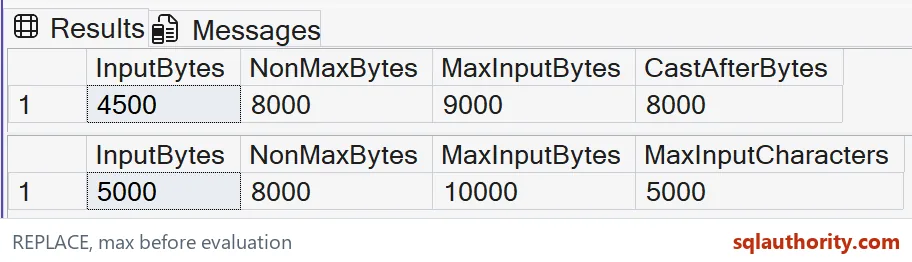
The first example supplies 4,500 lowercase a characters in a non-max varchar expression. Replacing each one with aa asks for 9,000 characters. REPLACE returns at most 8,000 bytes when the searched expression isn’t varchar(max) or nvarchar(max).
These examples use simple ASCII characters. The expected non-max result is 8,000 bytes. The max-input version retains the requested 9,000 bytes.
WITH Seed AS (
 SELECT CAST(REPLICATE('a',4500) AS varchar(8000)) AS InputText
), Expanded AS (
 SELECT InputText,REPLACE(InputText,'a','aa') AS NonMaxResult,
        REPLACE(CAST(InputText AS varchar(max)),'a','aa') AS MaxResult
 FROM Seed
)
SELECT CAST(DATALENGTH(InputText) AS bigint) AS InputBytes,
       CAST(DATALENGTH(NonMaxResult) AS bigint) AS NonMaxBytes,
       DATALENGTH(MaxResult) AS MaxInputBytes,
       DATALENGTH(CAST(NonMaxResult AS varchar(max))) AS CastAfterBytes
FROM Expanded;

WITH Seed AS (
 SELECT CAST(REPLICATE(N'a',2500) AS nvarchar(4000)) AS InputText
), Expanded AS (
 SELECT InputText,REPLACE(InputText,N'a',N'aa') AS NonMaxResult,
        REPLACE(CAST(InputText AS nvarchar(max)),N'a',N'aa') AS MaxResult
 FROM Seed
)
SELECT CAST(DATALENGTH(InputText) AS bigint) AS InputBytes,
       CAST(DATALENGTH(NonMaxResult) AS bigint) AS NonMaxBytes,
       DATALENGTH(MaxResult) AS MaxInputBytes,
       CAST(LEN(MaxResult) AS bigint) AS MaxInputCharacters
FROM Expanded;
Cast the searched input before replacement
Both expressions use the same search text and replacement. Their deliberate difference is the cast around InputText before the second REPLACE call. That call receives varchar(max), so its result can exceed the non-max limit.
The final length column casts the non-max result afterwards. Its expected length remains 8,000 bytes. This separates choosing a sufficiently large calculation type from merely choosing a large destination for the value that survived.
Inspect lengths without publishing oversized data
The result grid contains four lengths rather than the repeated strings themselves. That makes the lost output easier to spot, but the metric is still only one check. For a real transformation, I also compare relevant prefixes, suffixes and expected replacement counts.
Two different strings can have the same length. A length check can expose truncation. It doesn’t prove the replacement preserved the intended text or that the input was complete.
Read Unicode limits as bytes
The second supplied input contains 2,500 basic Unicode a characters in nvarchar(4000), giving an expected 5,000 bytes. Doubling them asks for 5,000 characters, or 10,000 bytes for this specific input.
The non-max result is still limited at 8,000 bytes. The max-input result is expected to retain 10,000 bytes and 5,000 characters. This example doesn’t treat an 8,000-byte ceiling as an 8,000-character allowance for Unicode data.

Keep the rest of the expression contract visible
REPLACE substitutes all matching occurrences and follows the input collation. A NULL argument produces NULL, and an empty search string leaves the searched expression unchanged.
Those rules can affect a transformation independently of its capacity. These examples intentionally use uncomplicated lowercase text and a fixed nonempty search value. For case-sensitive cleanup or mixed-language input, I review the comparison policy as well as the input and result types.
Protect the complete path rather than one expression
A max-input REPLACE call doesn’t protect later assignment to a shorter parameter, output column or application buffer. It also cannot restore text that was truncated while constructing the input earlier. I inspect the whole path from source to consumer and choose the intended limit explicitly.
Retain the exact SQL and both measured grids during validation. Changing the type alone doesn’t establish a timing improvement.
Cast the input first, and the long text arrives in one piece.
Casting the output is not a fix, it is too late after REPLACE truncates.
Published by Pinal Dave on SQLAuthority. More of my work at pinaldave.com.
Discover more from SQL Authority with Pinal Dave
Subscribe to get the latest posts sent to your email.