
One of the developers at my company asked is it possible to parse HTML and retrieve only TEXT from it without using regular expression. He wanted to remove everything between < and > and keep only Text. I found the question very interesting and quickly wrote UDF which does not use regular expression. Let us see how to parse HTML without regular expression.
Following UDF takes input as HTML and returns TEXT only. If there is any single quotes in HTML they should be replaced with two single quotes (not double quote) before it is passed as input to function.
CREATE FUNCTION [dbo].[udf_StripHTML] (@HTMLText VARCHAR(MAX))
RETURNS VARCHAR(MAX)
AS
BEGIN
DECLARE @Start INT
DECLARE @End INT
DECLARE @Length INT
SET @Start = CHARINDEX('<',@HTMLText) SET @End =
CHARINDEX('>',@HTMLText,CHARINDEX('<',@HTMLText))
SET @Length = (@End - @Start) + 1 WHILE @Start > 0
AND @End > 0
AND @Length > 0
BEGIN
SET @HTMLText = STUFF(@HTMLText,@Start,@Length,'')
SET @Start = CHARINDEX('<',@HTMLText) SET @End = CHARINDEX('>',@HTMLText,CHARINDEX('<',@HTMLText))
SET @Length = (@End - @Start) + 1
END
RETURN LTRIM(RTRIM(@HTMLText))
END
GO
Test above function like this :
SELECT dbo.udf_StripHTML('<b>UDF at SQLAuthority.com </b>

<a href="http://www.SQLAuthority.com">SQLAuthority.com</a>')
Result Set:
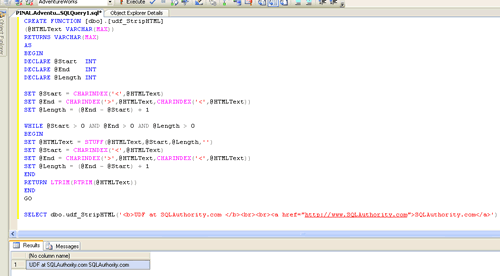
UDF at SQLAuthority.com SQLAuthority.com
If you want to see this example in action click on Image. It will open large image.
Let me know what think of blog post by leaving your note in the comment sections.
Published by Pinal Dave on SQLAuthority. More of my work at pinaldave.com.



95 Comments. Leave new
B”H
YESSSS! Thank you for making this available. Works like a charm!
Thanks for the code.
easiest way to do it :)
Nice solution, i have been searching for something that remove the html code embbebed in a string, you usually think in a complex solution, i thougth to solve this using regular expresions, but this is a easy and beauty way to do it.
Thanks and regards from Mexico.
Thanks, saved me some time!
How to change this function use in @HTMLText NTEXT.
Thanks very much, your function has saved me time and headache :)
What if i write:
SELECT dbo.udf_StripHTML(‘The symbol < means less than’)
Cool Function!
Hi Pinal
Its really very useful
thanks
supriyo
This code is interesting. How would one go about using this as a procedure instead of a function ?
Modify it as a procedure that uses a output parameter
Great work….
Hi Sir,
Its really a nice example. But its not showing color if i have use span and style tag
The code works great if I use the function in Query Analyzer but if I use it as part of a query in Report Builder 2.0 all returned fields are blank.
Any idea what Reporting Services is doing that removes all the data?
Pinal,
the result http://www.sqlblogauthority.com is also inside a html tag.
stripping html is not working correctly. you have just removed the tags.
Great Article. Was very helpful and worked for me.
Though in my custom function i have to write code to take care of &,   characters of HTML.
Dear Pinal
I have Arabic data enclosed in my DB with html tags.
Example:
25/10/2010- إنتظار مدير أي تي ليتابع تنفيذ المشروع وجاري البحث
But when use this function it gives me result as below:
25/10/2010- ?????? ???? ?? ?? ?????? ????? ??????? ????? ?????
But it’s working for english datas…Please help. I hv given nvarchar(max) and using sql server 2005.
hi
I myself got the soution.Just modified varchar to nvarchar.it’s working perfect…………..
Hi Pinal,
Great Solution but I could not understand why you used STUFF function instead of replace. Like in Stuff you need to do the looping but like removing we can just use
replace(”, CHAR(13)+CHAR(10)) simply…
Wjhat do you say??
Becuase everything that is part of should be removed
I have used this one and working properly…
set ANSI_NULLS ON
set QUOTED_IDENTIFIER ON
go
CREATE FUNCTION [dbo].[udf_ConvertHTML2Text]
(@HTMLText varchar(MAX))
RETURNS varchar(MAX)AS
BEGIN
DECLARE @Start int
DECLARE @End int
DECLARE @Length int
–Replace single quote with two single quotes
SET @HTMLText = replace(@HTMLText,CHAR(39),””)
–Replace & as &
SET @Start = CHARINDEX(‘&’, @HTMLText)
SET @End = @Start + 4
SET @Length = (@End – @Start) + 1
WHILE (@Start > 0 AND @End > 0 AND @Length > 0)
BEGIN
SET @HTMLText = STUFF(@HTMLText, @Start, @Length, ‘&’)
SET @Start = CHARINDEX(‘&’, @HTMLText)
SET @End = @Start + 4
SET @Length = (@End – @Start) + 1
END
–Replace < with <
SET @HTMLText = REPLACE (@HTMLText, '<','
SET @HTMLText = REPLACE (@HTMLText, ‘>’,’>’)
— Replace any tags with two newline
SET @HTMLText = REPLACE (@HTMLText, ‘‹’,'<')
— Replace any tags with two newline
SET @HTMLText = REPLACE (@HTMLText, ‘›’,’>’)
–Replace   with space
SET @HTMLText = REPLACE (@HTMLText, ‘ ‘,’ ‘)
— Replace any tags with a newline
SET @HTMLText = REPLACE (@HTMLText, ”,CHAR(13)+CHAR(10))
— Replace any \t with a space
SET @HTMLText = REPLACE (@HTMLText, ‘\t’,’ ‘)
— Replace any tags with a newline
SET @HTMLText = REPLACE (@HTMLText, ”,CHAR(13)+CHAR(10))
— Replace any \n with a newline
SET @HTMLText = REPLACE (@HTMLText, ‘\n’,CHAR(13)+CHAR(10))
— Replace any tags with a newline
SET @HTMLText = REPLACE (@HTMLText, ”,CHAR(13)+CHAR(10))
— Replace any tags with two newline
SET @HTMLText = REPLACE (@HTMLText, ”,CHAR(13)+CHAR(10)+CHAR(13)+CHAR(10))
— Replace any tags with two newline
SET @HTMLText = REPLACE (@HTMLText, ”,CHAR(13)+CHAR(10)+CHAR(13)+CHAR(10))
— Replace any tags with two newline
SET @HTMLText = REPLACE (@HTMLText, ”,CHAR(13)+CHAR(10)+CHAR(13)+CHAR(10))
— Replace any tags with two newline
SET @HTMLText = REPLACE (@HTMLText, ”,CHAR(9))
— Replace any tags with two newline
SET @HTMLText = REPLACE (@HTMLText, ‘•’,’*’)
— Replace any tags with two newline
SET @HTMLText = REPLACE (@HTMLText, ‘™’,'(tm)’)
— Replace any tags with two newline
SET @HTMLText = REPLACE (@HTMLText, ‘⁄’,’/’)
— Replace any tags with two newline
SET @HTMLText = REPLACE (@HTMLText, ‘©’,'(c)’)
— Replace any tags with two newline
SET @HTMLText = REPLACE (@HTMLText, ‘®’,'(r)’)
–want to keep mail addresses enclosed in <
SET @HTMLText = REPLACE (@HTMLText, '<mailto:','mailto:')
SET @HTMLText = REPLACE (@HTMLText, 'From: <','From: ')
SET @HTMLText = REPLACE (@HTMLText, 'To: <','To: ')
SET @HTMLText = REPLACE (@HTMLText, 'CC: <','CC: ')
SET @HTMLText = REPLACE (@HTMLText, 'Reply-to: <','Reply-to: ')
— Remove anything between tags
SET @Start = CHARINDEX(”, @HTMLText, CHARINDEX(‘ 0 AND @End > 0 AND @Length > 0)
BEGIN
SET @HTMLText = STUFF(@HTMLText, @Start, @Length, ”)
SET @Start = CHARINDEX(”, @HTMLText, CHARINDEX(‘<', @HTMLText))
SET @Length = (@End – @Start) + 1
END
–Remove leading and trailing space
RETURN LTRIM(RTRIM(@HTMLText))
END
seems the texts are not appearing properly…please contact me in case updated version is required…
Hi Pinal ,
I am having problem in removing the tags from my data. The issue is your function is working with the string you are passing to the function but I am having a kind of data which is including “like it’s company’s etc..” so in sql window it is taking it as a end of txt.
Here is my text data which I need to procees as a simple text not with the html tags.
“Recommendation Despite the underlying volatility of it’s business. any more ’23s and ’32s. theoretical 40% discount to NAV. Description management (AUM) were GBP 8.2 billion at Sept. 38, 3999, and comprise: 3i’s d (mainly funds) 0.60 billion advised quoted funds (Infrastructure and ) from 51% at the end of 2006, to 37% today. Europe, Asia, and the U.S. . The company is listed on the , and . Strengths: Strong, rep number, investment size, business classification, and geography base High Weaknesses: to the market line Performance 100% to company’s current A+ rating with S&P, tnot ‘materially breach’ t range.”