WINDOW lets me name a window definition and reuse it across compatible calculations. I still specify the partition, ordering and frame. A short name should make the intended calculation easier to review.
A running sum and a running row count can share the same definition. Repeating a long OVER clause beside each expression can obscure that relationship. Naming it puts the common rule in one place.

Use one definition for two calculations
The example contains five entries across two accounts. Entry identifiers provide a unique order within each account. One amount is missing, which separates counting rows from summing populated values.
RunningWindow partitions by AccountCode and orders by EntryId. Its explicit ROWS frame begins at the partition’s first row and ends at the current row. Both calculations refer to that same named definition.
The WINDOW clause is available in SQL Server 2022 and later. The database must also have compatibility level 160 or higher. This example does not change compatibility or any session setting.
WITH Entries AS
(
    SELECT AccountCode, EntryId, Amount
    FROM (VALUES (CAST('A' AS varchar(1)), 1, CAST(10 AS int)),
                 ('A', 2, NULL), ('A', 3, 5), ('B', 4, 7), ('B', 5, 3)) AS v(AccountCode, EntryId, Amount)
)
SELECT AccountCode, EntryId, Amount,
       SUM(Amount) OVER RunningWindow AS RunningAmount,
       COUNT(*) OVER RunningWindow AS RowsSeen
FROM Entries
WINDOW RunningWindow AS
       (PARTITION BY AccountCode ORDER BY EntryId
        ROWS BETWEEN UNBOUNDED PRECEDING AND CURRENT ROW)
ORDER BY AccountCode, EntryId;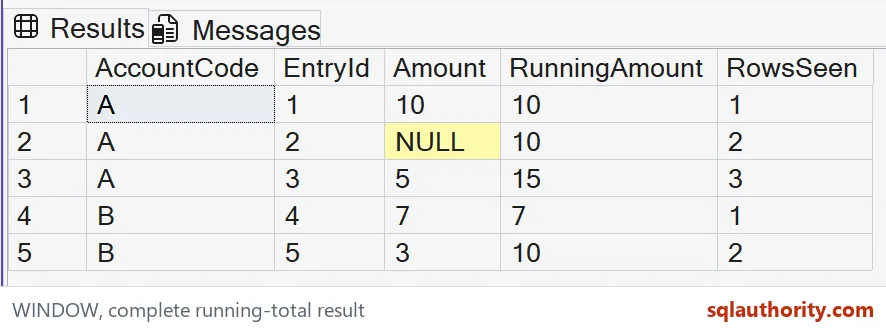
Read the two running results
Account A starts with amount ten, so its running sum is ten and its row count is one. The next row has no amount. Its expected sum stays ten while its row count increases to two.
The third A entry adds five, producing a running sum of fifteen and a row count of three. SUM ignores the missing amount. COUNT star still includes that row because it counts entries.
Account B starts a separate partition. Its first entry has sum seven and count one, rather than continuing account A’s totals. The second B entry produces sum ten and count two.
The expected output retains every source entry. Window functions add calculations without collapsing these rows into one account summary. That makes the original amount and running results available together.
The name does not choose a frame for you
The explicit frame is part of the calculation’s contract. Removing it can introduce default frame behavior for an ordered aggregate. I keep ROWS visible when the requirement is a row-by-row running result.
A unique ordering key also matters. This example has distinct entry identifiers within each account. If business timestamps can tie, add an appropriate tie-breaking key before assuming the row sequence is stable.
The final ORDER BY controls presentation. The order inside the window controls the calculation. Using the same columns here makes the output easier to inspect, but the two clauses have different jobs.
A named window belongs to its query scope. It is not a stored database object or a reusable definition across unrelated statements. The example therefore needs no creation or cleanup step.

Keep reuse within the calculation contract
A window definition can be extended where the syntax permits, but an already defined component cannot be redefined there. Do not try to override its partition or order inconsistently. Use a separate named definition when another calculation needs a different rule.
Naming a window does not promise a faster execution plan. The benefit shown here is an explicit shared definition and inspectable results. Performance decisions still require appropriate measurements on the actual data.
I don’t use the name as a substitute for explaining the measure. RunningAmount sums amounts, while RowsSeen counts entries. Missing amounts leave those two measures with intentionally different behavior.
The complete five-row result gives useful checks for partition reset, missing input and the final accumulated amount. Keep those cases when adapting the query. A single account containing only populated amounts would hide two of those checks.
Name the shared window when it clarifies the query, and keep its partition, order and frame in plain view.
A named window is not a way to skip the frame, it is one shared rule.
Published by Pinal Dave on SQLAuthority. More of my work at pinaldave.com.
Discover more from SQL Authority with Pinal Dave
Subscribe to get the latest posts sent to your email.