
Here is a quick script which will help users to identify locked tables in the SQL Server. Run it whenever you need to identify locked table names and their lock types.
SELECT
OBJECT_NAME(p.OBJECT_ID) AS TableName,
resource_type, resource_description
FROM
sys.dm_tran_locks l
JOIN sys.partitions p ON l.resource_associated_entity_id = p.hobt_id
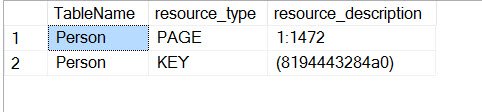
When you run above script, it will display table name and lock on it.
I have written code to lock the person table in the database. After locking the database, when I ran above script – it gave us following resultset.
One Gap in This Script and How to Close It
The script above joins resource_associated_entity_id to hobt_id in sys.partitions. That works for KEY, PAGE and RID locks, because for those locks the column holds a hobt_id. For a lock on the whole table, the resource type is OBJECT, and the same column holds the object_id instead. Those rows do not match any partition, so table level locks drop out of the result. Also, sys.partitions only knows about the current database, so run the script in the database you are checking.
When I want to identify locked table names at the object level, I use this small query.
SELECT OBJECT_NAME(resource_associated_entity_id) AS TableName,
    request_mode,
    request_status,
    request_session_id
FROM sys.dm_tran_locks
WHERE resource_type = 'OBJECT'
    AND resource_database_id = DB_ID();
The request_mode column shows the lock type, such as IS, IX or X, and request_status tells you whether the lock is granted or still waiting. If you see WAIT, another session is blocking this one. Check blocking_session_id in sys.dm_exec_requests to find out which session it is, and talk to its owner before you think about ending it. Run the query a few times over a minute or two. A lock that shows up once and disappears is routine. A lock that sits in WAIT for a long time is the one to chase, because every second it waits, a user is waiting too. Locks are normal. Long waits are the real problem worth your time.
Published by Pinal Dave on SQLAuthority. More of my work at pinaldave.com.
Discover more from SQL Authority with Pinal Dave
Subscribe to get the latest posts sent to your email.

11 Comments. Leave new
Pinal – What does resource_description mean?
How do you lock a single table in database?
create table Table1(a int)
begin tran
insert Table1 values(1)
Until the transaction will be committed or rolled back, the table Table1 will be locked.
Manioko – I see, its locking table only for SELECT and UPDATE but for INSERT. it does not stop any one to INSERT data in table.
I want to completely lock the table and not allow anyone do any operation on that table? One way is write a trigger on table and ROLLBACK everything.
Looking for TABLOCKX hint, it will help you
Thanks Dave, Hopefully I’ll never have to use this, but it’ll be a handy tool in the ol’ toolbox.
Hi Pinal,
I think your code only finds locks in a particular database and not across all databases on the server? If this assumption is correct, I would like to know how to find all locked tables and views across all databases on a given server?
Thanks,
Vlad.
that’s due to sys.partitions using which I am fetching more details. You can skip that and get all locks using DMV sys.dm_tran_locks.
How can I know which of user has locked the Table and from which host computer?
what is resource_description here?
Exactly what I needed!
I find your articles informative and, more important, correct.
Cheers!