
I recently wrote article SQL SERVER – Finding Last Backup Time for All Database and requested blog readers to respond with their own script which they use it Database Backup.
Here is the script suggested by SQL Expert aasim abdullah, who has written excellent script which goes back and retrieves the history of any single database.
USE AdventureWorks

GO

-- Get Backup History for required database

SELECT TOP 100

s.database_name,

m.physical_device_name,

CAST(CAST(s.backup_size / 1000000 AS INT) AS VARCHAR(14)) + ' ' + 'MB' AS bkSize,

CAST(DATEDIFF(second, s.backup_start_date,

s.backup_finish_date) AS VARCHAR(4)) + ' ' + 'Seconds' TimeTaken,

s.backup_start_date,

CAST(s.first_lsn AS VARCHAR(50)) AS first_lsn,

CAST(s.last_lsn AS VARCHAR(50)) AS last_lsn,

CASE s.[type]
WHEN 'D' THEN 'Full'

WHEN 'I' THEN 'Differential'

WHEN 'L' THEN 'Transaction Log'

END AS BackupType,

s.server_name,

s.recovery_model

FROM msdb.dbo.backupset s

INNER JOIN msdb.dbo.backupmediafamily m ON s.media_set_id = m.media_set_id

WHERE s.database_name = DB_NAME() -- Remove this line for all the database

ORDER BY backup_start_date DESC, backup_finish_date

GO
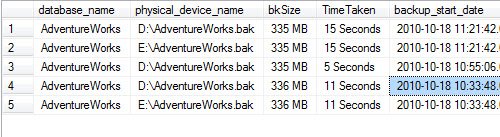
Very neat script and in my above example I have ran that for single database adventureworks and you can see following results. The same can be ran for multiple database as well if you just remove the WHERE condition.
Published by Pinal Dave on SQLAuthority. More of my work at pinaldave.com.





50 Comments. Leave new
you can also do 1048576.0 to get rid of rounding problem.
may i a have a help over here i am trying to Write a SP that will generate a report regarding backup success
Jhonatan – What help you are looking for?
He wants you to create the stored proc wrapper for him rather then attempting to create it himself. One pattern I’m noticing in the comments is most people want you to do their work for them with mods to the script.
Give a man a fish, he eats for a day. Teach a man how to fish, he eats for a lifetime.
These people need to attempt to understand the script and modify it themselves.
@Joey Glazer Give a man a fire, he is warm for a day; set a man on fire, he is warm for the rest of his life ;)
Hi Pinal,
I need to get the time taken for all the servers in sql using CMS. Can you please help me with a script? I would really appreciate it.
Thank You,
Snea
Snea – Are you not able to use the query given in the blog via CMS?
hi Dave ji,
as per my app team request they want a report on daily basis for job status, we have 40jobs they want status in single mail.
i know physical device name where my back up file was stored but idon’t know the back p device location
Thank you so much. It is very helpful
how to get table history from sql
Hi, recently we migrated the backups from ServerA to server. But in backupset table in serverB, server name showing as serverA for the backups.
How it is possible to have different server name on backupset table
Hi,
Can i have the total timing for system databases for a server?
(replying to a 6 year old post, I know, but still…)
. . . . .. . . . . . . . . . . ,.-‘”. . . . . . . . . .“~.,
. . . . . . . .. . . . . .,.-“. . . . . . . . . . . . . . . . . .”-.,
. . . . .. . . . . . ..,/. . . . . . . . . . . . . . . . . . . . . . . “:,
. . . . . . . .. .,?. . . . . . . . . . . . . . . . . . . . . . . . . . .,
. . . . . . . . . /. . . . . . . . . . . . . . . . . . . . . . . . . . . . ,}
. . . . . . . . ./. . . . . . . . . . . . . . . . . . . . . . . . . . ,:`^`.}
. . . . . . . ./. . . . . . . . . . . . . . . . . . . . . . . . . ,:”. . . ./
. . . . . . .?. . . __. . . . . . . . . . . . . . . . . . . . :`. . . ./
. . . . . . . /__.(. . .”~-,_. . . . . . . . . . . . . . ,:`. . . .. ./
. . . . . . /(_. . “~,_. . . ..”~,_. . . . . . . . . .,:`. . . . _/
. . . .. .{.._$;_. . .”=,_. . . .”-,_. . . ,.-~-,}, .~”; /. .. .}
. . .. . .((. . .*~_. . . .”=-._. . .”;,,./`. . /” . . . ./. .. ../
. . . .. . .`~,. . ..”~.,. . . . . . . . . ..`. . .}. . . . . . ../
. . . . . .(. ..`=-,,. . . .`. . . . . . . . . . . ..(. . . ;_,,-”
. . . . . ../.`~,. . ..`-.. . . . . . . . . . . . . . … . /
. . . . . . `~.*-,. . . . . . . . . . . . . . . . . ..|,./…..,__
,,_. . . . . }.>-._. . . . . . . . . . . . . . . . . .|. . . . . . ..`=~-,
. .. `=~-,__. . . `,. . . . . . . . . . . . . . . . .
. . . . . . . . . .`=~-,,.,. . . . . . . . . . . . . . . .
. . . . . . . . . . . . . . . . `:,, . . . . . . . . . . . . . `. . . . . . ..__
. . . . . . . . . . . . . . . . . . .`=-,. . . . . . . . . .,%`>–==“
. . . . . . . . . . . . . . . . . . . . _. . . . . ._,-%. . . ..`
hi , have a query here .. is it possible to know by which user that back up has taken , mean to say by which id the back up task has done on a specific server for a particular time ??
How can I include backup type – ‘Copy Only’ as well in this script ?
BTW
the script shows incorrect backup size if you perform a multifile backup (in particular to azure)
Hello sir,Pls suggest how can I get database back up status for a list of SQL Servers instances in a domain at one.