POWER uses the base expression’s type to determine its return type. I cast the base before calculating when the result needs a fractional value. Changing the display afterward cannot restore a fraction already lost.

Compare one calculation with three typed bases
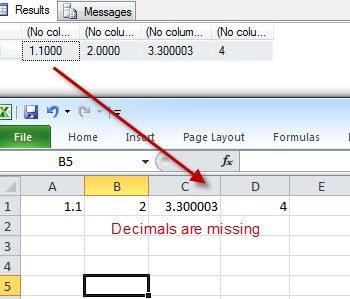
The mathematical expression two raised to negative two equals one quarter. The first query asks for that calculation with int, float and decimal bases. Each base is explicitly typed before POWER receives it.
The expected integer result is zero. An int return cannot retain one quarter as a fractional number. This does not mean that negative exponents universally produce a mathematical zero.
The float expression is expected to display 0.250000 after the chosen decimal cast. The decimal(6,2) base is expected to return 0.25. The query makes the representation decision visible rather than inferring it from a printed literal.
I keep these expressions separate instead of combining all bases into one VALUES column. A common type chosen for that column could change the input contract. The point is to compare the types passed into the function.
SELECT
    POWER(CAST(2 AS int),-2) AS IntegerResult,
    CAST(POWER(CAST(2 AS float),-2) AS decimal(10,6)) AS FloatDisplay,
    POWER(CAST(2 AS decimal(6,2)),-2) AS DecimalResult,
    CAST(SQL_VARIANT_PROPERTY(CAST(POWER(CAST(2 AS decimal(6,2)),-2)
        AS sql_variant),'Precision') AS int) AS DecimalPrecision,
    CAST(SQL_VARIANT_PROPERTY(CAST(POWER(CAST(2 AS decimal(6,2)),-2)
        AS sql_variant),'Scale') AS int) AS DecimalScale;
Read the decimal result’s width deliberately
For a decimal base, POWER returns decimal(38,s). The scale comes from the supplied base. The expected property outputs are precision thirty-eight and scale two.
That larger precision does not add fractional scale beyond two. A smaller fraction can still be rounded at the return scale. Choosing decimal as a general label is insufficient when the required fractional detail is known.
The value in this example fits at scale two. That makes the type comparison clear without introducing an overflow or tiny-result boundary. A real expression needs expected values near its own permitted limits.
I inspect the return properties from the typed calculation itself. A client may hide zeros or present fewer digits. The client’s display cannot establish the function’s complete type contract.
Move the cast to the correct side of the calculation
The second query compares a decimal cast after integer-base POWER with a cast applied before the function. Both final columns use the same display type. Their expected values remain different.
CastAfter is expected to display 0.000000. It converts the already integer result. No later formatting choice can infer the fractional value that was not retained.
CastBefore is expected to display 0.250000. The float base requests a return capable of representing the fraction. The final cast merely chooses the displayed decimal scale.
I’d inspect conversion placement before adding more decimal places to a report. More printed digits can show more zeros without correcting the original calculation. The expression tree determines when the type decision occurs.
SELECT
    CAST(POWER(CAST(2 AS int),-2) AS decimal(10,6)) AS CastAfter,
    CAST(POWER(CAST(2 AS float),-2) AS decimal(10,6)) AS CastBefore;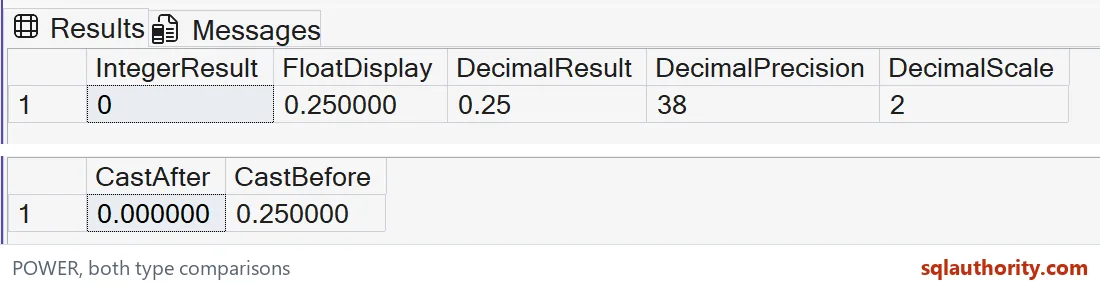

Validate range and approximation separately
A result can overflow the return type when the exponent produces a large value. Widening the exponent alone does not redefine the return type. Check the base type and expected result range together.
This example intentionally uses small safe values and no deliberate errors. It does not claim that every exponent is valid for every base. Negative bases with fractional exponents need their own mathematical domain policy.
A float input also brings approximate arithmetic into the calculation. Casting its result to decimal controls presentation, not the internal arithmetic model. Exact business calculations need an independently defined numeric contract.
Compare the cast before POWER with the cast after POWER. A later display conversion cannot recover a fraction already lost. Keep both outputs visible when deciding which base type belongs to the calculation.
I choose the base representation from the required result rather than the shortest literal. Then I check both an ordinary result and a fractional boundary. That makes conversion placement part of the calculation’s reviewable design.
Put the cast where the fraction is born, and the rest takes care of itself.
A later decimal cast is not a recovered fraction, it is a new view of the result.
Published by Pinal Dave on SQLAuthority. More of my work at pinaldave.com.
Discover more from SQL Authority with Pinal Dave
Subscribe to get the latest posts sent to your email.