
If Microsoft Office SharePoint Server (MOSS) and your database (MS SQL Server) are running together on same physical server, changing the name of the server (computer) using operating system may create non-functional SharePoint website.
When you change the physical server name the SharePoint is already connected to the SQL instance of old computer name (OldServerName/SQLInstance) and on changing the name the SharePoint will not able to connect the SQL Server as now the SQL Server instance will run on new computer name (NewServerName/SQLInstance).
To solve this problem you need to reconfigure the entire Microsoft Office SharePoint Server with SQL Server Instance. Please follow the steps to fix the issue.
1. Open command prompt, change directory to where stsadm.exe exists.
C:\cd C:\Program Files\Common Files\Microsoft Shared\web server extensions\12\BIN

2. To invoke setconfigdb operation we need to use stsadm.exe. Run following command on command prompt
stsadm.exe -o setconfigdb -databaseserver ServerName -farmuser MyUserName – farmpassword MyPassword

3. Go to IIS, All Programs>>Administrative Tools>>Internet Information Service (IIS) Manager.

4. Right Click SharePoint Central Administration v3, click on delete and re-run the configuration wizard; the web application will be re-created by the configuration wizard.

5. After the above operation has completed successfully, run the SharePoint Products and Technologies Configuration Wizard.
All Programs>>Microsoft Office Server >> SharePoint Product and Technologies Configuration Wizard
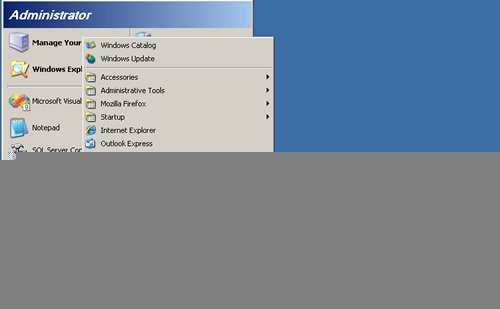
6. Complete all the steps of wizard by clicking on Next button.

At the end of this process you will get a success wizard.
On completion of this whole procedure Microsoft Office SharePoint Server gets connected to the database with new Computer Name.
Reference : Pinal Dave (https://blog.sqlauthority.com)




11 Comments. Leave new
Hi pinaldave,
I am working on Sharepoint 2007. I am facing problem with SPSites when My computer name is changed. No sites is working after I change the Computer Name. I follow the steps provided by you to solve this Issue. Once the Configuration wizard is Completed successfull ( That is last step ) it is open the central administration site. In Central administration site one option is available to check the web application lists. when i open the link it is showing only the Central administration Site in Web application list ( Before changing the Computer Name i have 10 Shrepoint sites in IIS which are working without showing any error) How can i make them to work.
Thanks
Nazeer Basha Shaik
Nazeer,
Have you figured out how to get your sites to work? I was afraid that would happened if I followed this proceedure, so I wanted to know if it would all work out before I went ahead with this.
If anybody has information on how to get your old sites back up and running after you change server names it’d be much appreciated.
Thank you.
I have an existing server farm and the SQL Server computer changed. I cannot connect to the SQL Server and when I have tried to run through the wizard I first disconnect from the farm and again re-run the wizard. But, I cannot connect the existing SQL Server under the new name. Any help would be great.
Thanks, Josh
SQL Server 2005
Sharepoint 2007
You need this as well.
https://support.microsoft.com/en-us
Hey Pinal Dave, see – if you use SQL aliases you can change the server name very easily. You just need to plan it when you do your initial SharePoint installation.
DDK
MOSS + SqlExpress ( Server )
== Migrated to ==>>
MOSS ( SERVER1 ) + sql 2005 ( server2)
After migration am not seing any sites in IIS on Server1
Any help please..
Thank you for this procedure. Works great with SharePoint 2010 also.
The only thing different is in IIS Manager, the node to delete will be SharePoint Central Administration v4 instead of v3.
Ryan,
Did you have old sites you managed to get working again? I’m trying this with 2010 as well, but I’m afraid I’ll lose my sites.
Just an FYI you can do this much easier by simply changing the Registry Key which contains the settings for connection to the Configuration database.
If you go this route you do not have run the STSADM command and no need to run the configuration wizard to rebuild Central Admin.
Some of the images in this page is not getting loaded, can you re-upload those images?
Thanks yar Ap ne mara Sara masal hal kar dia …
Thank’s Friend you have Solved all my problems