Very frequently I use following command prompt script to start and stop default instance of SQL Server. Our network admin loves this commands as this is very easy.
Click Start >> Run >> type cmd to start command prompt.
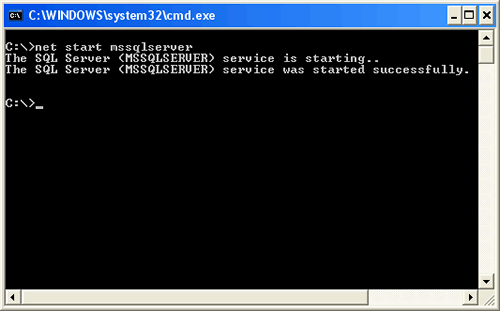
Start default instance of SQL Server
net start mssqlserver
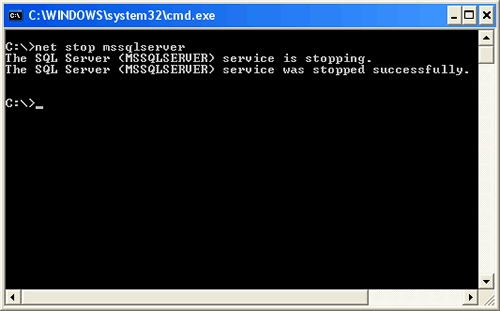
Stop default instance of SQL Server
net stop mssqlserver
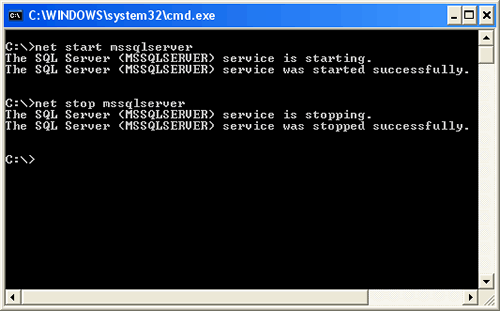
Start and Stop default instance of SQL Server.
You can create batch file to execute both the commands together.
Reference : Pinal Dave (http://blog.SQLAuthority.com)


thanks for the useful trip,
is it useful for sql on the network?its mean how can stop and start my sql on the other system?
how can i upgrade the version of sql server 2005 through command prompt. can u help me out
I love your site. Great info (I just read your article on @@IDENTITY vs. SCOPE_IDENTITY(), and it really gave me a good understanding of the differences).
However, you get the strangest comments on this site. :-P This post’s comments are definitely par for that particular course.
Pinal,
In interview every time ppl ask about the performance tunning.. can you tell me about it.. I m really screwed with the examples on websites.
Please give me real time examples as well some sites or how can I check on the SQL Server 2000
Great article!
People say you don’t need to restart SQL Server 2005, but I often need to do this to clear out the tempdb, especially before a backup.
Does anyone know how I can shrink the tempdb without restarting the SQL Service?
Thanks!
Jason
http://www.lonestarfinancing.com
One of the best sites I have ever seen for the same.
Keep it up man,
-Nisheeth Pandya
how to start or stop services SQL server by command prompt from client (client can stop or start service in server)
How to start dependent services (SQL Server Agent) from command prompt.Once MSSQLSERVER stopped Agent also get stopped .. how to start it…
i was looking for this! thanks!
Hello
Assuming that memory allocation in sql server is mostly related to pages cached. Normally in my company it takes around 6 to 10 hours to allocate the max amount of memory we have set in the settings.
Is there any performance issue associated to restarting SQL server service ? i.e. the application connecting to SQLserver will behave better or worst after restarting SQL server service ?
thanks,
dbaexp2008
i have increased the initial size of tempdb (27gb)
now i have to change it back to original size (2mb)
tried
“use tempdb dbcc shrinkfile (‘tempdev’,2,TRUNCATEONLY)”
its working but the problem is as i restart the server angain it goes back to the same size(27gb)
when i try to restart server in command prompt i get following error
“”C:\>net stop mssqlserver
System error 1060 has occurred.
The specified service does not exist as an installed service.”"
could any one help me to resolve .
please send your solution to raghujchavan@gmail.com
thanks
raghu
raghujchavan@gmail.com
delete all the temp files
nice work, bro
another great tip! thanks again
Hey Thanks,
I’m a non-sql guy even though I’m inspired to learn as much as i can. My product SMS relies heavily on sql. Thanks for the stop and restart tip.
@Papillon ( No 8)
START :
To start named instance of SQL Server and SQL Server Agent run this command from command prompt:
net start “SQL Server (prod2005)”
net start “SQL Server Agent (prod2005)”
– Remember SQL Server Agent can only be start after SQL Server has started. hence follow the same order mentioned in the code.
Here “prod2005″ is the named instance, this name does not includes my machine name.
Complete name of the instance is IMRAN\prod2005 , But here we dont need complete name we just need instance name.
STOP:
Similarly to stop SQL Server and SQL Server Agent run this command from cmd prompt.
net stop “SQL Server Agent (prod2005)”
net stop “SQL Server (prod2005)”
– Remember to Stop SQL Server you first need to stop SQL Server Agent, so first stop SQL Server Agent and then Stop SQL Server, follow the same order as mentioned in the code
The same concept applies here as well, you will not use the complete name of the instance ( imran\prod2005) , but you will just use instance name with out machine name (Prod20005).
What I did, I wrote these two scripts to start and to stop SQL Server and Agent in two different bat files. When ever I want to start or stop these two services, I just double click bat files, and thats it… it does all the work.
Hope this helps,
Imran.
Can I restart one perticular instance of a database? I dont want restart whole SqlServer.
Chetan,
Do you mean, you want to take a DB offline?
Command For SQL Server Stop From Client Computer
i’m newly opened the sql server 2005,how to start the query in what way,i know about query,but what way ,hw to open the sql server 2005,pls immediately reply to me,see already i installed the sql server 2005
If you are using MS Cluster to run MSSQL2005 you should
use the cluster commands to script a stop and start of MSSQLServer. Otherwise the cluster service will think that your service has failed.
I created a cmd/bat file that I schedule to run weekly.
cluster /cluster:CLUSTERNAME group “Group 0″ /offline
cluster /cluster:CLUSTERNAME group “Group 0″ /online
This stops and starts all depdendent services for MSSQL SQL AGENT etc. in the cluster Group 0 in the correct order and keeps the services running on your primary server.
I have SQL server installed on my person pc. I had stopped the server sometime back . Now when I open the Enterprise manager and starting the server, it is giving failed error. I have tried to start it many times but it says connection failed.
I have tried to give the command(net start mssqlserver) in run but it says service could not be started.
I also tried one more way but that also didn’t work, Here is that :
Create a batch file called RestartSQL.BAT with the following commands in it, and save it on the C:\ drive:
@ECHO OFF
NET STOP SQLSERVERAGENT
NET STOP MSSQLSERVER
NET START MSSQLSERVER
NET START SQLSERVERAGENT
Please help me how can we start this ?
Amit.
@Amit.
There could be many many reasons for this to happen.
I will list very important solution.
1. Go to Start
2. Go to Run
3. Type Services.msc
4(a). Search for SQL Server service ( if you have SQL Server 2005), double click this service.
4(b). Search for MSSQLServer service ( if you have SQL Server 2000), double click this service.
5. Check for Startup Type , this should not be disabled. This can be Manual or Automatic. If it is disabled, set it to manual, click apply, click Start, if the service starts, thats good, there is no more problem if not then proceed to step 6.
6. On the top of the same box, there is a LogOn Tab, click that tab, click local system, click apply click ok. If Service starts, then you have problem with the account under which Service is running, you should use a valid username and valid password.
Browse on internet for more information,
Should be straight forward.
Hope this helps,
IM.
muchisimas gracias maestro Imran Mohammed,
ya me iba a dormir super frustrado y cansado.
leyendo sus sabios consejos y aplicandolos se solucionó el problema q tenia con sql server.
nuevamente gracias desde venezuela.
manuel
Thank You Very much
Special thanks to Imran Mohammed Mine is Named Instance
[...] SQL SERVER – 2005 – Start Stop Restart SQL Server From Command Prompt [...]
Hi Dave,
I am in need to know one thing that is ther any way for intimation whenever any MSSQl Services stopped some one or server was restarted unexpected and MSSQL Server agent is not started as like when any SQL agent job failed it intimated to defined group by the help of operator.
Do you have any SQL script for above requirement, Please guide me or send me on email ID.
Please do not suggest any monitoring tools because of we have already configuring. SQL script is Just for backup of monitoring tool is failed.
Thanks in advance…
Anurag Tripathi
Don’t bother running on two lines with this, just do:
net stop mssqlserver && net start mssqlserver
I NEED TO REMOVE SQL SERVER AND INSTALL NEW SQL SERVER BUT SQL SERVER IS NOT REMOVE FROM MY COMPUTER
FATAL ERROR IS COMING.
for starting and stopping remote SQL server, we can use the command -
SC \\servername start mssqlserver
SC \\servername stop mssqlserver
For MSSQL Server agent , use
SC \\servername start sqlserveragent
SC \\servername stop sqlserveragent
I’m very impressed u website. This is the best site of world for helping purpose.
Warm Regard,
rajesh
It works for sql sever 2005, but how to make it works in sql server 2008 express?
net start MSSQL$SQLEXPRESS to start/stop sql express
Hi,
i have problem with starting SQlserver 2005 in my system (vista). When I am trying to start by these steps, I am getting following error.
a service specific error occurred: 17051
More help is available by typing NET HELPMSG 3547.
Even I am not able to start services from Configuration manager.
Please help me out to resolve problem.
@Imran Mohammed
Thank you for this outstanding comment — Using cmd to stop/start a named instance.
It’s really a pain in the [...] to use UI to do such a simple task :)
Thanks again
HI,
What happens when the agent is restarted? I mean, what does it clear, what does it do?
I have an issue of a job, that does not complete – runs indefinitely. But when I restart the agent and then run the job, it completes. Again, if I attempt to run the job, it keeps running. I restart the agent, it completes!
I am curious to know what happened when I restarted the SQL Agent Service, that made it run?
My company server went down with a corrupted harddrive. We reinstalled the backup of the C: drive from an image but now SQL Express 2005 won’t start. I manually tried to start it but it gives an error message “Windows could not start SQL Server (SQLEXPRESS) on Local Computer…….error code 17051″. I looked up this code on the net and it says the evaluation copy has expired. I thought SQL Express was free and it is working until the C: Drive went down. Any ideas on how to proceed?
Thank you for the straight-to-the-point restart instructions. We have to restart the database services quite often on a couple of our systems and your instructions on how to put the restart in a batch file were very helpful. Thanks!
very nice discussion.
for schedule back up of your application add RestratSQL.bat
in schedule task
Hey Amit,
Is it good practices to restart the SQL Server 2008 services every week once a week?
Please note: our db’s use a lot of the tempDB’s
Thanks,
Dhaval
How can allow Remote Connection from command prompt
Can i stop/start the service using client ?
Hello Abhishek,
SQL Server service can be started or stopped from remote machine using NETSVC utility. For more details please visit the below page:
http://support.microsoft.com/kb/125627
Regards,
Pinal Dave
I mistakenly stopped mssqlserver using configuration manager that caused to stop mssqlagentservice as well. When I followed ur instruction as mentioned above from command, then that prompt always says “Access Denied”. What shall I do?
The same error came to me as well, and I found out that the Command Prompt was not running with elevated priviliges, so i again started the CMD with “Run as Administrator”, and it start working then.
Hi ,
I am trying to start the sql server agent but giving error .
The error is :
The sqlagent service on local computer started and then stopped. some services stop automatically if they have no work to do, for example, performance logs and alerts service
Please some one help me…
Thanks & Regards ,
Sahasra
this article was really helped me. Thank you very much
Susantha
Trying to write a script that will do the following:
1. START MSSQLSERVER
2. START SQLSERVERAGENT
3. Restore database over existing database with overwrite existing option selected.
4. STOP MSSQLSERVER
5. STOP SQLSERVERAGENT
Any thoughts?
brad
I have SQL Server 2005. It is stopped and I can not start it again.
I have tried to start it:
1. through SQL Server Configuration Manages (/services/SQL Server (SQLEXPRESS) by double click.
2. through SQL Server Configuration Manages
(/services/SQL Server (SQLEXPRESS) right click /start .
3. changing the Built-in account to Local System and also to Network Services
but nothing!!!
I have run your proposal : “net start mssqlserver” but i have the following message:
“The specified service name is not valid. You can have more help by typing NET HELPMSG 2185″
Sobody told me that there might be a confict with other programs. Is this meaningful to you?
So… I have disabled the F-Secure antivirus but nothing changed.
Is there anyone that can help me?
Full of expectations…
Despina
Dev
We have a problem of not starting SQL Server service at start up of windows though it was set up to start automatically under win services.
So is there a way i can you the script as above to check is SQL server service has started successfull after reboot if not try attempting using the above script.
Thanks
How to remove more than once instance , i do have 5 sql server instance in local system, i want to completelly remove 2 instance. can anybody assist me>
To Uninstall a named instance of SQL Server 2000/2005,
1.Click Start, Control Panel, click Add/Remove programs.
2.Select a name of an instance of SQL Server 2000, and click Remove.
3.Select the appropriate SQL Instance to remove
4.Follow the Wizard to remove the SQL Instance
I am getting the restart problem
My system gets restart when ever i install SQL SERVER2005. and every time its restart…
Can any one help me….
Hi,
I set up a backup dairly mode for sql server. But I have could copy the backup file which has extenstion name .bak to other folder. Notice for every time copying is “access is denied”
I hope your help. Thanks a lot.
Hi,
I setup a backup dairly mode for sql server. But I have’nt could copy the backup file which has extension name .bak to other folder. The notice for every time copy is “access is denied” .
I hope your help. Thanks a lot.
dear sir,
this is ramakrishna i am having the problem in opening of the microsoft sqlserver 2005 pls tell me.
What is the problem you are facing? You need to give more informations to help you
I have a program that uses SQL server 2005. when i open it today, I cant open the program, it says that cant connect to server. Upon Checking the SQL, I cant connect to my SQL server.
when I check its configuration , it is not running, then I try to run SQL but it cant start the application..
any help..???
Thank you very much for you tips..
Hi guys
I did I.T abut only did networking and nothing on programming. but now my boss wants me to design a sql service report. where do i begin to do that. responses would be greatly appreciated guys.
Thanks
Given
Do you want to use any reoporting tool to display data? Start with SSRS
There is also another problem I have with our server. Theres an error message that comes up, the error message says,
[ 'hotfix.exe. application error'
The instruction at "0x002d002d" referenced memory at "0x00000000". The memory could not be "written"
Click OK to terminate the program
Click on CANCEL to debug the program ]
Now when this error message comes up it keeps stopping our sql server from running, i have to keep going to Microsoft SQL server services management. why does that happen and how do i stop it??
Thanks.
Given
Hello,
i try to restart sqlservice using these two commands
ExecuteCommand(“net stop mssqlserver”);
ExecuteCommand(“net start mssqlserver”);
and code for function ExecuteCommand is as below..
private int ExecuteCommand(string Command)
{
int ExitCode;
ProcessStartInfo ProcessInfo;
Process Process;
ProcessInfo = new ProcessStartInfo(“cmd.exe”, “/C ” + Command);
ProcessInfo.CreateNoWindow = true;
ProcessInfo.UseShellExecute = false;
Process = Process.Start(ProcessInfo);
Process.WaitForExit();
ExitCode = Process.ExitCode;
Process.Close();
return ExitCode;
}
but after executing these two statements. when i execute any Query i get the Following error..
A transport-level error has occurred when sending the request to the server. (provider: Shared Memory Provider, error: 0 – The system cannot open the file.)
can you help me find out the solution ..
for executing Query, In My connection string, server name is name of sever not IP, also SQL server debugging is disabled from Project Property.
Hi to All
I have installed sql 2005 server, My sql server stop automatically , and the connection with the database terminates, Please help somebody……..
Thanks in advance !
Manish
Hi,
I am using SQL Server 2000 .My Pc has two local user accounts. When I log on with the Administrator user then in the SQL server service manager the server name displays automatically and the server is started automatically. But I face a problem when log on with the accountant user which has no administrator privilege. During this time in SQL server service manager, the server name displays blank and the server could not be started automatically. During this time I have to write the server name manually in the server option of SQL server service manager and then have to click the refresh services. Is there any way to make a batch file which can copy the server name in the server option of SQL server service manager automatically? My server name is same as the computer name and the accountant user is a power user.
Hi,
Just I open SQL Server by using command prompt
NET START MSSQLSERVER and it is successfully done and I stop using
NET STOP MSSQLSERVER and it is also successful
My Question is LATER I WHEN I AM STARTED BY USING REGULAR WAY NOT BY COMMAND PROMPT BUT IT IS NOT WORKING WHY?
Hi Pinal,
How can I stop all the instances running on the same sql server. using command prompt.
Hi All,
I am able to stop and start the services by running this commands from command prompt. But our requirement is to take the back up. Before taking the back up we need to stop the SQL Server services and take the backup and start the services again.
Is there anyway to schedule these commands? Appreciate your reply on this.
Thanks.
Hi,
I am trying to install SQL server 2005 developer edition on win 7 32bit, when the installation reaches a point where it has to start the server it says server error.
I have tried using the Microsoft help, to resolve but unfortunately to no avail.
Could you be of assistance?
Thanks.
Microsoft SQL Server 2005 için
for Microsoft SQL Server 2005
NET STOP MSSQL$SQLEXPRESS
NET START MSSQL$SQLEXPRESS
thanks for your helpful article , but in fact I have a serious problem,
when i start cmd and echo :
net start mssqlserver
i have : “System error 5 has occoured ‘
access denied”
?????
and i don’t know how to access sqlserver 2008 with “sa”, as i forget the password :(
please help me as soon as possible
Eng.Alaa Saqallah
Alaa,
If you installed SQL using mixed mode, you should be able to log in to the computer Administrator’s account and then using Window’s Authentication enter SQL and rename the password.
tHANK SIR,,
VERY REALLY HELPFULLY
Good! Thanks.
Just I open SQL Server by using command prompt
NET START MSSQLSERVER and it is not successfully done… why ?? somebody gve me an answer… plz…
Can the SQL Server shutdown event be tracked?
my sql server has stopped and didnt start .
i have tried everything but no got any good news ,
and my sql server new installation tooo get bad after somedays
Guys,
Can someone asnwer my question please?
I have sql installed on cluster. I need to stop sql server but none of the node is allowing me to login. Both nodes exceeded max number of connections. How I can stop my SQL.
I installed .net in windows 7 but it not display icons of the tools bar
Hi to all
I installed SQL server 2005 to my client computer but is not connected to database so please help me how to connect to database(server)….
thanks
thanks
Hi there,
Good day, would like to know what is the different between server restart and sql server service restart? which for my understanding that both will cause down time as well and any other difference between? Kindly advice.
Thanks for your help.
Hello sir,
I have installed SQL server 2000 and SQL server 2005 on Windows server 2003 machine. I want to stop SQL server 2005, I have tried your comment on Star-Stop Sql…i.e net Start mssqlserver. ……..but using this I can stop SQL server 2000…T
Hi everybody,
I have a problem with SQL SERVER 2005.
I installed SQL SERVER 2005 on my computer, I tried to register a localhost server but gives me this error: sql server does not exits or access refused.
I tried to follow some of the solution provided above but it didn’t work, when I tried to run sql server through services.msc i do not find sql server services in the list.
Hi ….please give some comments on how to start and stop the SQL server services on 2 node cluster enviornment…
Pinal,
If my database is present in another system than how I will restart the database.
Thanks
[...] you try to attempt to answer this question without running this code in SQL Server 2012. You can restart SQL Server using command prompt as [...]
I am a newbie to this sql server stuff. i would like to know the practical reasons for which we would restart our sql server in production environment.
Hi Pinal,
i have one doubt. ie. if sql server restarts , buffer cache will be cleared?
please clarify me.
Regards
Subha
Hello, pls can anybody help me, i want to run DBCC CHECKDB in my SQL Server (MSSQLSERVER) from command prompt……its giving me the error below but when i try to run from command prompt it won’t let me. Pls find below…i need answers as soon as possible:
(The operating system returned error 23(error not found) to SQL Server during a read at offset 0x0000002c73e000 in file ‘c:\Program Files\Microsoft SQL Server\MSSQL.1\MSSQL\DATA\cmedb.mdf’. Additional messages in the SQL Server error log and system event log may provide more detail. This is a severe system-level error condition that threatens database integrity and must be corrected immediately. Complete a full database consistency check (DBCC CHECKDB). This error can be caused by many factors; for more information, see SQL Server Books Online.)
Hello Pinel : can you please tell me how to determine who restarted SQL Server please.
Hello Everyone,
I have MSSQL Server 2000 SP2 on Windows Server 2003, and use Windows Schedule Task with Batch Process to stop and restart my MSSQL services.
The bacth process syntax :
——————————————————————–
ECHO Stoping SQL SERVER Agent
REM cls
NET STOP SQLSERVERAGENT
ECHO Stoping SQL SERVER Database
REM cls
NET STOP MSSQLSERVER
ECHO Start SQL SERVER Database
REM cls
NET START MSSQLSERVER
ECHO Start SQL SERVER Agent
REM cls
NET START SQLSERVERAGENT
REM cls
ECHO Finish Sequence
——————————————————————–
It turn out well, but then recently I got error of :
17113 :
initconfig: Error 32(The process cannot access the file because it is being used by another process.) opening ‘C:\Program Files\Microsoft SQL Server\MSSQL\data\master.mdf’ for configuration information.
And my SQL Server Service couldn’t start until I manually start the SQL Server service and SQL Server Agent service by the SQL Service Manager…
Can anyone help me with this?
How can I know what process that use the master.mdf file?
Thank you
Stan
This is awesome along with everything else from Pinal Dave.
Thanks
Ned
Good! Thanks…
can anyone please tell me what is the error code which comes in informatica if sql server is down? i mean if its shut down and we run a mapping then what error code it gives in session log? actually I have to build a session which checks the status of sql server 2008 whther its up or not, so I have to capture the error code of sql server down for that. any help would be appreciated!!
Could not start the SQL Server (SQLEXPRESS) in configration manager, the requiest fail, service did not respond in timely fashion. How we set State in running , I Checked Property of sqlexpress , should be local service
Hi sir I tried this but i found this message “Service could not be started” A specific error occurred : 3417
How to find who restarted SQL server
Hi, Can I automate the restart of sql server??
Wow this is an old post :D
I use sc.
I.E.:
sc start mssqlserver (to start)
sc stop mssqlserver (to stop)
sc query mssqlserver (to check status)
sc \\remoteserver query msslqserver$instance (to check a remote named instance)
You can automate a restart using these commands with windows scheduled tasks.
sql server was not started.
in command prompt i type “net start mssqlserver” and press enter.
i got the message: system error 5 has occured.
Access is denied.
Hie Dave
I lost my sql server enterprise manger short cut key from desktop. But still i can access the database and tables through Visual Studio ‘Server Explorer’. How shd i open sql server enterprise manger ?. I have tried ‘sqlwb’ & many commands in run prompt but nothing is working.. please help.. Thanx in advance Dave
why we use sqlwb for sql 2005 and ssms.exe for sql 2008R2??? please any body can explain me this????