
In previous post I have mentioned about SQL SERVER 2005 – Vista Ultimate and SQL Server 2005 DEV Edition. There was one simple issue with the installation. I was not able to login using windows authentication method. I was able to successful login using sa username and password. Windows Authentication kept failing with Error 18456. If Vista Windows Authentication gives you the same trouble, the fix below is short.
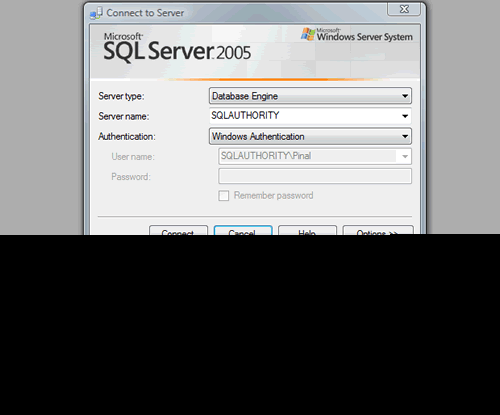
I kept on receiving following error.
TITLE: Connect to Server
——————————
Cannot connect to SQLAUTHORITY.
——————————
ADDITIONAL INFORMATION:
Login failed for user ‘SQLAUTHORITY\Pinal’. (Microsoft SQL Server, Error: 18456)
For help, click:
——————————
BUTTONS:
OK
——————————
After a while I realize that this may be due to one needs Administrator rights to do any task in SQL Server. I added the my current login as administrator in SQL Server and next time I was able to login successfully using Windows Authentication.
Following diagrams explains the fix.
1. Error while using Windows Authentication
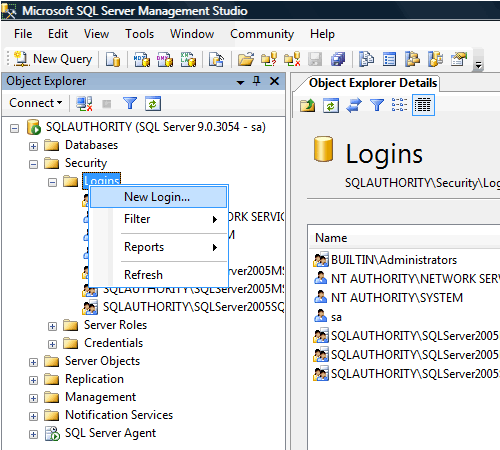
2. Login using SA username and password and go to Security >> New Login
3. Type In Login Name as ComputerName\UserName
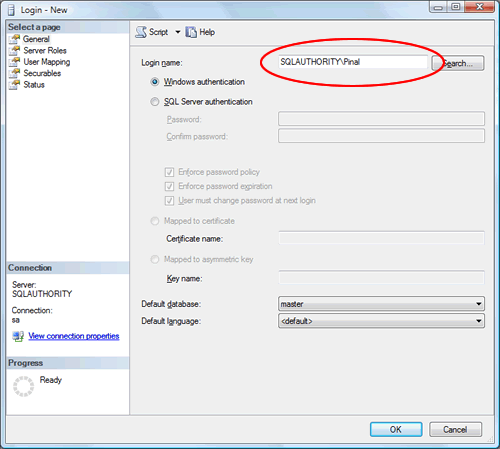
4. Click Server Roles and check sysadmin server role, after that click OK.

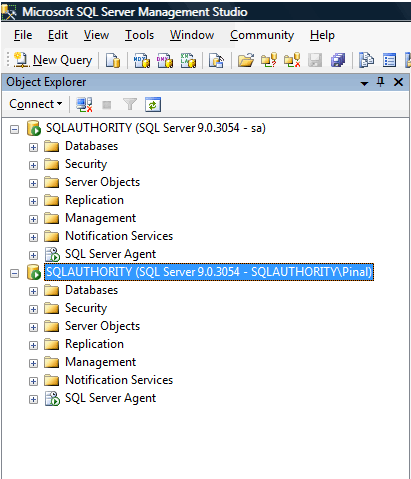
5. Now login using Windows Authentication and it should work fine.
Published by Pinal Dave on SQLAuthority. More of my work at pinaldave.com.




106 Comments. Leave new
OK, thanks anyway..
now i try to create a new login (SQL express 2008R2 & SQL express 2005) , with the tips from the Pinal (above)
now….i get a new error ;
Create failed for Login ‘IGZYY-PCSQLEXPRESS05igorSQL’.
Windows NT user or group ‘IGZYY-PCSQLEXPRESS05igorSQL’ not found. Check the name again. (Microsoft SQL Server, Error: 15401)
———————————————————————————————-
> WTF!!!!
same thing with the creation of login (“sa” login , witch is ok) , i just can’t create a new login with the windows authority.
Please help
THX all..
It was problem with virtual VMware , remember all internet propertis on virtual machine set to “default” and NAT bridget onnection…
Check with “ping” and shutdown firewall
that’s it…
This helped for Windows 7 too… Thanks a ton…
thanks. it helped.
thanks….
thank u
Thanks a lot it really worked with me.
i can connect to the sql server. Thanks.
Thank you,
thank you very much, this post was very useful for user like me ;)
thanx a lot
is there any other way to connect to the server in sql 2005 without using “run as administrator”