
This backup timeline shows how to restore a database in the full recovery model. I assume you know the basic backup types, so I won’t discuss them today. Instead, we’ll look at the correct order to restore them.
The Three Kinds of Backup
In the full recovery model, you take three kinds of backup:
- Full Database Backup
- Differential Database Backup
- Log Backup
The differential backup is the one that confuses most people.
What a DBA Told Me
One DBA in my city once called me and laughed. They said they had found something not smart in the SQL Server product design for backup. In their view, the differential backup is an extra step. I asked how they restore. They start with the first full backup, then all the log backups and differential backups in sequence.
They had also found that skipping the differential backups and restoring only the log backups works fine. So to them, the differentials were an unnecessary step. I was happy to tell them they were wrong, because they had missed the idea of a differential backup.
I told the story to another friend at their company, who found it funny too. That friend offered to explain it to them. The advice was to restore all the differential backups first, then all the log backups after the last differential. I was amazed again, because that was wrong too.
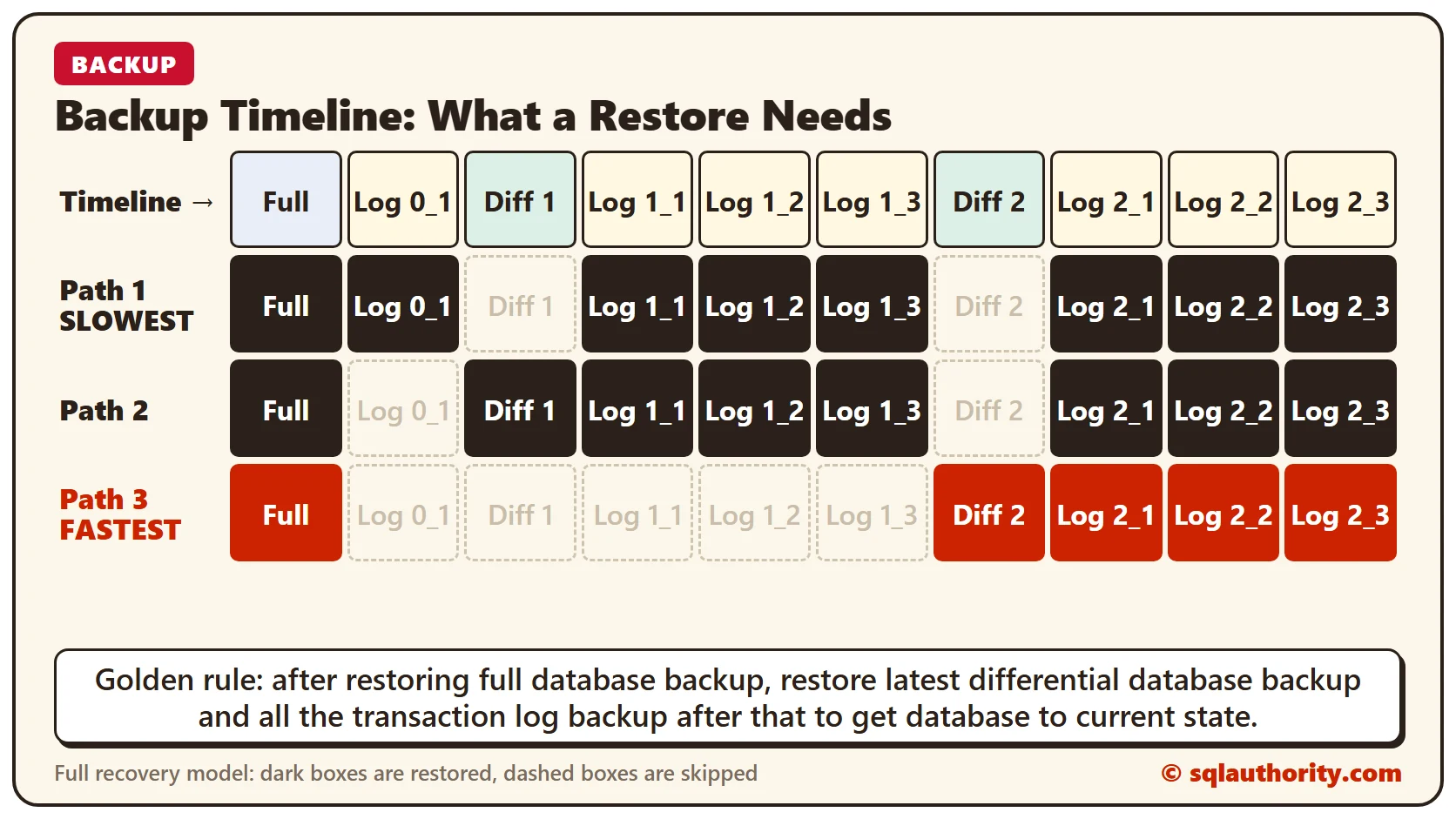
After talking with many DBAs, I’ve learned that most people are confused about how a differential backup helps. Many don’t know the correct way to restore in the full recovery model. Before I explain, look at the diagram below. It shows the timeline of when each backup was taken.
Backup Timeline
Remember the golden rule for restoring first.
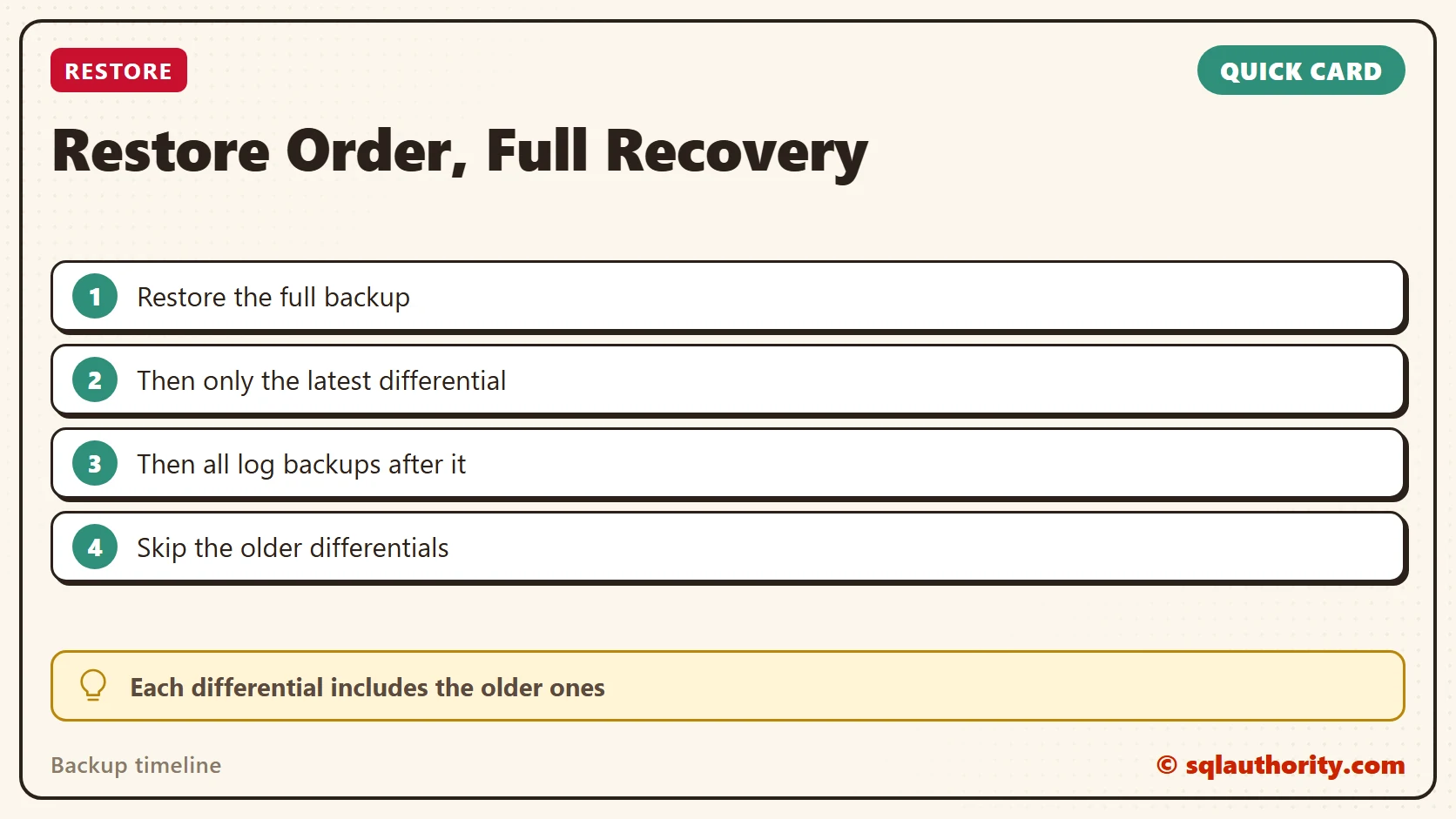
After restoring full database backup, restore latest differential database backup and all the transaction log backup after that to get database to current state.
From this rule, you don’t need to restore every differential backup. Restore only the latest one. A differential backup holds all the changes made since the last full backup, so it is cumulative. That is why each differential backup is larger than the one before it. It contains all the data of the earlier ones.
After the latest differential, restore the transaction log backups to bring the database to the current state. Without differential backups, you would restore every transaction log backup. That takes a long time. It isn’t recommended in a disaster, when getting the server back online is the priority. You would also have to apply every log without missing a single transaction. Differential backups save time and make the restore easier.
Three Paths to the Current State
In our example, there are several paths to the current state:
- Path 1 (SLOWEST): Full Database Restore >> Log Backup 0_1 >> Log Backup 1_1 to all remaining logs.
- Path 2: Full Database Restore >> Differential Database Backup 1 >> Log Backup 1_1 to all remaining logs.
- Path 3 (FASTEST): Full Database Restore >> Differential Database Backup 2 >> Log Backup 2_1 to all remaining logs.
Tell me if my explanation is clear. If anything is confusing about how a full database backup and restore work, let me know.
Two Quick Videos
Here is a quick video on how to take a backup.
And here is a quick video on how to restore it.
A differential backup is not an extra step, it is a shortcut through the log chain.
Published by Pinal Dave on SQLAuthority. More of my work at pinaldave.com.
Discover more from SQL Authority with Pinal Dave
Subscribe to get the latest posts sent to your email.




67 Comments. Leave new
Thank you. Your article served to confirm my understanding. However, that understanding is precisely what has given me a scare today. Some of our staff manually take a full backup (to an arbitrary file on an arbitrary path) of a database from time to time, to restore on a development server for testing development etc. Our backup process is weekly full, daily diff, and hourly logs. My understanding leads me to conclude that since the manual full is “undocumented” and not stored with the routine backups, every time someone does this, we are left exposed to potential data loss, for up to week, until the next full backup is taken. Am I correct? For now I am stopping this process and requiring such copies to be retrieved from the off-site storage.
Hi Pinal,
Could you please explain how Log shipping works? Do we need to perform a restore of “Full backup of primary data center” on the secondary data center and then configure the log shipping? Or just by configuring “Log Shipping” the secondary data center gets the complete copy of the master database?
Picture speaks thousand words…The best way to understand the back up-restore.
Hi Pinal,
I am taking a full backup weekly and differential backup all the other days. I can see the details of the last Database backup and Last Database log backup information in the database properties section of the restoring (norecovery) database. Is there any way we can find information about when the last differential backup was restored ?
Hi
I have a doubt:
If I do backups as you have suggested and restored the database as described.
nth Transactional backup time: 3:45 AM
kth Differential backup time: 4:00 AM
(n+1)th Transactional backup time: 4:15 AM
Now after Full backup restore and kth Differential backup restore, I need to restore (n+1)th Transaction backup (right ?) to get back in working state. But this (n+1)th backup will contain data from 3:45 to 4:15 and we have already restored till 4:00 via kth differential backup.
Doesn’t it give error while restoring (n+1)th backup?
Hi Pinal/Dusht,
From your comment above, I have tried a similar situation.
I have taken a full database backup, then a transaction backup, and then a differential backup, and again a transaction backup.
I have successfully restored the full backup. After that when I am trying to restore the differential backup, its giving the following message as below.
Msg 3136, Level 16, State 1, Line 1
This differential backup cannot be restored because the database has not been restored to the correct earlier state.
Msg 3013, Level 16, State 1, Line 1
RESTORE DATABASE is terminating abnormally.
I can restore the transactional backups without any problem. But the differential backup following the transactional backup is not working.
Am I doing anything wrong ? Does it mean that the transactional backup will break the following differential backups.
I assume that the transactional backups needs to be taken as copy-only for not to break the differential backup chain.
Make sure to to restore your full backup with the no recovery option.
Nick – Thanks for your comment.
The error would mean that you are restoring a differential backup on top of a full backup which is not eligible for this differential backup. There is another full backup taken after the one which you restored.
Nice write up but I’d be very worried if a DBA on my team did not know this as it’s fairly fundamental stuff.
Thanks Nick. I am glad you liked it.
Hi Pinal – When I started with the Back up and Restore, I initially thought the multiple Differential back up have to be restored (after the Full Back up and before the Transaction log back up). But then, I realized that the latest Differential backup after the full back up is enough. But what would happen if we still restore the multiple Differential back ups after full backup? Will there be any data duplication or errors (due to primary key duplication).
Dusht,
U have asked very relevant question. I expected that someone has answered it. Here my explanation….
When Kth Differential executed at 4.00 AM, Log file flashed out its information into differential backup. So from 4.00 onward Log file contains active log transactions. Actually in 4.15 T log backup, it contains information from 4.00AM to 4.15AM. Hope this will help you.
Super fine Article
very nice artical
what happenes internally when we take a backup of a database
based on type of backup, the data is read from database and kept in backup file.
Excellent Topic @Pinal Dave