PI supplies an approximate constant, and the point of rounding can affect a circle calculation. I choose the final output precision separately from any intermediate conversion.

The constant has a SQL type
PI returns a float and takes no argument. That constant is an approximate representation of the mathematical value. Supplying an exact decimal radius doesn’t automatically make the resulting multiplication exact decimal arithmetic.
Circumference uses twice PI times the radius. Area uses PI times the radius squared. Both formulas therefore depend on the constant and input units. A radius expressed in one unit cannot produce an area in an unrelated unit without another conversion.
I’d keep the radius visible beside a reported result. That helps distinguish an incorrect source unit from a rounding difference. A rounded area alone contains too little context. The example uses simple nonnegative radii with no implicit text parsing.
Compare early and final rounding
The script supplies radii one, two, one-half and zero. A fifth radius is NULL. It casts circumference and the ordinary area calculation to decimal(12,6). That fixes the displayed output width without narrowing PI beforehand.
A separate area expression casts PI to decimal(12,6) before multiplying. It then uses the same radius and final output type. These paths answer a practical question about rounding placement. They do not compare different radii or different mathematical formulas.
For radius two, early rounding is expected to display 12.566372. Keeping the native constant until the final cast displays 12.566371. The difference is small but deliberate. A matching number of decimal places does not imply the intermediate calculation was identical.
WITH Inputs AS
(
    SELECT Id, CAST(Radius AS decimal(7,2)) AS Radius
    FROM (VALUES (1, 1.00), (2, 2.00), (3, 0.50),
                 (4, 0.00), (5, NULL)) AS v(Id, Radius)
)
SELECT Id, Radius,
       CAST(2 * PI() * Radius AS decimal(12,6)) AS Circumference,
       CAST(PI() * Radius * Radius AS decimal(12,6)) AS FinalRoundedArea,
       CAST(CAST(PI() AS decimal(12,6)) * Radius * Radius
           AS decimal(12,6)) AS EarlyRoundedArea
FROM Inputs
ORDER BY Id;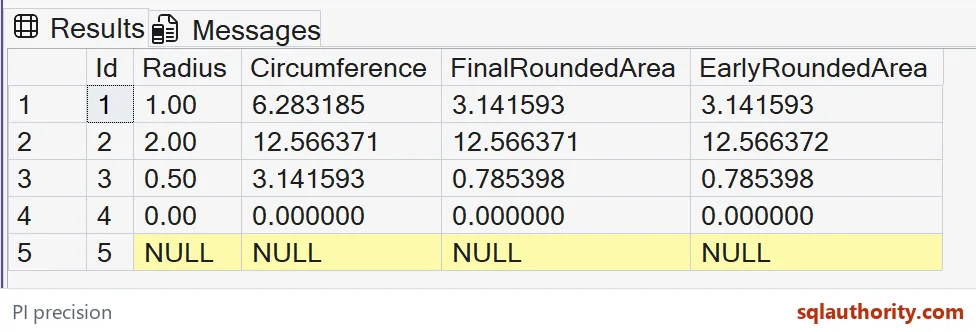

Retain the needed detail until the boundary
Rounding early can be a requirement when a published contract explicitly supplies a fixed constant. That would be a different calculation rule. I would document it beside the formula. The convenient appearance of six digits isn’t enough to establish that requirement.
The native float calculation still has finite precision. Delaying a display cast doesn’t create an exact irrational constant. It simply avoids the extra demonstrated decimal rounding step. Choose the actual tolerance and output precision from the consumer’s needs.
Larger radii also require a range review. A final decimal type can overflow even if an intermediate float can hold the result. These selected values fit the declared width. The article doesn’t present that width as a universal area-storage recommendation.
Compare the complete radius tuple
Zero is a real radius with zero circumference and area in this demonstration. NULL remains an unknown radius with missing outputs. No default is introduced. Those cases prevent a missing measurement from being silently interpreted as an empty circle.
The CTE reads literal radii and the SELECT calculates four named outputs. It creates no objects or session changes. ORDER BY fixes the five-row sequence. Both area paths remain beside the same original radius.
Compare all displayed decimal values and SQL types before reusing the calculation. Keep the early cast and final cast paths together. A screenshot that omits the last fractional digit would conceal the selected rounding difference. Keep the complete values available.
Keep the full digits on screen, and the difference cannot hide.
Six decimals is not one calculation, it is two different rounding choices.
Published by Pinal Dave on SQLAuthority. More of my work at pinaldave.com.
Discover more from SQL Authority with Pinal Dave
Subscribe to get the latest posts sent to your email.